
Posted on

KeePass Review (2025): Features, Pricing, and Security

KeePass fast facts

Our rating: 3.0 stars out of 5
Pricing: Free
Key features

  • Downloadable user-generated plugins.
  • Open-source.
  • Completely free.

KeePass is a free and open-source password manager that’s been around for over 20 years. Since its release in 2003, the password manager’s ability to add user-generated plugins and extensions has made it a popular option for enthusiasts and more technical users.

While KeePass offers decent and secure password storage, its dated design, lack of traditional password capture and replay, and unintuitive application make it hard to recommend against more modern password managers.

KeePass pricing

KeePass is a completely free password manager that doesn’t have any paid tiers. This is in contrast to competitors like NordPass and Dashlane which have paid plans and have free versions, but with inherent limitations. For example, Dashlane’s free version only allows for a maximum of 25 passwords. However, you can avail of their paid plan to get unlimited password storage.
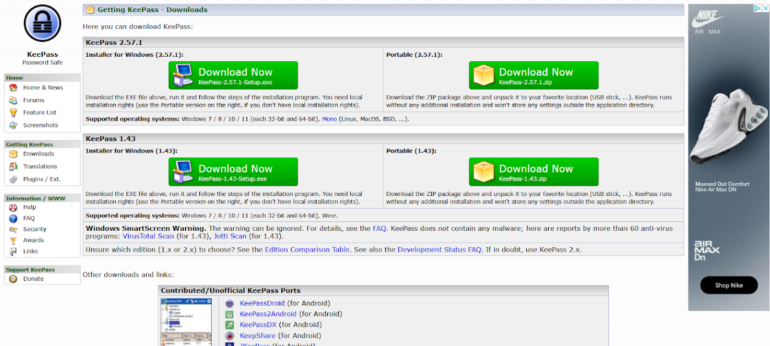
KeePass desktop app available for free.
Image: KeePass

One big difference between KeePass and other password managers is that a lot of features aren’t included out of the box. Instead, users can customize their KeePass client’s feature set via downloadable plugins from the password manager’s site. Plugins are available for capabilities such as importing and exporting passwords, data backups and auto typing.

Is KeePass safe?

Yes, KeePass is a safe and secure password manager. It utilizes the industry standard AES-256 encryption for its database and user vaults. It’s also open-source, allowing the public to verify its source code for possible vulnerabilities or potential security holes.

This is a big feature for privacy enthusiasts, especially those who value transparency, as it lets the users and experts collaborate with KeePass in keeping it secure to use.

Encryption-wise, I like that KeePass encrypts the whole database, which means that not only are passwords encrypted but also other items such as usernames and notes.

As of March 2025, KeePass had not been involved in any data breach. The password manager has been audited in the European Commission’s Free and Open Source Software Auditing (EU-FOSSA 1) project, which showed that it had zero security issues.

KeePass also shares that it is the recommended password manager in the BSI Cyber Security Recommendations BSI-CS 003 2.0 by the German Federal Office for Information Security and is on the list for recommended free software for French public agencies.

To me, these recommendations from government agencies hold a lot of weight since they handle highly sensitive and public data.

Key features of KeePass

Aside from password storage and password generation, KeePass comes with a few key features that make it unique compared to other password managers.

Library of plugins and extensions
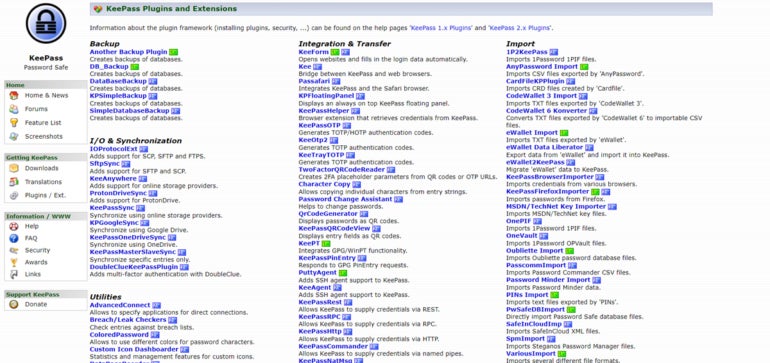
KeePass Plugins.
KeePass Plugins. Image: KeePass

One of KeePass’ biggest selling points is the ability to download and add plugins for each user’s KeePass client. These plugins add more features or modify existing functionality, such as letting users import or export different file formats, changing the KeePass user interface, or adding autofill capabilities.

Right now, there are more than 180 downloadable plugins on the KeePass website. This is perfect for users who value being able to customize their password manager and its feature set.

For me, I prefer a password management solution that already comes with dedicated features, without having to worry about adding them after the initial installation. If you’re like me on this, 1Password or NordPass are password managers with a variety of features already baked in.

Local-device password management
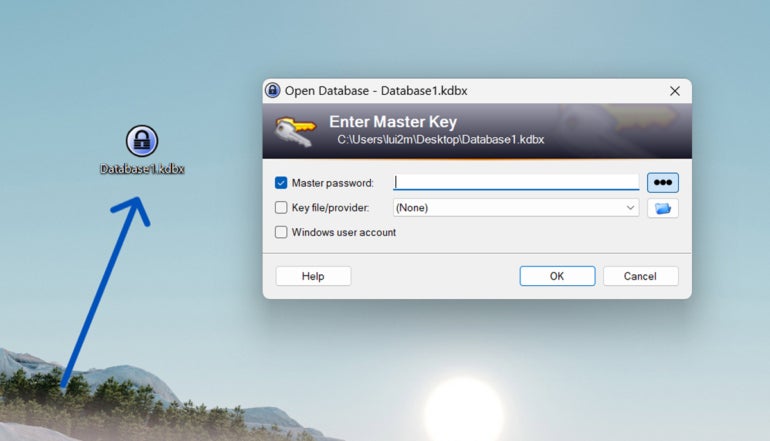
A KeePass database saved on my desktop.
A KeePass database saved on my desktop. Image: Lui Millares

Another standout feature from KeePass is that it is a completely local password management system. This means that all your passwords and stored credentials are encrypted locally on your computer or device of choice. This is in contrast to other password managers that store passwords in the cloud, like 1Password or LastPass.

If you’re paranoid about cloud-based password managers possibly being involved in a data breach and leaking your data, KeePass can be a great solution since everything is stored locally. You can read our LastPass review to learn more about how data breaches can affect a password management solution.

On the flip side, KeePass’ all-local implementation can be a disadvantage since you won’t have the convenience of easy access to your passwords on multiple devices through the cloud.

Auto-Type functionality

Unlike most modern password managers, KeePass doesn’t have a conventional autofill feature. What it does have is Auto-Type — a global auto-type hotkey which automatically types out credentials in your chosen account pages.
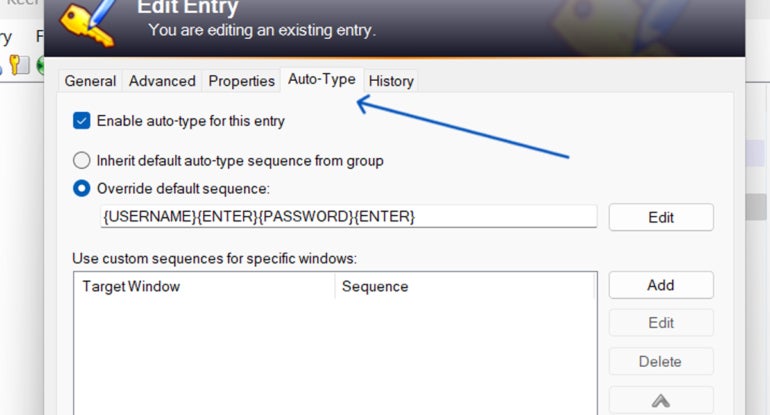
Auto-Type tab.
Auto-Type via KeePass. Image: Luis Millares

Auto-Type works by having KeePass open in the background, switching to the website, and KeePass automatically typing out your login credentials after you hit a particular keyboard shortcut. This is opposed to other password managers that automatically fill out the username and password fields via a browser extension or through a clickable pop-up.

While seeing KeePass automatically type out my password was cool at first, I did find it really finicky to use after a few times. Because I had to manually set the sequence in which the login credentials are to be typed, i.e. if the username or password goes first, there were times that KeePass couldn’t type my details in the proper fields.

Despite Auto-Type being a unique party trick that I haven’t encountered on other password managers, I honestly found manually copying and pasting from the KeePass client to be a better alternative.

KeePass authentication and security options

KeePass comes with two main multi-factor authentication (MFA) options: key file and linking a Windows user account. A key file is a file that you can save either on your computer, USB flash drive, or any other device, which acts as an additional requirement in tandem with your master password to access your database.
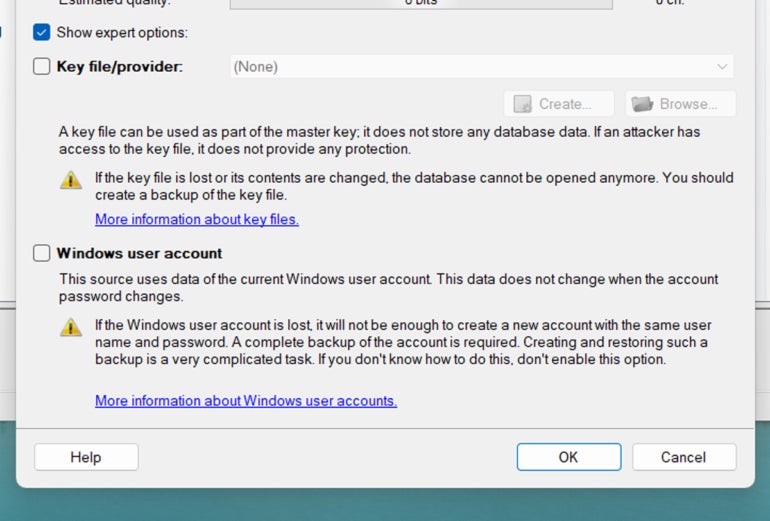
Authentication options.
Authentication options. Image: Luis Millares

You can set your KeePass vault or database to only open if you’re logged into a specific Windows user account. I would have preferred it if KeePass had more MFA options like 1Password’s fingerprint verification or NordPass’ authenticator app integration.

While you can download two-factor authentication (2FA) or One-Time Password (OTP) plugins, I think having these authentication options baked within the app itself is more user-friendly. This saves users the time of having to pick which plugin is the best, especially since most competitors have these readily available once installed.

For security options, I like that KeePass has a timer for whenever you copy passwords off your database. At default, KeePass automatically removes any copied credential from the clipboard after 12 seconds.

There are also different Enforce Options that let you set whether you want your KeePass database to automatically lock after inactivity or have KeePass warn you whenever a key transformation setting is weak.
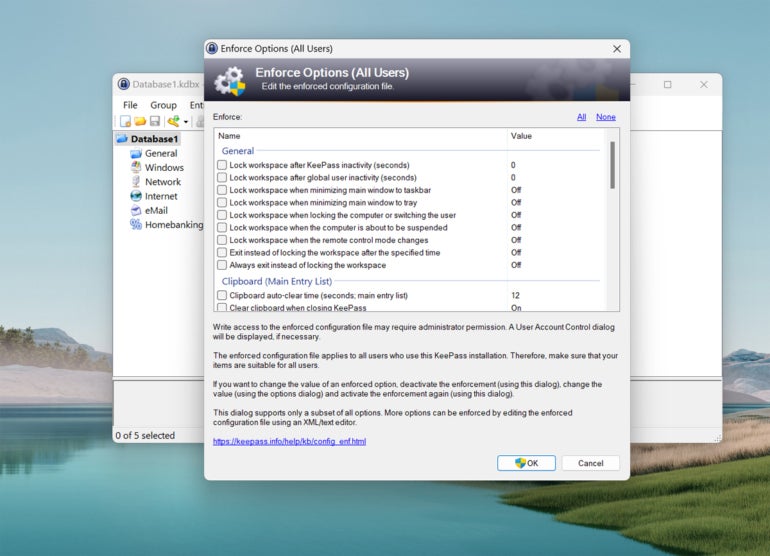
Enforce options.
Enforce options. Image: Luis Millares

KeePass interface and performance

KeePass’ desktop user interface (UI) falls flat in both design and ease of use. Its design is dated and looks a bit like legacy-Windows applications from the 2000s. I prefer password managers with a sleek and modern UI.
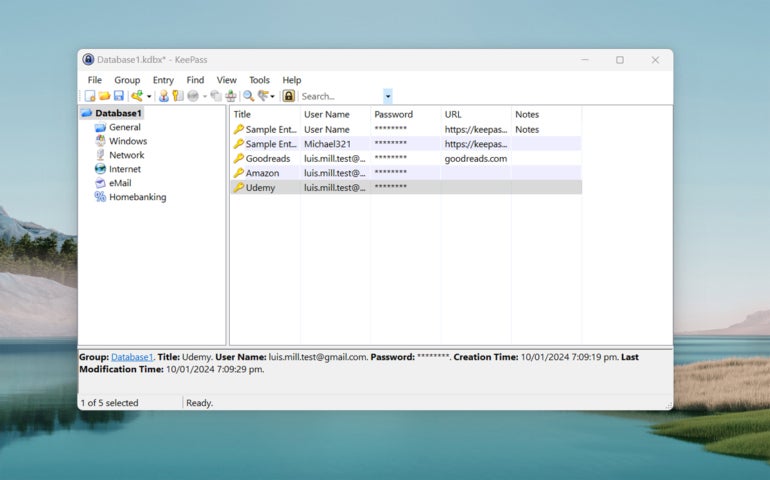
KeePass main dashboard.
KeePass main dashboard. Image: Luis Millares

KeePass’ application is also not the easiest password manager to use and learn. Once I installed the application, I got a blank dashboard with no included guide. There wasn’t a clear tutorial on how to save my first password or use any of KeePass’ features.

Fortunately, there are video tutorials, guides, and forum posts online that outline how to use KeePass. However, I don’t think the password manager needs to sacrifice ease-of-use to get to their goal of customizability.

In terms of performance, I had no trouble adding new password entries inside the KeePass app. The included password generator also worked without any issue and I like that there’s no limit to password characters.

It’s unfortunate that KeePass doesn’t have traditional autofill and password capture and replay functionality. Without any plugins, you have to manually input login credentials to save new usernames and passwords. This adds an extra step to the process compared to something like Keeper’s KeeperFill feature that automatically saves and fills in new logins upon creation.

KeePass mobile app

KeePass doesn’t have its own proprietary iOS or Android mobile application. However, it recognizes user-generated mobile ports of its service.
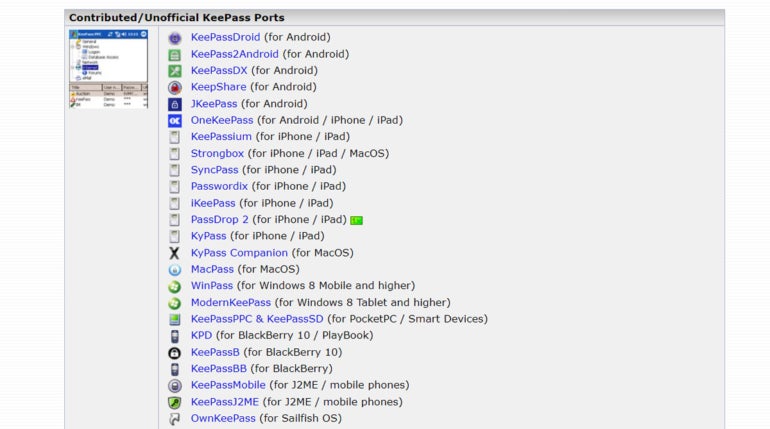
KeePass ports list.
KeePass ports list. Image: KeePass

This provides users a ton of options in terms of KeePass mobile applications. However, this means that there’s no assurance that a given mobile app will be supported long-term. Each mobile port will also have varying levels of quality, so your mileage may vary.

KeePass pros

  • Completely free password manager.
  • Open source and secure.
  • Highly customizable.
  • Downloadable user-generated plugins.

KeePass cons

  • Hard to learn and not user-friendly.
  • No autofill feature included.
  • Auto-Type is a bit clunky.
  • Multi-factor authentication options are separate downloads.
  • Design looks a bit dated.
  • No official mobile app.

SEE: Penetration Testing and Scanning Policy (TechRepublic Premium)

Who is KeePass for?

KeePass is for users who want a password manager they can personalize. With its large library of downloadable plugins and extensions, KeePass can be a very powerful tool for those willing to take the time to maximize its capabilities.

It’s also a good pick for individual users who are wary of cloud-based password managers and want a secure way to store their passwords locally.

However, its less than friendly user interface, clunky auto-type feature, and lack of traditional password capture and replay make it hard to recommend against other top password managers in the market. Its locally-stored password storage also makes it hard

KeePass alternatives

If you find that KeePass isn’t a good fit, I’ve listed three alternative password managers that are worth a try.

Bitwarden icon.
Image: Bitwarden

Bitwarden

If you want a cloud-based password manager with a generous free version, check out Bitwarden. Bitwarden’s free version allows for unlimited password storage and access on an unlimited number of devices. You also get strong zero-knowledge encryption and affordable pricing on its paid plans across the board.

Check out our full Bitwarden review.

NordPass icon.
Image: NordPass

NordPass

NordPass is an all-around password manager that doesn’t have many faults. It has an intuitive user interface, plans for both single users and business, and has independently audited applications. It also utilizes the secure and more modern XChaCha20 encryption algorithm.

Check out our full NordPass review.

1Password icon.
Image: 1Password

1Password

For avid travelers, 1Password can be a great pick. It comes with a handy Travel Mode feature that lets users hide select vaults whenever they travel. This is on top of its sleek desktop UI and strong AES-256 encryption. 1Password also provides 14-day free trials across all its plans that let you test their service.

Check out our full 1Password review.

Review methodology

My review of KeePass involved a detailed analysis of its security features and real-world performance. I used KeePass on a Windows laptop for testing and for hands-on experience.

I rated KeePass on everything from its password management features to its ease of use based on an internal algorithm to get a rating of 3.0 out of 5 stars. The scoring was based both on KeePass on its own and in relation to other password managers.

This article was originally published in January 2024. It was updated by Luis Millares in March 2025.

Posted on

NASA’s SPHEREx Mission Sends First Space Images Before Full Sky Survey

NASA’s SPHEREx mission has sent back its first images from space. This marks an important step before it begins the full survey of the sky. The space telescope, which was launched on March 11, 2025, is designed to scan millions of galaxies and collect data in infrared light. On March 27, its detectors captured uncalibrated images that show thousands of light sources, including distant stars and galaxies. The images, processed with added colours for infrared wavelengths, confirm that SPHEREx is operating as expected. Once fully operational, the telescope will take 600 exposures daily and map the entire sky four times during its two-year mission.

Recorded Images Reveals Interesting Details

According to NASA’s SPHEREx mission, the observatory’s six detectors recorded images of the same area of the sky, providing a wide field of view. The top three images represent one portion of the sky, while the bottom three cover the same section. As per the report, the SPHEREx catpured each image with around 100,000 light sources. As per multiple reports, scientists can now learn more about what celestial objects and its distance from Earth with the help of infrared wavelengths. The data from SPHEREx will also help researchers to explore the origins of water in the Milky Way. Moreover, it might also help the scientists to find more clues about the universe’s earliest moments.

Olivier Doré, SPHEREx project scientist at NASA’s Jet Propulsion Laboratory (JPL) and Caltech, told NASA that the telescope is functioning as intended. The infrared light detected by SPHEREx is invisible to human eyes, but colour mapping enables researchers to visualise and analyse it. The observatory’s unique design includes 17 infrared wavelength bands for each detector, creating a total of 102 hues in every six-image capture.

How the Telescope Works

Unlike Hubble or the James Webb Space Telescope, which focuses on specific areas of space, SPHEREx is built for large-scale surveys. It uses spectroscopy to break down light and identify chemical compositions and distances of celestial bodies. Light entering the telescope is divided into two paths, each leading to three detectors. Specialised filters process the incoming wavelengths, allowing for detailed observations of millions of cosmic sources.

Beth Fabinsky, deputy project manager at JPL, said in NASA’s official statement that the successful image capture represents a major milestone. The telescope has also reached its target operating temperature of minus 350 degrees Fahrenheit, crucial for detecting faint infrared signals. Since focusing cannot be adjusted after launch, mission engineers verified the accuracy of the telescope’s optics before sending it into space.

Jamie Bock, principal investigator at JPL and Caltech, confirmed in NASA’s report that the telescope is performing as expected. Engineers will continue testing before the observatory begins routine operations in late April.

Posted on

The best Roku streaming device is $20 off right now

Roku Ultra 2024 featured

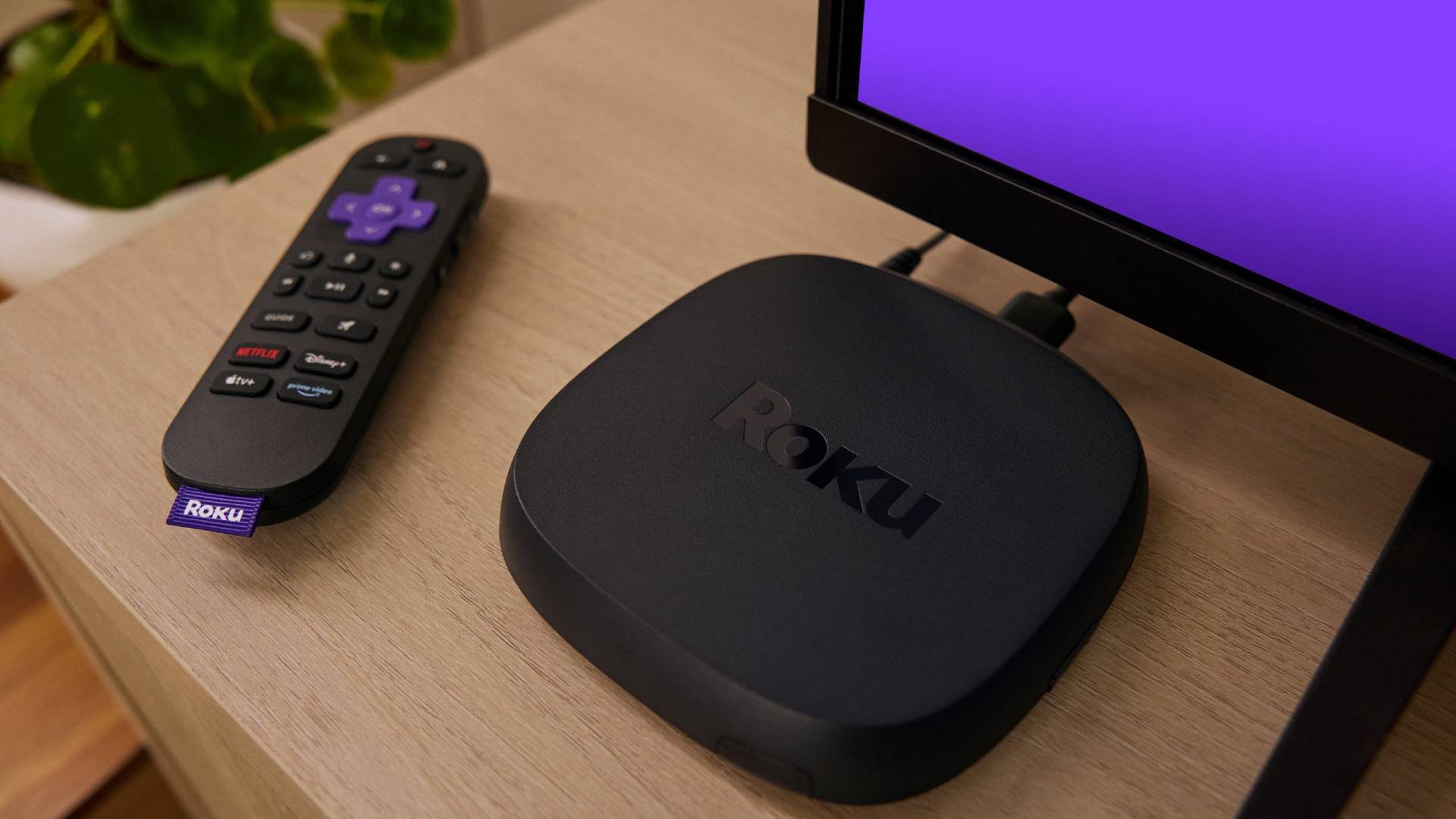
Roku has plenty of streaming devices, but if you want the absolute best one the brand has to offer, it would be the 2024 version of the Roku Ultra. It’s on sale today, so you can get the best of the bunch at just $79.99. It’s usually $99.99, so you’re saving yourself a nice $20 bucks!

Get the Roku Ultra 2024 for just $79.99 ($20 off)

This offer is available from Best Buy. That said, it’s also available on Amazon and Roku’s own website. We’re not sure how long the sale will last, but Roku’s page mentions it’s a “limited time offer.”

Roku Ultra

Roku Ultra
AA Recommended

Roku Ultra

There can be only one streaming king. Learn all about Roku’s most powerful offering right here.

The faster and more powerful Roku Ultra is loaded with a new and improved quad-core processor. You can enjoy channels that launch quickly in a responsive interface.

As mentioned, the Roku Ultra 2024 is the best streaming device the brand has to offer right now, without counting the TVs or soundbars, which are in a different category. In fact, Roku mentions it is its “fastest streaming player ever.”

More specifically, it is 30% faster than every other Roku player, so it’s for those who want actual performance. I’ve tested plenty of these Roku players, and can tell you they can be pretty slow, so this is a welcomed upgrade.

Of course, it has plenty of other great features and capabilities. It can stream at up to 4K resolution and sports HDR10+ capabilities. It also comes with both Dolby Vision and Dolby Atmos support, so it will look and sound great.

Roku Ultra 2024 remote with backlit keys

Furthermore, this one comes with an improved Roku Voice Remote Pro, which supports voice commands, but that is only the tip of the iceberg. This one also gets very nifty backlit keys, which will be a nice addition for using it in a dark room. Also, this one has an integrated rechargeable battery! I don’t know about you, but I find it very annoying when any devices require buying actual batteries.

Of course, you’ll get access to Roku’s full app portfolio. This includes access to all the great streaming services we all know and love, additional apps, and even over 500 live TV channels.

While this is not a record-low price, it is very close to the all-time low of $77.98. It’s still a great time to get it, especially if you want a fine-tuned smart TV experience. Go get it before the sale ends!

Extra deals: Other Roku devices are also on sale!

If you don’t care much for faster performance and fancy features, the other Roku streaming devices will do just fine streaming your favorite movies, shows, internet videos, and more.

The Roku Express, for example, is a great option for those who don’t have a 4K TV. It supports Full HD 1,080p resolution, has access to the free 500+ live TV channels, and gets a basic remote. It works well and only costs $17.99!

If you do have a 4K TV, though, you can get the Roku Express 4K Plus for $27.99. It supports UHD resolution and HDR10+. This one also has an improved remote with voice command support, which is a nice addition.

If you want a better upgrade, there’s also the Roku Streaming Stick 4K. This one actually gets a design improvement. It is an HDMI stick, so it will hide behind the TV instead of sitting on top of a flat surface. It also has 4K and HDR10+ support, Dolby Vision, and the same remote with voice commands. It’s still pretty cheap at $38!

You might like

Posted on

Samsung is being weirdly cagey about supporting Netflix’s big HDR upgrade that’s basically custom-made for its TVs

Remember last week, when Netflix added HDR10+ support in a move that looked like great news for Samsung TV owners? Well, I assumed that this would be an instant win for the best Samsung TVs across the board, but it seems that’s not the case – and Samsung is surprisingly cagey about which of its existing TVs will see the benefit, and when. Samsung released a statement saying that all of its 2025 TVs, including the Samsung S95F OLED TV, will support Netflix’s HDR10+ implementation, as will its 2024 and 2025 HDR computer monitors – but no one owns the 2025 TVs yet, so what about current TVs? Samsung says there will be “support for additional models in the future”, but hasn’t offered any further information so far. I’ve asked Samsung if it’s able to share any more specific information for users of these TVs, and will update if I hear back. My guess is that Samsung will actually bring support fairly broadly, and fairly quickly – but this cagey announcement feels like dropping the ball just seconds away from a touchdown. The Samsung S95D, our TV of the Year 2024, may or may not get Netflix’s HDR10+ support… (Image credit: Future) HDR10+ is a more advanced kind of HDR, with scene-by-scene metadata, like Dolby Vision. In theory, it can help TVs better ‘tone map’ the levels of HDR brightness onto the capabilities of the TV’s screen, meaning more detail is retained in the brightest and darkest areas of the image, even if your TV isn’t great at going especially bright or dark. Samsung’s TVs support HDR10+, and don’t support Dolby Vision – it’s the only maker of the best TVs that has rejected Dolby’s HDR format. And this has been a frustration, because Dolby Vision HDR is the advanced format used by most of the best streaming services. The lack of Dolby Vision is the big complaint we hear from people when we post about Samsung TVs, and having HDR10+ support on the biggest streamers (Prime Video also supports it) helps mitigate that – so I would’ve expected Samsung to embrace this instantly. In fact, I just assumed Samsung would have everything prepped in advance for it, given how tied the company is to HDR10+ as a format. Sign up for breaking news, reviews, opinion, top tech deals, and more. But that’s been changing over time, and Netflix supporting HDR10+ felt like a key shift to offer all Samsung TVs an instant boost… but only once Samsung supports it. When Samsung confirms that it’s supporting the Netflix update on more TVs, we’ll let you know straight away, Samsung TV owners. You might also like…

Posted on

James Webb Space Telescope Reveals a Stunning Einstein Ring in Hydrus

James Webb Space Telescope has recently captured a detailed image of an unusual cosmic occurrence. The latest images released by European Space Agency shows a glowing ring in the depths of space. It also reveals an effect that is caused by a massive galaxy bending light from another galaxy hidden behind it. The phenomenon has been recorded in the constellation Hydrus. It has been observed that light from the background galaxy forms a ring due to gravitational bending.

Formation of the Einstein Ring

According to the European Space Agency and the Canadian Space Agency the sight captured is known as an Einstein ring. It was reported that the effect is caused when a massive object bends light from another galaxy located behind it. The report further highlights that the foreground galaxy shown in the images belongs to a cluster known as SMACSJ0028.2-7537. The light from a distant spiral galaxy is being curved by the gravitational pull of the elliptical galaxy in front.

As per the official statement from ESA, the effect is a classic case of Albert Einstein’s theory of general relativity. The agency highlighted that the large objects in space can warp space-time, which in turn, forces light to travel around them in curved paths. The report further mentioned that when the observer, the light source and the massive object align perfectly, the light appears as a full ring.

Significance of Gravitational Lensing

The image was shared as part of the March picture of the month initiative by the space agencies. The images were capture using the Near Infrared Camera instrument on the James Webb Space Telescope with the help of Hubble Space Telescope’s Wide Field Camera 3 and Advanced Camera for Surveys.

It is also reported that such lensing phenomena assist astronomers in studying distant galaxies that would otherwise be too faint to observe. The ESA further noted that the magnification effect helps reveal the structure and composition of galaxies that existed shortly after the Big Bang

For the latest tech news and reviews, follow Gadgets 360 on X, Facebook, WhatsApp, Threads and Google News. For the latest videos on gadgets and tech, subscribe to our YouTube channel. If you want to know everything about top influencers, follow our in-house Who’sThat360 on Instagram and YouTube.

Scientists Spot a Key Difference in Matter and Antimatter Decay

Two New Exoplanets Found Orbiting a Star in Draco Constellation

Related Stories

Posted on

Here are some sweet Samsung monitor deals for different types of users

Samsung 43 inch M7 4K UHD Smart Monitor Widget Image

These offers are all available from Amazon, and they are labeled as “limited time deals.” This means it’s only a matter of time before the prices bounce back to standard levels.

Samsung Essential S3 (S36GD) Series 27-Inch Monitor

  • Covers the basic needs at a really low price

Let’s start with the most affordable monitor. It’s only $109.99 right now, but that doesn’t mean it’s a lackluster monitor. For starters, this is a pretty sizeable 27-inch monitor. It’s pretty rare to find a monitor of this size at such a low price.

Additionally, this display features a Full HD 1,080p resolution and a 100Hz refresh rate. The latter is also pretty rare to find at such price ranges. Not only that, but this is a 1,800R curved display, which is a pretty nice addition. It even has a Game Mode, which will optimize contrast and colors to give you a gaming edge. It also offers an Eye Saver Mode.

In terms of connectivity, you’ll get an HDMI and a D-sub port. It’s a pretty nice monitor, and we would never imagine it would cost just $109.99.

Samsung M7 Series 43-inch Smart Monitor

  • For those who want a large monitor and a TV replacement

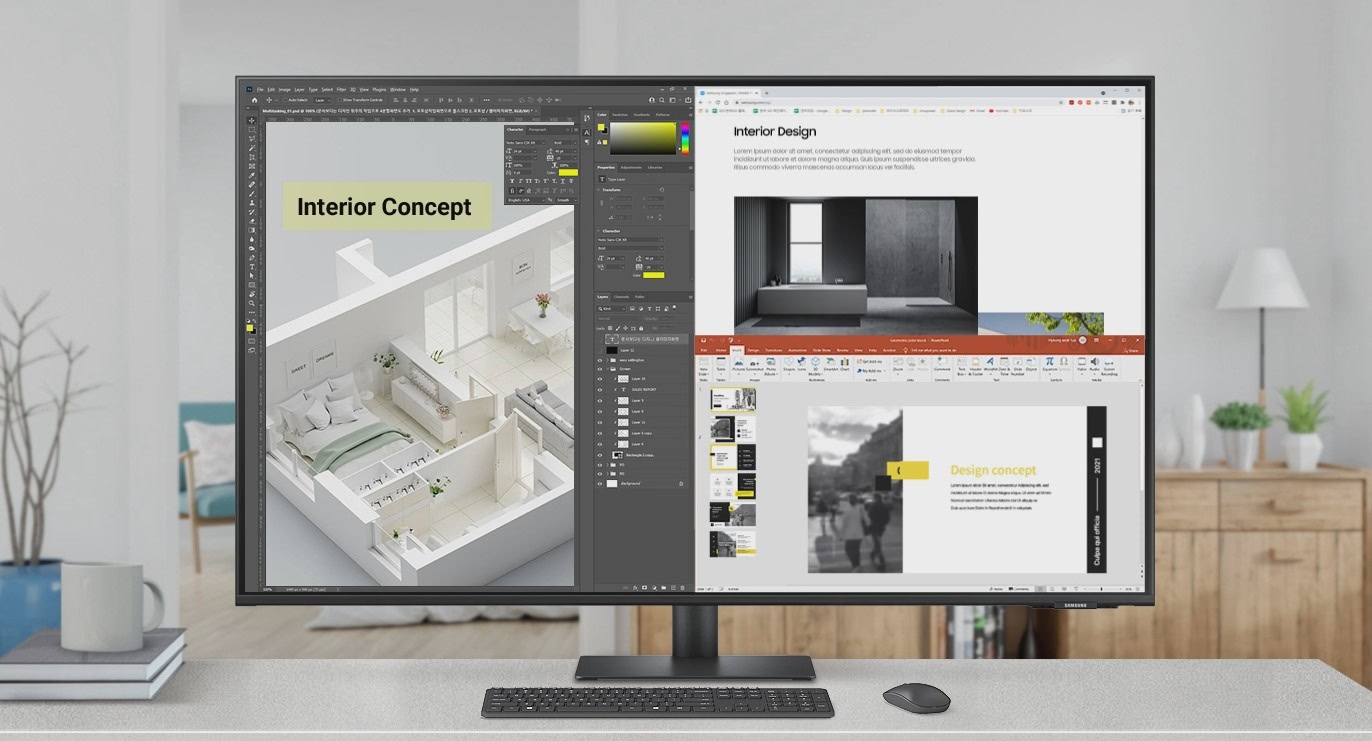
Now, let’s take things up a notch. I like buying things that serve more than one purpose. The Samsung M7 Series 43-inch Smart Monitor can work as a large monitor, but one of its main lures is that it doubles as a TV for chord-cutters.

This monitor has Samsung’s smart TV OS built-in. Additionally, it comes with Samsung Smart TV Plus, which can replace your traditional TV service, as it streams live TV channels. This is important because it has no physical TV tuner, but those of us who rely on internet streaming will love it. It even has access to the Samsung Gaming Hub, so you can stream your games and play with a wireless controller directly connected to the TV.

Because it is meant to replace an actual TV, the display is very large at 43 inches. It also has a 4K UHD resolution, which is amazing to have both for entertainment and for screen real estate, when using it as a monitor. It even comes with a controller so you can use it as a regular TV when lounging, and the remote has a small solar panel, so you won’t have to worry about it dying on you.

This is a higher-end monitor, even if a bit older. This means you’ll also enjoy a nice variety of ports. It has two HDMI ports, a USB-C connection, and three USB-A ports.

This is an outstanding monitor with dual-purpose capabilities. You are pretty much getting two screens in one for a really good price. It happens to be a pretty nice display, too.

Samsung Viewfinity S9 49-inch Curved Ultrawide Monitor

  • Large, ultrawide perspective, with awesome capabilities

I always wanted to get one of those fancy ultrawide, large monitors, but they tend to cost thousands. Things are changing, and the Samsung Viewfinity S9 49-inch Curved Ultrawide Monitor shows me I can now afford a good monitor of this type without emptying my bank account. Well, at least not as much.

This is $749.99, but the original price point is $1,199.99, so you’re saving $450 here. This is also a pretty impressive monitor. It measures 49 inches and has a Dual QHD resolution, which essentially means it’s like placing two QHD monitors side by side. You’re getting a 5,120 x 1,440p resolution. It also has a very smooth 120Hz max refresh rate.

By the way, this one is curved — it has a 1,000R curvature. You’ll also get plenty of ports: two HDMI connections, a DisplayPort, USB-C, multiple USB-A ports, USB-B, and even a LAN connection.

This is quite the monitor!


Make sure to get your monitor sooner rather than later. We’re not sure how long these offers will stick around.

You might like

Posted on

Sony launches two new budget soundbars – one with Dolby Atmos and DTS:X, and one with big surround-sound for cheap

Sony has announced its 2025 home audio lineup, and the new offerings include a 3.1.2-channel soundbar, a 5.1-channel soundbar system, and wireless surround speakers. The new models join Sony’s existing home audio lineup, which is led by the Bravia Theater Quad wireless Dolby Atmos speaker system, and Sony Bravia Theater Bar 9 and Sony Bravia Theater Bar 8 soundbars. Also continuing in 2025 are the A3000 Dolby Atmos soundbar and S-series HT-2000, S400, and S100F soundbars. The SW5 and SW3 and RS5 and RS35 wireless surround speakers will also carry over into 2025. Pricing and availability for the new Sony soundbars and speakers have not yet been announced. Bravia Theater Bar 6 (Image credit: sony) The Sony Bravia Theater Bar 6 is a 3.1.2-channel Dolby Atmos soundbar with a dedicated center speaker plus upfiring speakers to convey height effects in Atmos soundtracks. It comes with a wireless subwoofer and supports DTS:X. Proprietary sound-enhancing features in the Theater Bar 6 include S-Force Pro Front Surround and Vertical Surround Engine. It also supports Sony’s Voice Zoom 3 feature when used with a compatible Sony Bravia TV, along with Bluetooth streaming for music. Bravia Theater System 6 (Image credit: sony) The Sony Bravia Theater System 6 is a 5.1-channel system powered by 1,000 watts. It’s comprised of a soundbar, wireless subwoofer, and two surround sound speakers that connect to a wireless amp. Sign up for breaking news, reviews, opinion, top tech deals, and more. According to Sony, the Theater System 6 supports Dolby Atmos and DTS:X and features Multi Stereo processing for an immersive music experience. Like the Theater Bar 6, it has S-Force Pro Front Surround and Vertical Surround Engine, along with Sony’s Voice Zoom 3 feature when paired with a compatible Sony Bravia TV. Bluetooth wireless support is also onboard. Bravia Theater Rear 8 (Image credit: sony) The Theater Rear 8 is an upgraded wireless surround sound speaker option for the company’s various soundbars. It has a rounded design that matches the form factor of the company’s Theater Bar 8 and 9 soundbars, along with a new fabric grille. A four-channel amplifier in the Theater Rear 8 provides a power boost over the current RS3S wireless surround speaker. Like that model, it also supports Sony’s 360 Spatial Sound Mapping for a more immersive surround sound experience. We look forward to getting our hands on the new Sony audio lineup soon, to see how it compares to our current list of the best soundbars. You might also like…

Posted on

T Corona Borealis May Erupt Soon: Rare Nova Could Be Visible to Naked Eye

T Corona Borealis is a binary star system in the Northern Crown constellation which is being monitored closely by astronomers worldwide for signs of a rare stellar eruption. The system consists of a white dwarf and a red giant orbiting each other with the white dwarf pulling material from its companion. The gradual accumulation of matter on the surface of dwarf white planet can lead to a thermonuclear explosion, known as a Nova. Scientists recorded the last erupted Nova in 1946. Now, there have been some indications that we might experience another nova outburst in the near future.

The researchers have recorded a brightening event in 2015 followed by a dimming in 2023, which has mirrored the pattern seen in the last eruption. This leads the experts to believe that there might be another nova outburt. If an eruption occurs T Corona Borealis could become visible to the naked eye and shine as brightly as the most prominent stars.

Accretion Activity and Expert Predictions

According to a study published in the Monthly Notices of the Royal Astronomical Society, the system has exhibited behaviour similar to the years leading up to its previous eruption. T Corona Borealis is one of only eleven recurrent novae observed in recorded history with eruptions noted in 1217, 1787, 1866 and 1946. As per the latest data available with the researchers, the accretion disc surrounding the white dwarf has became highly active and bright between 2015 and 2023. The study reveals that this heightened activity could trigger an eruption within a year or two.

There are multiple predictions from the scientists based on orbital analysis suggesting possible eruption dates. As per multiple reports, the Nova outburst might take place between March 27 or November 10 this year or June 25, 2026. The researchers has also suggested a theory regarding a potential third object influencing the binary system. Astronomers like Dr Léa Planquart of Université de Strasbourg and Dr Jeremy Shears of the British Astronomical Association have dismissed this theory citing the absence of supporting evidence. Both experts believe the activity of the accretion disc remains the most likely cause of an impending eruption.

For the latest tech news and reviews, follow Gadgets 360 on X, Facebook, WhatsApp, Threads and Google News. For the latest videos on gadgets and tech, subscribe to our YouTube channel. If you want to know everything about top influencers, follow our in-house Who’sThat360 on Instagram and YouTube.

Vivo X200 Ultra Confirmed to Feature Dedicated Camera Control Button; Design Teased

Facebook Introduces Friends Tab Without Recommended Content as Part of ‘OG’ Revamp

Related Stories

Posted on

You can still save $100 on the Yaber T2 Portable Projector

Yaber Project T2 angled

Kaitlyn Cimino / Android Authority

Amazon’s Big Spring Sale is over, and with it ended a bunch of pretty nice deals. If you were considering getting a portable projector, though, you can still save on the Yaber T2. The deal is the same, you save $100, bringing the cost down to the same record-low price of $249.99.

Get the Yaber T2 Portable Projector for just $249.99 ($100 off)

This offer is available from Amazon, and it comes in the form of an on-page coupon you must manually apply before adding the item to your cart. You can only reach this $249.99 price point with the Standard model. All other versions are more expensive, but most do still get a $100 coupon. They just happen to have a higher retail price, so you’ll have to pay a bit more. The only one without an available coupon is the Smile Face version.

The Yaber T2 Portable Projector is actually one of our favorite of its kind. It’s a fantastic little projector you can use anywhere, and it’s usually $349.99. This $100 coupon takes the price down to the $249.99 all-time low price, making this quite the steal.

One thing we really like about the Yaber T2 Outdoor Projector is that it comes with a built-in battery. This can keep a projection running for up to 2.5 hours on a full charge, enough to outlast almost all movies. It’s an ideal solution if you want to take your projector to places, instead of having it tethered to the wall.

The Yaber T2 can project at Full HD resolution and features 450 lumens of brightness. You won’t even need to worry about using separate speakers, as it has a couple of 8W integrated speakers powered by JBL. In our Yaber T2 Projector review, we mention that we were actually quite surprised by these, and they performed better than we thought they would. Of course, dedicated speakers can do much better, but these will do just fine on their own.

Yaber Projector T2 hand

Kaitlyn Cimino / Android Authority

Not only will these speakers be great for projections, but you can actually use the unit in audio-only mode. This means it pretty much doubles as a Bluetooth speaker. And get this: battery life is extended to 18 hours when using this in audio-only mode.

If I had to complain about something, it’s that this specific model doesn’t come with a smart TV OS. That said, it is a very nicely priced projector, and you can still take advantage of the USB and HDMI ports. Yaber also sells a Google TV dongle, but it costs an extra $49.99. It’s cool because it has a nice design that fits the projector very well, but honestly, you can also use any other smart TV dongle or set-top box with it.

Oh, we also mentioned in the review that there is no automatic horizontal keystone, only vertical. That said, you can manually adjust the horizontal aspect ratio in the settings, using the remote.

All things considered, we still think this is one of the coolest portable projectors around. It comes at a very reasonable price point, especially if you can catch this deal. Go get it while you can!

You might like

Posted on

I tested Samsung’s new top mini-LED 4K TV, and the Glare-Free screen tech makes a big difference

The Samsung QN90F is the company’s flagship 4K mini-LED TV series for 2025, and it carries the torch of its Samsung QN90D predecessor by delivering an incredibly bright picture. But high brightness isn’t the only notable feature of the QN90F series – it also features Samsung’s Glare-Free screen tech, which has been ported from last year’s Samsung S95D OLED to a wider range of the company’s TVs in 2025, including the 8K Samsung QN990F mini-LED. The high brightness delivered by the Samsung QN90F is one feature that makes it great for daytime viewing, and it’s a capability that helped land the QN90F as the best for sports option in our best TVs guide. You may like But an anti-reflection screen coating is another thing that helps with daytime viewing, or viewing in rooms with bright overhead lights, so the new QN90F’s one-two punch of brightness and glare rejection should fully seal it as a perfect TV for sports. Samsung recently invited me to its New Jersey testing facility to spend hands-on time with the QN90F and other new TVs, and I was able to take a full suite of measurements and also do some subjective viewing tests. I’ll dive into those details momentarily, but let’s first look at the wide range of features supported by the Samsung QN90F. AI Upscaling Pro comes to 4K The QN90F series offers screen sizes from 43 inches to 115 inches. This makes the QN90F Samsung’s most flexible TV when it comes to accommodating a range of screen size needs, and the 115-inch model is also the largest mini-LED TV Samsung makes. Samsung’s US pricing for the QN90F series ranges from $1,399 for the 43-inch model to $14,999 for the 98-inch model, with the 65-inch version I tested selling for $2,699. Happily, these prices are the same as last year’s QN90D series at launch. Sign up for breaking news, reviews, opinion, top tech deals, and more. QN90F series sets come with the company’s upgraded NQ4 AI Gen3 processor along with AI Upscaling Pro, a new feature previously limited to the company’s 8K TVs. This brings with it an improved version of Auto HDR Remastering Pro, which applies HDR to regular high-definition, standard dynamic range programs, plus an AI-based color enhancer and depth-based stereoscopy enhancer feature. The QN90F also has a new Clear Face Restoration feature that removes noise from faces in close-up shots without eliminating detail, and it gains the AI Motion Enhancer feature found in last year’s 8K flagship Samsung QN900D. AI Motion Enhancer combines a ball-tracking algorithm with an onboard picture database to fill in any visual gaps of a ball (or puck) in motion when watching fast-action sports, and having reviewed the QN900D, I can confirm that it does that job incredibly well. The Samsung QN90F has an super-slim profile for a mini-LED TV (Image credit: Future) Other AI-based magic tricks performed by the QN90F series include Live Translate and Generative Wallpaper features. Live Translate generates subtitles (English only supported at launch) for programs that lack them on broadcast TV channels. Generative Wallpaper lets you add custom creations to the TV’s existing library of still and motion graphic screensavers using voice-based prompts. Another eye candy option for the QN90F series is the Samsung Art Store for displaying a wide range of contemporary and classic artworks (subscription required), a feature that was previously limited to Samsung’s The Frame TVs. Samsung TVs are known for their gaming chops and the QN90F series expands upon that with 165Hz support for PC gaming. The TV has an incredibly slim design, with a 12.9mm thin panel. Despite this, it harbors a 4.2.2-channel, 60W built-in speaker array, and also features Samsung’s OTS+ processing for accurate positioning of dialogue and effects. The Samsung QN90F’s pedestal stand (Image credit: Future) Hands-on with the QN90F My measurements of the QN90F indicated that the TV’s overall brightness was lower than its QN90D predecessor. It hit 1,915 nits peak HDR brightness (10% window) and 597 nits fullscreen brightness in Filmmaker Mode, and in Standard mode measured 1,334 nits peak and 680 nits for fullscreen. Those are still very impressive results and ones we’ve come to expect from the best mini-LED TVs. Color space coverage for the QN90F measured 93.5% for UHDA-P3 and 76.3% for BT.2020. That UHDA-P3 result is similar to what I measured on last year’s Samsung QN90D, though the BT.2020 one is notably higher. Input lag on the QN90F measured with a Leo Bodnar HDMI Input Lag Tester at 4K 60Hz was 9.5ms in Game mode – a typical result for Samsung TVs, which regularly rank among the best gaming TVs. The QN90F showed only minimal halo effects on backlight blooming torture tests (Image credit: Future) While I conducted measurements in Filmmaker Mode on the QN90F during my hands-on testing, I used Movie mode for most of my subjective viewing. That was mainly because Movie provided a brighter and more punchy-looking picture than Filmmaker Mode. The picture in Movie mode also held up much better when viewing darker content with overhead lights on, The same images in Filmmaker Mode looked flat and devoid of shadow detail – a situation I suspect is due to the TV’s Glare-Free screen, since I noted the same issue when viewing with the Samsung QN990F mini-LED and Samsung S95F OLED, both of which also feature Glare-Free tech. With the lights dimmed, the QN90F’s picture displayed excellent contrast and detail, with bold, rich colors. Backlight blooming was also impressively minimal, with high contrast images showing virtually no halo effects on black backgrounds. The QN90F’s image lost a degree of contrast when viewed off-axis (Image credit: Future) Not everything was perfect: there was some contrast fade when viewing from an extreme off-center seat, and a quick look at a reference scene from the James Bond film No Time to Die revealed a degree of judder and motion blur, both of which could be reduced using the custom settings in the Motion Clarity menu. But otherwise, the QN90F met my picture quality expectations for a flagship Samsung mini-LED TV. Between Glare-Free tech, AI Upscaling Pro, and other AI picture processing features, the Samsung QN90F is a strong upgrade over last year’s QN90D, which was itself a fantastic TV. Other new features like the Samsung Art Store and 165Hz support make it that much more compelling. I look forward to getting a QN90F in for a more comprehensive review, but from my initial hands-on test, it’s looking to be the flagship 4K mini-LED TV that I expected. You might also like…