Posted on Leave a comment

Top Smart TV Brands: Who Offers the Fastest and Best Processors?

Top Smart TV Brands: Who Offers the Fastest and Best Processors?

Understanding Smart TV Processors

Smart TV processors are critical components that significantly influence a television’s performance, affecting everything from speed to image quality and user interface responsiveness. Essentially, the processor acts as the brain of the smart TV, executing tasks and managing various multimedia functions. In the context of smart TVs, processors handle the processing of images, decoding video streams, and running the operating system and applications. The efficiency and power of the processor can determine how smoothly a user can navigate through menus, stream content, or multitask between different applications.

Various types of processors are utilized in smart TVs, typically categorized into single-core, dual-core, quad-core, and even more advanced multi-core configurations. Generally, a higher number of cores allows for better multitasking capabilities, enabling users to run multiple applications simultaneously without experiencing lag. For instance, a quad-core processor can efficiently manage tasks such as streaming a movie while also updating its operating system in the background. Additionally, some brands employ specialized processors designed specifically for enhancing video quality through upscaling and color adjustments, further enriching the viewing experience.

Key specifications to consider when evaluating smart TV processors include clock speed measured in gigahertz (GHz), number of cores, and the architecture of the processor itself. A higher clock speed indicates faster processing capabilities, while an efficient architecture can lead to better power consumption. Other metrics like RAM size play a role as well, as adequate memory is crucial for ensuring applications run smoothly. Thus, understanding these aspects of smart TV processors is vital for consumers aiming to select a television brand that offers optimal speed while enhancing overall user satisfaction.

Leading Brands and Their Processor Technologies

In the competitive landscape of smart TVs, several leading brands distinguish themselves with advanced processor technologies designed to optimize performance and enhance user experience. Samsung, LG, Sony, and TCL are among the most prominent players, each offering unique innovations that drive their flagship models.

Samsung, known for its high-quality displays and cutting-edge technology, utilizes the Quantum Processor series in its premium models. This family of processors leverages machine learning algorithms to upscale lower resolution content, improve picture quality, and manage HDR content dynamically. By employing AI capabilities, Samsung’s Quantum Processor ensures seamless multitasking and a responsive user interface, catering to the demands of modern streaming services and gaming.

LG, on the other hand, showcases its Alpha processor line, particularly in its OLED TVs. The Alpha 9 Gen 4 AI processor stands out with its deep learning technology, which analyzes and fine-tunes audio and video content in real-time. This leads to enhanced contrast, rich colors, and optimized sound performance. LG’s commitment to providing a cinematic experience is evident in its use of innovative technologies that make viewing more immersive and enjoyable.

Sony utilizes its proprietary Cognitive Processor XR in flagship models, aimed at replicating human perception for an enhanced viewing experience. This technology works by analyzing and optimizing multiple elements simultaneously, ensuring that colors appear more vibrant and images maintain clarity. Furthermore, Sony’s implementation of XR Motion and XR Surround contributes to smooth motion rendering and immersive audio experiences, positioning Sony as a leader in smart TV performance.

TCL, often recognized for its affordability, has rapidly gained traction due to their integration of the AiPQ Engine. This proprietary technology intelligently optimizes picture quality and performance across various content types, allowing TCL to deliver a competitive option with impressive processing capabilities without commanding premium pricing.

Each brand brings innovative processor technologies that reflect their unique philosophies and emphasize their commitment to enhancing the smart TV experience. By understanding these advancements, consumers can make informed decisions regarding their next purchase.

Performance Comparison: Speed and Efficiency

The performance of smart TVs largely hinges on the efficiency and speed of their processors, which play a pivotal role in determining overall user experience. In recent evaluations, several leading smart TV brands have been scrutinized for their processing capabilities, particularly focusing on benchmark results that highlight the strengths of their respective systems. Brands such as Samsung, LG, Sony, and TCL have demonstrated varying levels of processing efficiency in terms of load times for applications and overall responsiveness to user commands.

Benchmark tests reveal that Samsung’s Quantum Processor ranks among the fastest, offering rapid load times for popular streaming applications. Similarly, LG’s α9 processor is noted for its efficient performance that not only accelerates app response but also enhances picture quality through superior upscaling techniques. Sony’s Cognitive Processor XR also stands out, delivering remarkable real-time optimizations that further boost both speed and visual fidelity. These performance metrics are critical for consumers who desire seamless interaction without lag, especially when navigating through apps or streaming content in high resolution.

Another essential aspect contributing to operational efficiency is the integration of intelligent processing methods. For instance, upscaling capabilities allow these processors to enhance the quality of lower-resolution content, making it more visually appealing. This is particularly important in today’s media landscape, where the availability of 4K and 8K content is steadily increasing. Hence, not only do processors need to manage load efficiency, but they must also adeptly handle content enhancement. Overall, the comparative analysis shows that while there are top contenders in the smart TV market, the specific features and technologies each brand employs differentiate their performance and operational capabilities. Understanding these nuances helps consumers make informed decisions when choosing a smart TV based on processing speed and efficiency.

Making the Right Choice: Which Brand to Choose?

When it comes to selecting the right smart TV, understanding processor performance is essential. With a variety of brands available, consumers must assess their individual needs, whether it be for gaming, streaming, or general usage. Certain brands, such as Samsung and LG, are often praised for their advanced processors, which enhance overall performance, providing seamless multimedia experiences. For gamers, low latency and high frame rates are critical, making it worthwhile to research models with dedicated gaming modes that utilize their processing power for smoother gameplay.

For streaming purposes, consider smart TVs with robust application support and fast processor response times. Brands like Sony and Vizio offer models equipped with processors that provide quick access to popular streaming platforms, ensuring buffer-free content consumption. Additionally, it’s important to evaluate the smart TV’s operating system and interface—some brands provide more user-friendly platforms that can enhance the overall experience.

Price points are also a significant factor when choosing a brand. While premium brands may offer top-tier processors, more budget-friendly options from manufacturers like Hisense and TCL can still provide respectable performance without breaking the bank. It is advisable to balance cost with performance—ensuring that the chosen model meets your specific needs at a fair price.

Warranty options and processor longevity should not be overlooked either. Many brands offer extended warranties that reflect their confidence in processor durability and performance over time. Researching customer reviews and satisfaction ratings can also provide further insight into how well these processors hold up under various usage conditions. By taking these factors into account, consumers can make informed decisions for their next smart TV purchase, ultimately leading to greater satisfaction with their investment.

Posted on Leave a comment

Finding the Best TV Brand: Picture and Sound Quality, Features, and More

Finding the Best TV Brand: Picture and Sound Quality, Features, and More

Introduction to TV Quality and Features

In the modern landscape of home entertainment, the choice of television can significantly impact the overall viewing experience. The importance of picture and sound quality is paramount, as they are the primary mediums through which content is delivered to the audience. A television with superior picture quality allows viewers to witness vibrant colors, sharp contrasts, and lifelike details, making movies, sports, and shows more engaging. Similarly, high sound quality enhances the audio experience, allowing for clearer dialogue, richer sound effects, and an immersive atmosphere that transports viewers into the heart of the action.

Beyond these foundational attributes, the significance of additional features cannot be overlooked. Contemporary televisions now come equipped with a range of functionalities designed to maximize user satisfaction. Smart technology has become prevalent, providing users with access to streaming services, applications, and internet browsing capabilities directly from their televisions. Features such as HDR (High Dynamic Range), 4K resolution, and various connectivity options (like HDMI and USB ports) further enrich the viewing experience, allowing for greater flexibility and adaptability to diverse entertainment needs.

As consumers navigate the landscape of television brands, it is essential to assess the quality of both picture and sound, along with these additional features. Various manufacturers distinguish themselves by excelling in one or more of these aspects. By understanding the importance of these elements, consumers are better equipped to make informed decisions when selecting a television that aligns with their preferences and enhances their overall home entertainment experience. The following sections will delve into specific brands that stand out in delivering exceptional quality and features, reinforcing the importance of careful consideration when choosing a television.

Understanding Picture Quality

Picture quality is one of the most critical factors to consider when selecting a television. It encompasses several key components including resolution, color accuracy, brightness, contrast ratio, and High Dynamic Range (HDR), each of which plays a significant role in defining the overall viewing experience.

Resolution refers to the number of pixels that comprise the image displayed on the screen. Higher resolutions, such as 4K and 8K, yield sharper, more detailed images, which enhance the clarity and the overall immersion. This is particularly important for larger screens, where lower resolutions may cause pixelation and diminish visual quality.

Color accuracy is another essential element, as it determines how closely the colors displayed on the screen match those in the real world. A television with superior color accuracy offers more vibrant and lifelike images. Different brands utilize various technologies and calibration techniques to achieve this, contributing to their reputation for delivering authentic color reproduction.

Brightness influences how well the image can be perceived in different lighting conditions. A bright display can perform better in well-lit environments, ensuring that the details remain visible and the colors pop. On the other hand, contrast ratio measures the difference between the darkest and brightest parts of the image, which is crucial for depth and dimensionality. A high contrast ratio provides more detail in dark scenes and enhances the visual richness.

Furthermore, HDR enhances picture quality by increasing the range of brightness and color that a television can display, helping to produce images with remarkable realism. Brands such as LG, Samsung, and Sony consistently rank high in these aspects, offering premium models that excel in resolution, color accuracy, brightness, contrast, and HDR capabilities, ultimately elevating the viewing experience for consumers.

Exploring Sound Quality

When assessing the overall value of a television, sound quality is a critical factor that often receives insufficient attention. While most consumers prioritize picture quality when shopping for a new TV, the audio experience is equally important for an immersive viewing experience. High-quality sound enhances dialogue clarity, allowing viewers to comprehend conversations without straining their ears, and elevates the enjoyment of musical scores, sound effects, and ambient noises in films and television shows.

One key element of sound quality to consider is audio clarity, which refers to the ability of a television to reproduce sounds distinctly and accurately. This factor can significantly affect viewers’ ability to follow along with narratives, especially in action or dialogue-heavy scenes. Furthermore, the volume level capability is important; a television should maintain sound quality without distortion, even at higher volume settings. Brands that excel in engineering can ensure that their televisions provide a fuller and more immersive auditory experience.

Bass response is another essential characteristic that contributes to sound quality. A television with robust bass capabilities can create a profound sense of depth in movies and music, allowing viewers to feel more engaged with the content. Modern sound technologies like Dolby Atmos and DTS:X are becoming increasingly integrated into high-end televisions, delivering remarkable three-dimensional soundscapes that enhance the cinematic experience.

Prominent brands such as Sonos, Samsung, and LG have made significant advancements in sound quality, with each offering models that incorporate state-of-the-art audio technology. These brands are recognized for their commitment to providing superior audio performance, making them excellent choices for consumers looking to invest in televisions that deliver a rich auditory experience. Overall, understanding the nuances of sound performance is essential to finding a television that meets one’s audio expectations, consequently enriching the home entertainment experience.

The Role of Smart Features

In the evolving landscape of television technology, smart features have become a pivotal aspect for consumers when choosing a new TV brand. The integration of smart capabilities allows users to access a wide array of streaming services, applications, and personalized content directly from their television sets. Consequently, evaluating the smart features of various TV brands is essential, as it significantly impacts the overall user experience.

One of the primary factors to consider is the user interface of the smart platform. Brands like Samsung and LG have developed intuitive interfaces that offer seamless navigation, while others may provide a less cohesive experience. A well-designed interface not only enhances usability but also makes it easier for viewers to manage their subscriptions and discover new content. The responsiveness and speed of these platforms can greatly influence user satisfaction, making them a crucial consideration in the selection process.

Furthermore, the availability of popular applications on a TV’s smart platform plays a significant role in its appeal. Major brands invest in partnerships to ensure their devices support trending apps such as Netflix, Hulu, and Amazon Prime Video. This ensures that users remain connected to the latest multimedia offerings. Additionally, the presence of built-in digital assistants like Google Assistant or Amazon Alexa can enhance functionality, allowing users to control their TVs with voice commands, creating a hands-free experience.

Lastly, the capability to receive regular software updates is vital for maintaining performance over time. Manufacturers that prioritize updates demonstrate a commitment to improving their smart features, ensuring longevity and ongoing compatibility with emerging technologies. Overall, when assessing different television brands, the sophistication and usability of smart features should be a key determining factor, ultimately influencing purchasing decisions.

Brand Comparisons: Leading Contenders

When exploring the television market, several brands consistently rise above the rest in terms of picture and sound quality, features, and overall value. Among these, Samsung, LG, Sony, and TCL stand out as notable contenders, each offering unique attributes that cater to diverse consumer preferences.

Samsung has established itself as a leader in the industry, renowned for its QLED technology, which delivers vibrant colors and exceptional brightness. The brand’s televisions often boast impressive HDR capabilities and sleek designs, making them a favorite for consumers seeking modern aesthetics and superior visual performance. Additionally, Samsung’s smart TV platform provides an intuitive user experience with a vast selection of apps and streaming services.

In contrast, LG is celebrated for its OLED televisions, which are widely regarded for their unparalleled black levels and contrast ratios. This technology allows LG TVs to produce stunning visuals with deep colors, making them particularly appealing for movie enthusiasts and gamers. The webOS smart platform is another highlight, offering easy navigation and an extensive library of applications.

Sony, well-known for its film production prowess, transfers this expertise to its Bravia line of televisions. The brand emphasizes picture processing technologies and color accuracy, allowing for stunning image quality that is often unmatched. Sony’s Acoustic Surface Audio technology, which uses the screen itself to generate sound, further enhances the viewing experience by creating immersive audio to complement the visual appeal.

Lastly, TCL has rapidly gained traction in the market by offering excellent value for money. With impressive picture quality and built-in Roku streaming integration, TCL televisions provide a compelling option for budget-conscious consumers who still desire top-notch performance. Their competitive pricing coupled with solid features has made TCL a popular choice among families and first-time buyers.

Each of these brands brings their own strengths to the table, and a well-informed choice can significantly enhance one’s viewing experience based on individual needs and preferences.

Consumer Reviews and Ratings

When it comes to purchasing a television, consumer reviews and ratings play an essential role in influencing buyer decisions. By synthesizing feedback from various sources, potential buyers can gain valuable insights into the real-world performance of different TV brands. Numerous platforms such as online retail sites, dedicated tech forums, and professional review aggregate websites provide a wealth of information on customer experiences with specific models, which can either affirm or contradict professional evaluations.

Many users emphasize the importance of picture and sound quality, often noting that brands renowned for their display technologies, such as OLED or QLED, consistently receive high ratings for deep blacks and vibrant colors. Consumer feedback frequently points to brands like LG and Samsung, which leverage innovative technologies to enhance viewing experiences. Reviewers laud LG for its OLED screens that deliver outstanding contrast and accurate color representation, while Samsung is praised for its exceptional brightness and clarity in well-lit rooms.

Additionally, features such as smart functionality and user interface also dominate consumer discussions. Ratings often highlight how intuitive a TV’s operating system is and how seamless the integration of streaming services can be. Brands like Sony and TCL have received commendations for their user-friendly smart TVs, which cater to consumers seeking easy access to content. For instance, Sony’s Google TV platform is often mentioned for its responsive performance and extensive app compatibility.

Furthermore, customer service and warranty experiences can significantly influence consumer ratings and preferences. Brands with responsive support teams and extensive warranties tend to receive favorable reviews, as users value the peace of mind that comes with a reliable product and support. Overall, by examining these consumer reviews and ratings, potential buyers can make informed decisions that align with their expectations regarding picture and sound quality, cutting-edge features, and reliable customer support.

Price vs. Performance: Finding Balance

When it comes to purchasing a television, one of the most critical considerations is the balance between price and performance. Consumers often face the dilemma of whether spending more money guarantees superior picture and sound quality. It is essential to understand that price does not always equate to performance. While high-end brands typically offer cutting-edge technologies such as OLED displays and advanced sound systems, several mid-range and budget-friendly brands provide commendable performance without the exorbitant price tag.

Top-tier brands may boast premium features, but numerous lesser-known manufacturers have emerged as strong contenders in the market. These brands often utilize similar display technologies, such as LCD and LED, which help deliver impressive picture quality. Additionally, consumers can find models equipped with enhanced audio capabilities at more accessible price points. The advent of smart TVs has further leveled the playing field, as many budget models also come with robust streaming capabilities typically seen in their more expensive counterparts.

To evaluate the relationship between price and performance effectively, potential buyers should conduct thorough research. This involves reading expert reviews, seeking user testimonials, and comparing specifications across different models. Features such as resolution, screen size, refresh rates, and smart capabilities should be considered equally important when assessing quality. Furthermore, it can be beneficial to visit stores to observe the displays in action, allowing for a firsthand experience of picture quality and sound clarity.

Ultimately, while high prices may be indicative of premium offerings, many affordable options deliver excellent value. By prioritizing personal preferences and needs over brand reputation, consumers can find a television that offers a harmonious balance between performance and price, ensuring a satisfying viewing experience without overspending.

Future Trends in TV Technology

The future of television technology is poised to undergo remarkable advancements that will redefine the viewing experience. As consumers increasingly seek immersive entertainment options, developments in display technology are leading the way. Among these, OLED (Organic Light-Emitting Diode) and Mini LED technologies are gaining momentum. OLED panels offer exceptional color accuracy, deep blacks, and remarkable contrast ratios, appealing to both home theater enthusiasts and casual viewers. On the other hand, Mini LED offers enhanced brightness and improved backlighting control, further bridging the gap between affordability and high-end display quality.

Moreover, sound technology is on the verge of innovation as well. Brands are beginning to integrate sophisticated audio systems directly into their televisions. Innovations such as Dolby Atmos and proprietary sound technologies transform the auditory experience, enabling viewers to enjoy cinematic sound from the comfort of their homes. This evolution assures that sound quality matches the exceptional visual performance of modern TVs.

Another trend impacting the future of TV technology is the smarter integration with home systems. Increasingly, brands are focusing on developing smart TVs that seamlessly connect with other devices in a smart home ecosystem. This feature enables users to control their lighting, security, and other appliances directly through their television interfaces, creating a unified digital experience. Companies that prioritize interoperability and user-friendly interfaces are likely to capture significant market share in the coming years.

As these technologies advance, established brands like Samsung, LG, and Sony are expected to continue leading the market. However, emerging brands that can innovate in display technology and offer superior sound solutions may disrupt the current order. Anticipating these developments will be crucial for consumers looking to invest in the best TV brand that meets their entertainment needs.

Conclusion: The Best Brand for You

In the quest for the ideal television, several factors emerge as critical considerations. Picture quality, sound performance, and an array of features stand at the forefront of this decision-making process. Each of these elements plays a significant role in shaping your viewing experience and, ultimately, your satisfaction with a TV brand.

Throughout the exploration of various television brands, it is evident that companies like Sony, Samsung, LG, and others offer distinct advantages and drawbacks related to picture clarity, color accuracy, and sound fidelity. For instance, when assessing image quality, some brands are known for their superior OLED displays, while others excel in providing bright and vivid LED screen options. Additionally, sound quality varies significantly, with certain manufacturers delivering immersive audio experiences that enhance the overall viewing pleasure, thus proving essential for movie enthusiasts and gamers alike.

Beyond technical specifications, the inclusion of advanced features such as smart functionality, voice control, and mobile device integration should also influence your decision. These elements can enhance user convenience and open doors to a diverse range of content and interactivity. When evaluating the best TV brand for your circumstances, considering your specific needs, such as budget, space constraints, and preferred viewing types, becomes paramount.

As you reflect on the discussion of picture and sound quality alongside other notable features, it is crucial to identify what aligns best with your viewing habits. By weighing the key points presented, you will be better equipped to select a TV brand that meets your expectations, ensuring a rewarding and enjoyable television experience tailored to your unique preferences.

Posted on Leave a comment

Exploring the Mid-Range and High-Range TV Models of Sony, Samsung, and Panasonic in 2025

Exploring the Mid-Range and High-Range TV Models of Sony, Samsung, and Panasonic in 2025

Introduction to TV Technology in 2025

As technology continues to evolve, the landscape of television is undergoing significant transformations, particularly as we progress through 2025. This era is marked by remarkable innovations that enhance the viewing experience, culminating in superior picture quality, immersive sound, and intelligent features. One of the most notable advancements is the widespread adoption of 8K resolution, which offers over 33 million pixels for stunningly sharp and detailed images. This exceptional clarity ensures that consumers enjoy an unparalleled visual experience, whether watching movies, sports, or documentaries.

Additionally, OLED displays are becoming increasingly prevalent in both mid-range and high-range TV models, thanks to their superior contrast ratios and vibrant color reproduction. Unlike traditional LED screens, OLED technology utilizes organic compounds that emit light individually, allowing for true blacks and an extensive color gamut. This results in a more life-like representation of content, which is particularly appealing for viewers seeking high fidelity.

Moreover, the integration of smart technology in televisions has redefined how we interact with our devices. Smart TVs now come equipped with advanced operating systems that facilitate seamless access to streaming services, social media, and interactive applications. Voice control and AI integration further enhance usability, allowing users to control their viewing experiences simply and intuitively. Connectivity options such as HDMI 2.1 and Wi-Fi 6 are becoming standard, leading to improved streaming performance and reduced latency.

These advances in TV technology not only cater to the demands of tech-savvy consumers but also emphasize the importance of high-quality viewing experiences in modern living rooms. As we explore the mid-range and high-range offerings from leading manufacturers such as Sony, Samsung, and Panasonic, it becomes clear that the innovations of 2025 elevate home entertainment to new heights.

Overview of Mid-Range TVs

In 2025, the mid-range TV market encompasses a diverse selection of television models tailored to meet the needs of a broad audience. Typically, these TVs are priced between $500 and $1,200, accommodating consumers who seek a balance between quality and affordability. As manufacturers like Sony, Samsung, and Panasonic continue to innovate, their mid-range offerings increasingly feature impressive specifications and a range of enhanced functionalities that appeal to discerning viewers.

When evaluating mid-range TVs, consumers can expect to find resolutions of at least 4K Ultra HD, ensuring a clearer and more vibrant picture quality. Additionally, many models now incorporate advanced display technologies, such as OLED and QLED, which significantly enhance contrast ratios and allow for deeper blacks and more vivid colors. Furthermore, the inclusion of HDR (High Dynamic Range) support is becoming more standard, offering viewers enhanced brightness and a wider color spectrum for an immersive viewing experience.

Another notable trend in mid-range TVs is the integration of smart technology features. Most contemporary models include built-in streaming services, voice control capabilities, and compatibility with smart home devices, thus catering to the evolving viewer’s lifestyle and preferences. The usability of these televisions is also improved by user-friendly interfaces, enabling seamless navigation through diverse content offerings.

In terms of value for money, mid-range TVs from prominent brands like Sony, Samsung, and Panasonic provide an impressive balance of performance and affordability. Consumers can conduct a thorough evaluation of different models, weighing specifications, functionalities, and brand reputation to find the perfect fit for their entertainment requirements. Offering both quality and performance, mid-range TVs remain a popular choice among homeowners seeking to elevate their viewing experience without exceeding their budget.

High-Range TV Features

In the rapidly evolving landscape of television technology, high-range TV models from leading brands such as Sony, Samsung, and Panasonic stand out due to their impressive array of features that significantly enhance the viewing experience. One of the most compelling aspects of high-range TVs is their superior picture quality. Many of these models utilize advanced display technologies, such as OLED and QLED, which provide unparalleled contrast, deeper blacks, and vibrant colors. Furthermore, with 8K resolution becoming increasingly accessible, consumers can expect a level of detail that far surpasses that of mid-range alternatives, making them ideal for large screens and dedicated home theater setups.

In addition to exceptional visual performance, sound technology plays a crucial role in distinguishing high-range TVs from their mid-range counterparts. Many high-end models incorporate Dolby Atmos and DTS:X sound systems, which create a dynamic audio experience by simulating a multi-dimensional sound environment. This immersive audio capability complements the stunning visuals and enhances the overall experience for viewers, particularly for those who enjoy cinematic presentations.

Smart capabilities are another hallmark of high-range televisions. These premium models typically feature intuitive user interfaces and seamless integration with popular streaming services. Enhanced connectivity options, such as HDMI 2.1 and Wi-Fi 6, ensure that high-range TVs deliver lightning-fast data transfer speeds and support for advanced gaming consoles, making them a perfect fit for tech-savvy consumers. Voice control features, integration with smart home systems, and personalized content recommendations further elevate the smart capabilities of these devices.

Lastly, the design of high-range televisions often reflects premium craftsmanship. With ultra-slim profiles, minimal bezels, and luxurious materials, these TVs are designed to be striking additions to any modern living space. Collectively, these features reaffirm the value and performance of high-range TVs, making them suitable for discerning users who demand the best in entertainment technology.

Sony’s Mid-Range TV Models in 2025

In 2025, Sony continues to establish a strong presence in the mid-range TV market, offering a diverse lineup designed to cater to varying consumer preferences and budget constraints. Among these models, the Sony X80J series stands out with its exceptional balance of performance and affordability. Equipped with a 4K Ultra HD resolution, the X80J series features Sony’s proprietary TRILUMINOS™ technology, which enhances color accuracy and provides vibrant hues. This makes it a suitable choice for consumers seeking a quality viewing experience without the premium price tag of high-end models.

Another noteworthy model in Sony’s mid-range lineup is the X85K series, which builds upon the strengths of the X80J by incorporating enhanced processing capabilities through the Cognitive Processor XR. This technology intelligently analyzes content for improved contrast and detail, allowing users to enjoy realistic imagery across various types of content. The X85K series also supports advanced HDR formats, including HDR10 and Dolby Vision, ensuring a more dynamic range of colors and brightness levels, which is especially beneficial for movie enthusiasts.

From a pricing perspective, these mid-range models are positioned competitively in the market, generally ranging from $900 to $1,500 depending on screen size and features. Consumer reviews highlight the superior build quality and user-friendly interface found in these models. Additionally, many users appreciate the integration of Google TV as their smart platform, offering access to a wide range of streaming services and applications. Overall, Sony’s mid-range TVs in 2025 provide reliable performance, stylish aesthetics, and smart functionalities, making them a solid choice for consumers aiming to strike a balance between quality and cost-effectiveness.

Sony’s High-Range TV Models in 2025

As of 2025, Sony continues to establish itself as a leader in the high-range television segment, showcasing innovative technologies that enhance the viewing experience. Two flagship models that stand out in this lineup are the A95L OLED and the X95K Mini-LED. These models encapsulate Sony’s commitment to quality and cutting-edge technology, attracting enthusiasts and casual viewers alike.

The A95L OLED model represents a pinnacle of picture quality, leveraging Sony’s advanced OLED technology to deliver unmatched contrast and vivid colors. With its self-illuminating pixels, it offers deep blacks while maintaining exceptional brightness levels, making it ideal for varied viewing environments. Additionally, the model incorporates Sony’s Cognitive Processor XR, which intelligently analyzes content for enhanced detail and realism, elevating the viewer’s experience significantly.

On the other hand, the X95K Mini-LED television employs a host of innovative advancements, such as local dimming zones and precise LED control, to provide an immersive visual experience. Its Mini-LED backlighting allows for finer control over brightness levels, minimizing halo effects and enhancing overall picture quality. This model is particularly notable for its ability to render HDR content with improved brightness and clarity, appealing to gamers and cinephiles who demand a top-tier viewing experience.

Beyond these specifications, both models benefit from a sleek design that seamlessly integrates into modern living spaces, coupled with smart features powered by the Google TV platform. This integration allows for easy access to streaming services and a user-friendly interface, further solidifying Sony’s edge in the high-end market. By continuously innovating and prioritizing consumer needs, Sony remains a dominant force in the high-range television arena as we move through 2025.

Samsung’s Mid-Range TV Models in 2025

In 2025, Samsung continues to establish its presence in the mid-range television market with several competitive models that combine advanced technology and affordability. One of the standout offerings is the Samsung Q60B QLED series, which provides vibrant colors and impressive contrast thanks to its Quantum Dot technology. This model showcases a resolution of 4K and supports essential HDR formats, making it well-suited for a wide range of viewing experiences, from movies to sports.

Another notable entry is the Samsung AU8000, which offers a sleek design complemented by its Crystal UHD display. This specific model targets consumers seeking excellent value without compromising on visual performance. The AU8000 features Adaptive Sound technology, allowing users to fully immerse themselves in their favorite content by automatically adjusting audio settings based on the scene or environment.

Price points for these mid-range options range from approximately $500 to $1,000, depending on the size and specifications chosen. This pricing strategy allows Samsung to appeal to a broad customer base, as it provides solid performance within an accessible budget. In comparison to other brands in the same market segment, Samsung’s use of QLED technology distinguishes it from typical LED models, generating higher brightness levels and improved energy efficiency.

Samsung’s integration of smart features enriches the user experience in their mid-range TV models. With the latest Tizen operating system, consumers can enjoy seamless access to various streaming platforms and smart home integration, ultimately enhancing the overall viewing experience. The combination of leading technology and user-friendly features makes Samsung’s mid-range TVs a compelling choice in 2025, positioning them favorably against competitors like Sony and Panasonic.

Samsung’s High-Range TV Models in 2025

In 2025, Samsung continues to assert its dominance in the high-range TV market with a robust lineup that integrates cutting-edge technologies to enhance the viewing experience. Central to these offerings is Samsung’s signature Quantum Dot technology, which allows for a vibrant color palette that significantly surpasses that of traditional LED TVs. This technology utilizes microscopic particles, which emit light in a range of colors, producing richer and more accurate images across various content types.

Additionally, Samsung’s Neo QLED series has redefined home entertainment through its exceptional contrast and brightness levels. By employing mini-LED backlighting, the Neo QLED models provide more precise control over dimming zones, resulting in deeper blacks and brighter highlights. This is particularly beneficial when watching content in various lighting environments, as users can expect consistent picture quality whether in a bright room or a darker setting. Reviews from both experts and consumers highlight how these innovations contribute to a more immersive viewing experience, highlighting the capability of Neo QLED TVs to reproduce fine details that enhance the overall narrative of films and shows.

Moreover, the integration of Artificial Intelligence (AI) in Samsung’s high-range models ensures optimized picture and sound quality. The AI Smart Feature analyses content in real-time, intelligently adjusting settings to deliver the best possible experience tailored to the viewer’s preferences. This is a significant step forward in making high-range television not just a viewing device, but an interactive home entertainment system that adapts to the user’s demands.

As a result, Samsung’s high-range offerings in 2025 not only emphasize superior technology, such as Quantum Dot and Neo QLED but also deliver an engaging experience that is supported by positive feedback from expert reviews and users alike. These advancements solidify Samsung’s position as a leader in delivering compelling home entertainment experiences.

Panasonic’s Mid-Range TV Models in 2025

In 2025, Panasonic continues to assert its presence in the mid-range television market by introducing models that incorporate advanced display technologies and innovative features. The company’s commitment to delivering high-quality visual experiences is evident, as its mid-range offerings include OLED and LED displays, providing users with vibrant colors and deep contrasts. Panasonic’s emphasis on picture quality through its proprietary technologies, like HCX Processor, allows for enhanced image processing and accurate color reproduction, making their models a strong contender in this competitive segment.

One significant highlight of Panasonic’s mid-range TVs is their support for various HDR formats, ensuring broad compatibility with content from multiple sources. This adaptability is crucial for consumers who seek to enjoy high-definition content, ranging from streaming platforms to Blu-ray discs. Moreover, Panasonic has implemented features such as Dolby Vision and HDR10+, which elevate the viewing experience by optimizing brightness and contrast levels based on the specific capabilities of the display and the content being viewed. As a result, users can enjoy a more immersive experience that truly reflects the creator’s intentions.

Consumer feedback regarding Panasonic’s mid-range models has been overwhelmingly positive, particularly regarding build quality and user-friendly interfaces. Many users appreciate the ease of navigation provided by the My Home Screen platform, which allows for seamless access to apps and content. Additionally, the incorporation of voice assistant compatibility has been well-received, making it easier for users to control their TVs with simple voice commands.

When placed side by side with competitors such as Sony and Samsung, Panasonic’s mid-range models not only hold their ground but also offer distinctive features that cater to a specific audience. In this regard, they succeed in providing a balanced combination of performance and pricing, appealing to consumers looking for quality without stretching their budgets excessively. Overall, Panasonic’s mid-range TVs in 2025 represent a thoughtful approach to design and technology, reinforcing the manufacturer’s reputation for excellence in the consumer electronics space.

Panasonic’s High-Range TV Models in 2025

In 2025, Panasonic continues to establish itself as a formidable competitor in the high-end television market, offering a diverse range of models that emphasize innovation in display technology and user experience. Panasonic’s high-range TVs prominently feature advanced OLED technology, delivering exceptional picture quality characterized by deep blacks and vibrant colors. This commitment to superior display technology allows users to enjoy an immersive viewing experience, making Panasonic’s offerings highly sought after by audiophiles and cinephiles alike.

One of the flagship models for 2025 is the Panasonic JZ2000, which incorporates a neural processing engine that enhances picture clarity through real-time optimization of brightness and color accuracy. This cutting-edge processor distinguishes Panasonic from competitors like Sony and Samsung, as it ensures that viewers benefit from a personalized viewing experience that adapts to their unique preferences. Additionally, the incorporation of HDR10+ and Dolby Vision technologies in the JZ2000 model elevates the overall visual experience, offering an impressive range of colors and contrast ratios that are remarkable in the realm of home entertainment.

Furthermore, Panasonic has made significant strides in integrating smart features into its high-end televisions. The latest model includes a user-friendly interface supported by an array of streaming applications that cater to diverse entertainment needs. Voice recognition technology is also a key feature, allowing users to control their TV seamlessly through voice commands. Notably, this level of integration and convenience competes directly with similar high-range models from Sony and Samsung, heightening consumer choice in the premium TV market.

Sound quality also plays a crucial role in Panasonic’s premium offerings. With a focus on audio performance, Panasonic employs immersive sound technology, providing a comprehensive surround sound experience that complements its outstanding visual capabilities. This holistic approach to audio-visual excellence sets Panasonic apart, ensuring that their high-range TVs remain a preferred choice for consumers seeking top-notch entertainment solutions.

Posted on Leave a comment

Understanding Picture Quality: Full Array LED, QLED, OLED, and Mini LED Explained

Understanding Picture Quality: Full Array LED, QLED, OLED, and Mini LED Explained

Introduction to Display Technologies

The realm of display technologies has witnessed significant advancements over the years, evolving to meet the ever-increasing demand for improved picture quality. Among the most prominent technologies available today are Full Array LED, QLED, OLED, and Mini LED. Each of these display types has unique characteristics that can greatly influence the viewing experience.

Full Array LED technology leverages an arrangement of LEDs behind the screen, which enables local dimming. This means that certain areas of the screen can be illuminated or darkened independently to enhance contrast and deliver deeper blacks. This approach improves picture quality by allowing for better control over brightness levels across the display, resulting in a more dynamic range of colors.

In contrast, QLED, or Quantum Dot LED, utilizes quantum dots to improve color accuracy and brightness. QLED displays are characterized by their ability to produce vivid and saturated colors, while also maintaining significant brightness levels, making them ideal for well-lit environments. The application of quantum dots in this technology marks a considerable enhancement in color representation compared to traditional LED displays.

Moving forward, OLED, or Organic Light Emitting Diode technology, represents a shift from backlighting to self-emissive pixels. Each pixel in an OLED display generates its own light, allowing for exceptional contrast ratios and almost perfect blacks. This capability leads to a more immersive viewing experience with broader viewing angles and reduced motion blur.

Lastly, Mini LED technology builds on the foundation of Full Array LED by utilizing smaller LEDs, which allow for a greater number of dimming zones. This results in improved contrast and brightness control while maintaining the benefits of local dimming. The emergence of Mini LED has further blurred the lines between LED and OLED technologies by capitalizing on the strengths of both.

Understanding these advanced display technologies is vital for consumers as they navigate the market in search of superior picture quality. As viewers increasingly prioritize clarity, color accuracy, and overall immersion, a grasp on the fundamental principles behind Full Array LED, QLED, OLED, and Mini LED will guide informed purchasing decisions in the ever-evolving landscape of displays.

What is Full Array LED?

Full Array LED technology represents a significant advancement in LCD TV panel construction. Unlike traditional edge-lit LED displays, Full Array LED panels feature numerous LEDs placed directly behind the screen, evenly distributing lighting across its entire surface. This configuration allows for crucial advancements in brightness and contrast, as local dimming zones can be employed. Each zone can individually adjust light output, making it possible to enhance the dark areas of an image while maintaining brightness in lighter sections, resulting in superior overall picture quality.

The operational mechanism of Full Array LED displays is what sets them apart from other variants of LED technology. While edge-lit panels use LEDs positioned only along the edges, Full Array LED utilizes a grid system of backlighting. This means that when the picture on the screen requires deep blacks, LEDs in that area can dim or even turn off completely, thereby creating a more striking contrast. The capability of local dimming leads to improved performance in scenes where both bright and dark elements coexist, thereby significantly increasing the viewing experience.

However, as impressive as Full Array LED technology is, it is not without its limitations. This technology can sometimes struggle with color accuracy, especially in settings where ambient light is present. Though generally brighter than OLED technology, Full Array LED displays may not achieve the same deep color reproduction and rich blacks. Additionally, the level of local dimming can vary across devices, resulting in inconsistent performance between manufacturers. Despite these drawbacks, Full Array LED remains a popular choice for viewers who prioritize brightness and enhanced contrast in their viewing experience, making it a compelling option for a range of viewing environments.

Exploring QLED Technology

Quantum Dot Light Emitting Diodes, commonly known as QLED, represent a significant advancement in television technology. Utilizing quantum dot technology, QLED displays generate enhanced color and brightness by incorporating a layer of semiconductor nanocrystals. These tiny particles emit light when illuminated, effectively expanding the color volume that can be produced. Consequently, QLED TVs are known for their vibrant colors and impressive brightness, making them particularly well-suited for well-lit environments.

One of the notable strengths of QLED technology lies in its ability to produce a wider range of colors, predominantly at high brightness levels. The quantum dots enable QLED screens to exhibit exceptional color accuracy and consistency for HDR (High Dynamic Range) content. This feature is especially beneficial for viewing experiences that necessitate vivid visuals and lifelike landscapes. Furthermore, QLED televisions can reach extraordinary brightness, which is advantageous when viewing content in brightly lit conditions. This capability ensures that the picture remains clear and colorful, thereby enhancing the overall visual experience.

However, QLED technology does face challenges concerning black levels and contrast. Unlike OLED (Organic Light Emitting Diode) panels, which can achieve true blacks by turning off individual pixels, QLED screens rely on a backlight system. This limitation can sometimes lead to blooming effects, where light spills into dark areas of the image, detracting from the overall contrast ratio. Although advancements are being made in local dimming techniques to improve this aspect, the performance in dark scenes may not fully match that of OLED displays.

Calibration and viewing conditions also play a critical role in optimizing QLED performance. While QLED televisions come preset from the factory, to achieve the best image quality, users should consider performing proper calibration based on their specific viewing environment. Factors such as ambient light levels and screen reflective materials can influence the viewing experience, thus warranting attention during setup.

The OLED Experience

Organic Light Emitting Diode (OLED) technology has revolutionized the television viewing experience, primarily due to its self-emissive characteristics. Unlike traditional LED displays that rely on backlighting, OLED panels illuminate each pixel individually. This unique trait allows OLED screens to achieve true blacks, as pixels can be turned off completely, resulting in an unparalleled contrast ratio. The absence of light bleed ensures that dark scenes possess a depth that is often unattainable in other display types.

The superior picture quality delivered by OLED is further enhanced by its wide color gamut and rapid response time. As a result, viewers can enjoy vibrant colors and smooth motion, making OLED ideal for watching fast-paced sports or action films. In real-world applications, many users report a significant improvement in visual depth and detail, transforming their overall viewing experience into something truly immersive.

Despite its many advantages, OLED technology does come with certain drawbacks. One notable concern is the possibility of burn-in, which occurs when static images are displayed for extended periods, causing a permanent ghost image on the screen. Manufacturers have introduced various techniques to mitigate this issue, such as screen savers and pixel shifting, but users should remain aware of this risk. Additionally, OLED panels typically offer less overall brightness compared to other technologies like QLED or Mini LED. While this may affect brightness in well-lit rooms, many users find that the enhanced contrast compensates effectively, providing a remarkable viewing experience even in moderately illuminated environments.

In conclusion, OLED technology stands out as a pinnacle of modern display innovation, offering impressive picture quality characterized by perfect blacks and stunning color accuracy. Although there are considerations regarding burn-in and brightness, the benefits it brings to both casual viewers and home theater enthusiasts are significant, making OLED a worthy investment for anyone serious about image quality.

Mini LED Technology Explained

Mini LED technology is an innovative advancement in the realm of LED backlighting, providing significant improvements in display performance compared to traditional Full Array LED systems. This technology uses a dense array of miniature LEDs, allowing for more localized control of dimming and brightness levels across the screen. As a result, Mini LED displays can deliver enhanced contrast ratios, making dark scenes appear deeper and more detailed while ensuring bright areas maintain their vibrancy without halo effects.

One of the key benefits of Mini LED technology lies in its ability to achieve precise local dimming. With thousands of tiny LEDs packed behind the screen, the technology can turn off individual zones more effectively than its predecessor, Full Array LED. This zoning capability allows for sharper distinctions between light and dark areas on the screen, effectively reducing light bleed and enhancing overall picture quality. The increased control over contrast provided by Mini LED technology elevates the viewing experience, especially in high dynamic range (HDR) content.

When compared to OLED displays, Mini LED still holds its ground, particularly in terms of brightness. OLEDs provide exceptional color accuracy and true blacks due to their self-emissive nature, where each pixel can turn on or off independently. However, Mini LED can outperform OLED when it comes to high brightness levels, which can sometimes enhance HDR visuals and create an overall more dynamic viewing experience in well-lit environments.

In practical scenarios, Mini LED technology is particularly advantageous for users who enjoy a variety of content, including gaming and movies, as it combines the best characteristics of both LED and OLED without the drawbacks of either. Therefore, as consumers assess their options for displays, Mini LED technology stands out as a versatile and high-performing choice for those seeking an immersive picture quality experience.

Comparative Analysis of Picture Quality

When evaluating picture quality across different display technologies—namely Full Array LED, QLED, OLED, and Mini LED—it is essential to consider key performance factors such as brightness, contrast, color accuracy, viewing angles, motion handling, and responsiveness across diverse content types.

Starting with brightness, Full Array LED and QLED displays are typically renowned for their higher peak brightness levels, which makes them particularly effective in well-lit environments. They can produce vibrant, eye-catching images, especially during the day. In contrast, OLED displays, while capable of achieving excellent performance in darker settings, may struggle to match the brightness levels of their LED counterparts, although they excel in rendering deep blacks due to their self-emissive nature.

Contrast is another critical aspect; OLED technology provides superior contrast compared to Full Array LED and QLED, primarily because of its ability to turn off individual pixels completely, resulting in true blacks. Full Array LED technology mitigates this limitation through local dimming, but the effectiveness varies based on the quality and implementation of the local dimming feature. QLED uses quantum dots to improve brightness and color range, yet its reliance on a backlight means it cannot achieve the same levels of contrast as OLED.

Color accuracy is crucial for picture quality, with OLED generally leading in this regard. However, advancements in QLED technology—particularly with quantum dots—have significantly improved its color reproduction, making it competitive. Full Array LED displays can also deliver decent color accuracy but usually require calibration for optimal results.

Viewing angles pose another challenge, particularly for LCD-based technologies like Full Array LED and QLED, which tend to suffer from color and contrast degradation when viewed from extreme angles. Conversely, OLED displays maintain consistent quality at wider viewing angles, offering a more immersive experience. Lastly, motion handling is imperative, especially for fast-paced content. OLEDs excel at this due to their rapid pixel response times, while QLED and Full Array LED might introduce motion blur without effective motion smoothing technology.

In various content scenarios, each technology has strengths and weaknesses. OLED shines in cinematic experiences, providing exceptional contrast and color depth, while QLED and Full Array LED might be more suitable for bright ambient environments due to their higher brightness levels. Mini LED technology aims to combine the best elements of both LED and OLED, offering improved local dimming and potentially better contrast ratios. By understanding these distinctions, consumers can make more informed decisions when selecting the ideal display technology tailored to their viewing preferences and environments.

User Experience and Considerations

The user experience significantly varies across different display technologies, including Full Array LED, QLED, OLED, and Mini LED, influenced by factors such as room lighting, content type, and individual preferences. Users report distinct observations that impact their viewing satisfaction. For instance, individuals using OLED screens often appreciate the deep blacks and vibrant colors, which enhance movie-watching experiences in dimly lit rooms. A user reflects, “Watching films in the evening with my OLED TV feels cinematic, almost as if I’m in a theater.” This perception sharpens the overall quality, creating an immersive viewing experience.

Conversely, QLED technology tends to excel in bright environments. Users noted that even in well-lit rooms, QLED displays maintain excellent color fidelity and brightness levels. A satisfied QLED user states, “My living room gets a lot of sunlight, but the colors pop on my QLED TV, whether I’m watching sports or Netflix.” This makes QLED particularly suitable for users who find themselves in such lighting conditions.

Different viewing scenarios also play a crucial role in the perceived quality. Gamers, for example, often prioritize refresh rates and response times. Mini LED technology gains favor among gamers due to its superior backlighting and improved contrast ratios, facilitating an impressive gaming experience. A gamer notes, “The detail in shadows and highlights on my Mini LED screen is a game changer, especially in high-action sequences.” In contrast, movie enthusiasts may choose OLED for its exceptional color accuracy and black levels, creating stunning visuals during cinematic experiences.

Ultimately, user experiences with these technologies highlight the importance of aligning one’s viewing preferences and environment with the capabilities of the display technology to maximize picture quality.

Final Verdict: Which Technology Reigns Supreme?

In the competitive landscape of display technologies, each option—Full Array LED, QLED, OLED, and Mini LED—offers unique advantages, catering to various user preferences and requirements. Full Array LED displays are praised for their cost-effectiveness and reliable performance, making them a suitable choice for budget-conscious consumers. Their ability to provide decent brightness levels and contrast ratios is beneficial for viewers in well-lit environments.

QLED technology, backed by quantum dot innovation, stands out for its vibrant color reproduction and impressive brightness. This technology is ideal for large spaces where high luminance can enhance the viewing experience. The durable nature of QLED displays also appeals to users concerned with longevity and potential burn-in issues common in other technologies.

In contrast, OLED displays excel in delivering exceptional blacks and contrast ratios due to their ability to turn off individual pixels, resulting in an unparalleled viewing experience. This feature is particularly prominent for home theater enthusiasts who prioritize picture quality in darker settings. However, this advanced technology may come with a higher price tag, which could be a consideration for budget-sensitive shoppers.

Mini LED technology emerges as a significant contender, effectively bridging the gap between traditional LED and OLED displays. By utilizing smaller backlight dimming zones, Mini LED can enhance brightness levels and contrast while reducing issues like blooming associated with standard LED technology. It serves as a great alternative for users seeking high-quality picture performance without fully committing to the premium expenses of OLED.

Ultimately, the best choice depends on individual viewing habits, budget constraints, and specific aesthetic preferences. By evaluating the strengths and weaknesses of each technology, consumers can make an informed decision that best fits their unique requirements and enhances their overall viewing experience. A careful consideration of these factors will lead to a satisfying investment in a display technology that suits your specific needs.

Future of Display Technologies

The landscape of display technologies is rapidly evolving, with significant advancements anticipated in the coming years. The focus on improving picture quality has prompted innovation in various display technologies, particularly in Full Array LED, QLED, OLED, and Mini LED. Each of these technologies brings unique characteristics that cater to evolving user preferences and viewing experiences.

One notable trend is the enhancement of brightness and color accuracy, particularly within OLED and QLED technologies. With the continuous advancement in quantum dot technology, QLED displays are expected to offer even more vibrant colors and superior energy efficiency. Manufacturers are working on improving the efficiency of quantum dots, which can lead to wider color gamuts and enhancing overall visual performance. As a result, consumers may experience richer and more lifelike images, making QLED even more competitive in the high-end market.

On the other hand, Mini LED technology is poised to redefine the viewing experience by providing better localized dimming and superior contrast ratios compared to traditional Full Array LED displays. Mini LED technology, utilizing thousands of smaller LEDs, allows for more precise control over lighting, significantly improving black levels and dynamic range. This advancement may propel Mini LED to be a frontrunner in the battle for market dominance due to its combination of affordability and exceptional picture quality.

Moreover, advancements in virtual and augmented reality may also influence the development of display technologies. As these immersive experiences gain popularity, the need for displays that can offer superior motion handling and responsiveness will escalate. Thus, manufacturers may need to adapt existing technologies or develop new innovations to stay relevant in an increasingly competitive market.

In conclusion, the future of display technologies promises exciting potential for advancements in Full Array LED, QLED, OLED, and Mini LED. With continuous innovation, consumers can anticipate improvements in picture quality and overall viewing experiences that will shape their preferences for years to come.

Posted on Leave a comment

Upgrading from LCD to LED TV: Understanding the Differences and Picture Quality

Upgrading from LCD to LED TV: Understanding the Differences and Picture Quality

Understanding LCD and LED Technology

Liquid Crystal Display (LCD) technology has been a staple in television designs for several years. At its core, an LCD TV operates through the manipulation of liquid crystals, which do not emit light by themselves. Instead, they require a light source to create the visible image. This backlighting—typically provided by fluorescent lamps—shines through the liquid crystals to produce colorful visuals. The arrangement and orientation of these liquid crystals determine the projection of colors and images on the screen.

As technology advanced, the introduction of Light Emitting Diode (LED) technology revolutionized how pictures are rendered on televisions. While LED TVs are fundamentally still LCDs—because they utilize liquid crystal panels—the significant difference lies in the backlighting method. LED technology replaces the traditional fluorescent lights with small, energy-efficient diodes that emit light directly. This transition not only enhances brightness but also improves color accuracy and contrast. LED TVs are often available in two configurations: Edge-lit and Direct-lit systems. In Edge-lit LED TVs, the diodes are positioned along the screen’s perimeter, casting light toward the center. This allows for thinner designs, though it may result in less uniform brightness across the display. In contrast, Direct-lit LED TVs feature an even distribution of diodes placed behind the screen, offering more consistent lighting but typically making the television bulkier.

Overall, while both LCD and LED technologies serve a similar purpose in displaying images and videos, the distinctions, particularly in their backlighting methods, lead to varied viewing experiences. LED technology’s advancements in brightness and color representation significantly enhance the overall picture quality, positioning it as a more favorable option for consumers considering an upgrade from older LCD models. Understanding these differences is pivotal for making informed decisions when selecting a new television.

Picture Quality Comparison: LCD vs. LED

When considering the transition from LCD to LED TV, one of the most significant aspects to evaluate is picture quality. Both technologies differ notably in brightness, contrast, color accuracy, and refresh rates, affecting the overall viewing experience.

Brightness is one of the most pronounced advantages of LED TVs. Employing advanced backlighting technologies such as Full Array or Edge-Lit LED, these televisions can achieve higher luminosity levels compared to traditional LCD models. This capability allows LED TVs to produce vivid images even in well-lit environments, making them an excellent choice for daytime viewing. In contrast, LCDs often struggle with brightness, which may limit their effectiveness in bright rooms and lead to a subpar viewing experience.

Contrast levels also vary significantly between the two types. LED TVs typically exhibit superior contrast ratios due to their ability to dim individually lit zones of the screen. This feature creates deeper blacks and brighter whites, resulting in more striking images. In contrast, standard LCD TVs often produce a washout effect in darker scenes, diminishing the overall depth of the picture.

Color accuracy plays a crucial role in enhancing picture quality. LED TVs can reproduce a wider color gamut, which translates into more vibrant and true-to-life colors. This capacity allows viewers to enjoy a more immersive experience when watching movies or playing video games. Conversely, LCDs may not deliver the same level of accurate color reproduction, as they tend to have limited color ranges.

Refresh rates are essential for dynamic picture clarity. LED TVs generally offer higher refresh rates, reducing motion blur in fast-paced scenes, which is particularly beneficial for sports and action films. Higher refresh rates contribute to smoother transitions and increased detail in moving images, an area where LCDs may lag behind.

In essence, comparing picture quality between LCD and LED TVs reveals that LED technology often prevails, providing enhanced brightness, contrast, and color accuracy. These factors collectively contribute to an overall improved viewing experience.

Benefits of Upgrading to an LED TV

Upgrading from an LCD TV to an LED TV offers numerous benefits that enhance the viewing experience, making it a worthwhile investment for consumers. One of the primary advantages of LED televisions is their improved energy efficiency. LED technology utilizes light-emitting diodes, which consume significantly less power compared to traditional LCD screens that rely on fluorescent backlighting. This reduced energy consumption not only leads to lower utility bills but also contributes to a more environmentally friendly household.

Another compelling benefit of LED TVs is their design. These televisions are typically thinner and lighter than their LCD counterparts, allowing for easier installation and a more aesthetically pleasing look in modern living spaces. The sleek profile of LED screens provides consumers with greater flexibility in terms of furniture arrangement and wall mounting, ultimately maximizing room space.

Furthermore, LED TVs often come equipped with advanced technologies such as 4K and High Dynamic Range (HDR). These features enhance picture quality by delivering sharper images, greater color accuracy, and improved contrast. With 4K resolution, viewers can enjoy four times the detail of standard HD, making every movie and television show an immersive experience. HDR technology allows for better highlight and shadow details, resulting in a more realistic visual output that brings content to life.

The lifespan of LED technology also exceeds that of traditional LCD displays. LED TVs generally boast a longer operational life, with many models lasting upwards of 10 years or more under normal use. This longevity can offer considerable value, allowing consumers to enjoy high-quality performance without the need for frequent replacements. Given these advantages—ranging from energy efficiency and design to picture quality and durability—it is clear why upgrading to an LED television is an enticing option for those seeking enhanced home entertainment.

Considerations Before Making the Upgrade

Upgrading from an LCD to an LED TV involves several thoughtful considerations that can significantly impact your overall viewing experience. First and foremost, it is essential to evaluate your personal viewing habits. Take note of how often you watch television, what types of content you engage with most (movies, sports, gaming), and whether you typically watch alone or with family and friends. Understanding your viewing patterns will help you select a model that aligns with your needs.

Budget constraints also play a vital role in the upgrading process. LED TVs generally come with a range of price points based on brand, size, and feature set. It is advisable to establish a budget before exploring options, as this will narrow down your choices and aid in effective decision-making. Consider both upfront costs and long-term value; investing in a higher-quality model may provide enhanced longevity and improved picture quality, ultimately offering better value over time.

Room conditions should not be overlooked when contemplating an upgrade. The ambient light in your viewing area can greatly affect image quality. For instance, bright rooms may benefit from an LED TV that excels in handling glare, while darker environments can take advantage of LED’s superior contrast ratios. Additionally, the available space should dictate the size of your new display. A larger screen can enhance immersion, but an oversized TV in a small room may lead to discomfort.

Finally, selecting the right model can be a daunting task given the sheer number of options available. Researching various brands and reading user reviews will aid in making an informed decision. It may also be helpful to check for warranty offerings, customer support, and the availability of features such as smart technology and connectivity options. By taking these factors into account, you can ensure a smooth transition to your new LED TV, enriching your viewing experience significantly.

Posted on

How to Use LastPass Password Manager

LastPass’ history of data breaches makes it hard to recommend as a viable password manager in 2025. However, for those who wish to try LastPass, this article shows you how to set it up and maximize its available features.

How to set up and use LastPass

1. Choose a LastPass subscription

LastPass has two categories for its subscriptions: Single Users & Families and Business.

LastPass Single Users & Families plans.
LastPass Single Users & Families plans. Image: LastPass

For the Single Users & Families plans, you can select between Free, Premium, and Families. If you only need a basic password manager, LastPass Free allows for unlimited password storage and comes with a password generator.

However, with the free version, you miss out on important features such as advanced multifactor options, emergency access, and unlimited device access that are only offered with the Premium plan.

If you’re a group or a family that wants a centralized password management solution, LastPass Families may be better for you as it covers up to six users.

LastPass Business.
LastPass Business. Image: LastPass

Businesses can opt for either LastPass Teams or LastPass Business. Teams covers up to 50 users, while Business is tailored toward larger organizations. These two plans provide more business-centered features, such as shared folders and an administrative console.

Fortunately, LastPass offers generous free trials for both categories. In particular, LastPass Premium and Families has a 30-day trial, while LastPass Teams and Business has a 14-day trial.

I recommend going for one of these free trials, depending on your needs. The good news is that LastPass doesn’t require users to provide any payment information to access any of these free trials. For this article, I used LastPass Premium’s 30-day free trial.

To access one of the free trials, simply click the “Try” button below your subscription of choice.

2. Set up the web app and the browser extension

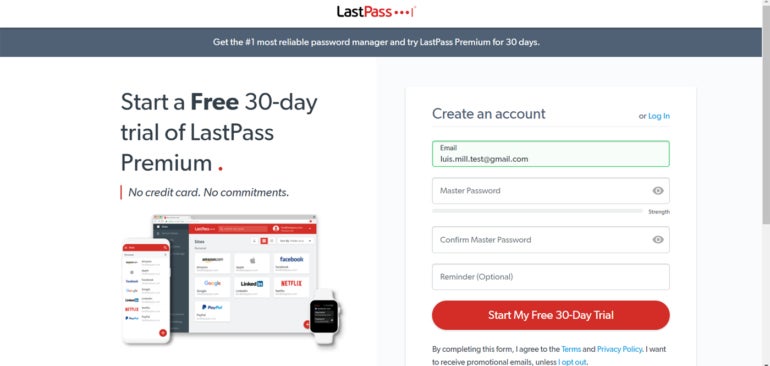
Upon selecting a plan, you’ll be redirected to create your LastPass account. Here, LastPass will ask you to provide an email address and your Master Password.

Creating a LastPass account.
Creating a LastPass account. Image: LastPass

In theory, your master password is going to be the only password you’ll have to create on your own. It’s also arguably your most important password, as it serves as the key that unlocks your vault, which contains all your other passwords and credentials. Thus, it’s crucial that you remember your master password.

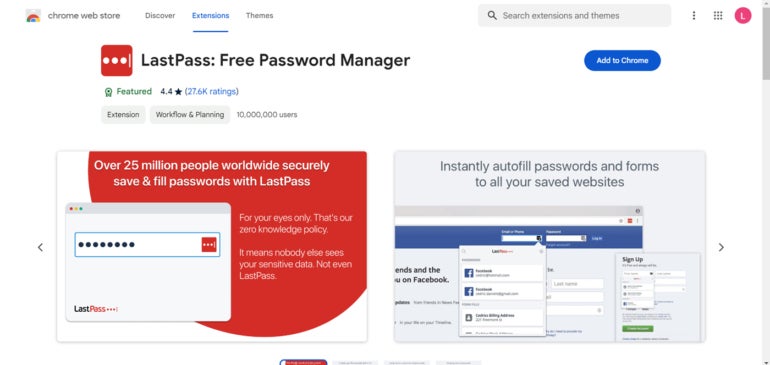
After you’ve finished creating your account, LastPass will ask you to install its browser extension. This is the main way you’ll interact with the service. I use Google Chrome, so LastPass redirected me to the Chrome Web Store.

LastPass Chrome browser extension.
LastPass Chrome browser extension. Image: Google

Once you’ve installed the browser extension, you can access LastPass’ web vault application. Before you do this, I recommend you pin the LastPass extension to your browser’s toolbar for easy access.

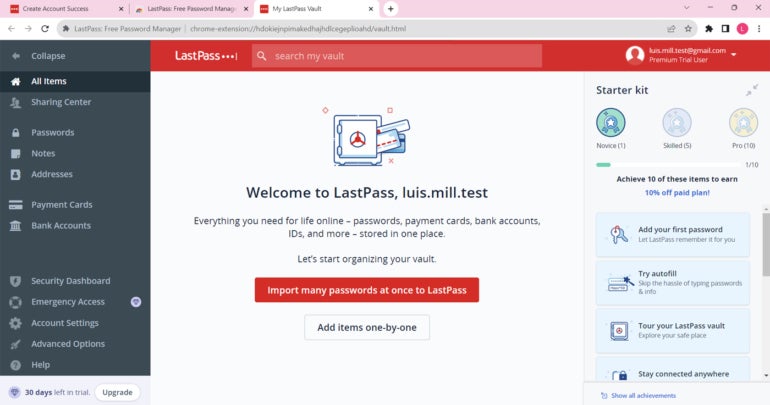
Now that you have the extension up and running, it’s time to access your LastPass web vault. To access it, go to the official LastPass website and click Log In. From there, enter your email and master password and you will be led to the LastPass web vault application.

LastPass web vault.
LastPass web vault. Image: Luis Millares

Your LastPass vault is where all your passwords, logins and other credentials will be stored.

3. Use LastPass

The main reason to use a password manager is to organize and secure your passwords. To illustrate how to do this, I’ve made a new account on LinkedIn.

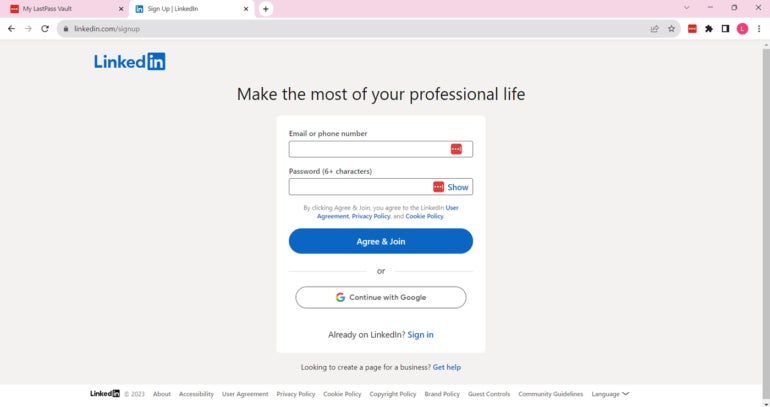
On LinkedIn’s signup page, you will see that there’s a LastPass icon on the username and password fields.

Creating a LinkedIn account.
Creating a LinkedIn account. Image: Luis Millares

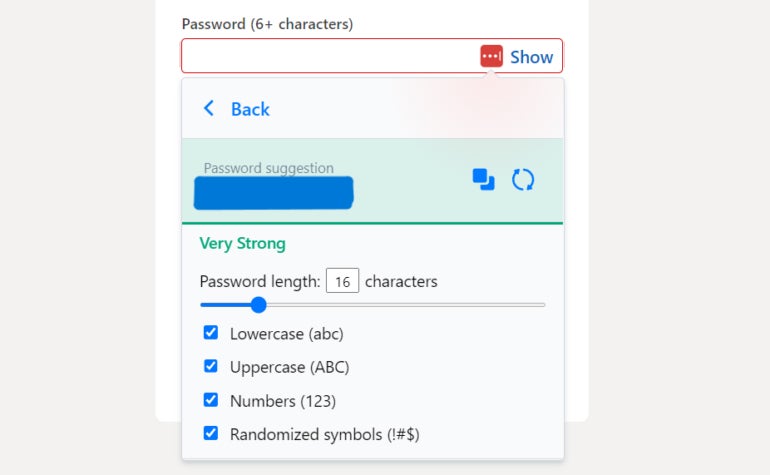
Clicking on the LastPass icon in the password field will bring up LastPass’ password generator. Here, LastPass automatically generates a random password for your new login.

LastPass password generator.
LastPass password generator. Image: Luis Millares

At default, LastPass will generate a 16-character password — which you can configure to have uppercase and lowercase letters, numbers, and symbols. LastPass allows you to create a password with as many as 99 characters. In this case, I selected the first suggestion from LastPass’ password generator.

Clicking on the generated password will prompt LastPass to ask you if you want to save the new login. Click “Add password,” and there you go — you’ve just created and saved your very first LastPass login.

LastPass saving new login.
LastPass saving new login. Image: Luis Millares

This login can now be found within your vault and LastPass will automatically be filled in the next time you’re on LinkedIn’s login page.

With that, we’ve just saved our very first login using LastPass!

SEE: IT Leader’s Guide to Cybersecurity Awareness Training (TechRepublic Premium)

LastPass frequently asked questions (FAQs)

Is LastPass no longer safe?

Due to its recent data breaches, I don’t consider LastPass a safe password manager to use in 2025. For context, LastPass was involved in two data breaches in 2022, where the threat actor gained unauthorized access to encrypted customer data.

While the password manager service has since implemented changes to bolster its security posture, there’s simply no reason to put your data at risk. This is especially true given there are other top-tier password managers that have not been hacked or involved in similar breaches.

Does LastPass have a free version?

Yes, LastPass has a free version but has limited features compared to its paid counterpart. On LastPass Free, you can only access your password vault while using one device type at a time. This means you can only view your passwords on a computer or a mobile device, not both at the same time.

You also don’t get LastPass’ One to Many Sharing feature (which allows login detail sharing with multiple people), encrypted file storage, advanced multi-factor authentication, and emergency access. All these features are available on any of LastPass’ paid plans.

Check out LastPass Free vs Premium, for a more in-depth comparison between the two.

How to add LastPass to Chrome?

To add LastPass to Chrome, visit the Chrome Web Store, search for LastPass, and click on “Add to Chrome.”

From there, LastPass will provide you steps on how to install and integrate their service to your Chrome browser. You can also go to the LastPass Download page and download the browser extension from there.

What operating systems does LastPass support?

LastPass supports Windows, Mac, and Linux operating systems via their browser extensions. Specifically, it has browser extensions for Chrome, Safari, Firefox, Microsoft Edge, and Opera.

It also offers dedicated mobile apps for both iOS and Android.

What we think of LastPass

In our full review, LastPass received a rating of 3.4 out of 5 stars. We couldn’t recommend LastPass because of its 2022 data breaches, particularly since a password manager’s main purpose is to protect user data.

While its free version and wide range of multifactor authentication options are enticing, there are a number of LastPass alternatives that we feel are better investments for your money — and data.

If you want to learn more, read our full review of LastPass or check out our Keeper vs LastPass comparison.

This article was originally published in December 2023. It was updated by Luis Millares in March 2025.

Posted on

KeePass Review (2025): Features, Pricing, and Security

KeePass fast facts

Our rating: 3.0 stars out of 5
Pricing: Free
Key features

  • Downloadable user-generated plugins.
  • Open-source.
  • Completely free.

KeePass is a free and open-source password manager that’s been around for over 20 years. Since its release in 2003, the password manager’s ability to add user-generated plugins and extensions has made it a popular option for enthusiasts and more technical users.

While KeePass offers decent and secure password storage, its dated design, lack of traditional password capture and replay, and unintuitive application make it hard to recommend against more modern password managers.

KeePass pricing

KeePass is a completely free password manager that doesn’t have any paid tiers. This is in contrast to competitors like NordPass and Dashlane which have paid plans and have free versions, but with inherent limitations. For example, Dashlane’s free version only allows for a maximum of 25 passwords. However, you can avail of their paid plan to get unlimited password storage.

KeePass desktop app available for free.
Image: KeePass

One big difference between KeePass and other password managers is that a lot of features aren’t included out of the box. Instead, users can customize their KeePass client’s feature set via downloadable plugins from the password manager’s site. Plugins are available for capabilities such as importing and exporting passwords, data backups and auto typing.

Is KeePass safe?

Yes, KeePass is a safe and secure password manager. It utilizes the industry standard AES-256 encryption for its database and user vaults. It’s also open-source, allowing the public to verify its source code for possible vulnerabilities or potential security holes.

This is a big feature for privacy enthusiasts, especially those who value transparency, as it lets the users and experts collaborate with KeePass in keeping it secure to use.

Encryption-wise, I like that KeePass encrypts the whole database, which means that not only are passwords encrypted but also other items such as usernames and notes.

As of March 2025, KeePass had not been involved in any data breach. The password manager has been audited in the European Commission’s Free and Open Source Software Auditing (EU-FOSSA 1) project, which showed that it had zero security issues.

KeePass also shares that it is the recommended password manager in the BSI Cyber Security Recommendations BSI-CS 003 2.0 by the German Federal Office for Information Security and is on the list for recommended free software for French public agencies.

To me, these recommendations from government agencies hold a lot of weight since they handle highly sensitive and public data.

Key features of KeePass

Aside from password storage and password generation, KeePass comes with a few key features that make it unique compared to other password managers.

Library of plugins and extensions

KeePass Plugins.
KeePass Plugins. Image: KeePass

One of KeePass’ biggest selling points is the ability to download and add plugins for each user’s KeePass client. These plugins add more features or modify existing functionality, such as letting users import or export different file formats, changing the KeePass user interface, or adding autofill capabilities.

Right now, there are more than 180 downloadable plugins on the KeePass website. This is perfect for users who value being able to customize their password manager and its feature set.

For me, I prefer a password management solution that already comes with dedicated features, without having to worry about adding them after the initial installation. If you’re like me on this, 1Password or NordPass are password managers with a variety of features already baked in.

Local-device password management

A KeePass database saved on my desktop.
A KeePass database saved on my desktop. Image: Lui Millares

Another standout feature from KeePass is that it is a completely local password management system. This means that all your passwords and stored credentials are encrypted locally on your computer or device of choice. This is in contrast to other password managers that store passwords in the cloud, like 1Password or LastPass.

If you’re paranoid about cloud-based password managers possibly being involved in a data breach and leaking your data, KeePass can be a great solution since everything is stored locally. You can read our LastPass review to learn more about how data breaches can affect a password management solution.

On the flip side, KeePass’ all-local implementation can be a disadvantage since you won’t have the convenience of easy access to your passwords on multiple devices through the cloud.

Auto-Type functionality

Unlike most modern password managers, KeePass doesn’t have a conventional autofill feature. What it does have is Auto-Type — a global auto-type hotkey which automatically types out credentials in your chosen account pages.

Auto-Type tab.
Auto-Type via KeePass. Image: Luis Millares

Auto-Type works by having KeePass open in the background, switching to the website, and KeePass automatically typing out your login credentials after you hit a particular keyboard shortcut. This is opposed to other password managers that automatically fill out the username and password fields via a browser extension or through a clickable pop-up.

While seeing KeePass automatically type out my password was cool at first, I did find it really finicky to use after a few times. Because I had to manually set the sequence in which the login credentials are to be typed, i.e. if the username or password goes first, there were times that KeePass couldn’t type my details in the proper fields.

Despite Auto-Type being a unique party trick that I haven’t encountered on other password managers, I honestly found manually copying and pasting from the KeePass client to be a better alternative.

KeePass authentication and security options

KeePass comes with two main multi-factor authentication (MFA) options: key file and linking a Windows user account. A key file is a file that you can save either on your computer, USB flash drive, or any other device, which acts as an additional requirement in tandem with your master password to access your database.

Authentication options.
Authentication options. Image: Luis Millares

You can set your KeePass vault or database to only open if you’re logged into a specific Windows user account. I would have preferred it if KeePass had more MFA options like 1Password’s fingerprint verification or NordPass’ authenticator app integration.

While you can download two-factor authentication (2FA) or One-Time Password (OTP) plugins, I think having these authentication options baked within the app itself is more user-friendly. This saves users the time of having to pick which plugin is the best, especially since most competitors have these readily available once installed.

For security options, I like that KeePass has a timer for whenever you copy passwords off your database. At default, KeePass automatically removes any copied credential from the clipboard after 12 seconds.

There are also different Enforce Options that let you set whether you want your KeePass database to automatically lock after inactivity or have KeePass warn you whenever a key transformation setting is weak.

Enforce options.
Enforce options. Image: Luis Millares

KeePass interface and performance

KeePass’ desktop user interface (UI) falls flat in both design and ease of use. Its design is dated and looks a bit like legacy-Windows applications from the 2000s. I prefer password managers with a sleek and modern UI.

KeePass main dashboard.
KeePass main dashboard. Image: Luis Millares

KeePass’ application is also not the easiest password manager to use and learn. Once I installed the application, I got a blank dashboard with no included guide. There wasn’t a clear tutorial on how to save my first password or use any of KeePass’ features.

Fortunately, there are video tutorials, guides, and forum posts online that outline how to use KeePass. However, I don’t think the password manager needs to sacrifice ease-of-use to get to their goal of customizability.

In terms of performance, I had no trouble adding new password entries inside the KeePass app. The included password generator also worked without any issue and I like that there’s no limit to password characters.

It’s unfortunate that KeePass doesn’t have traditional autofill and password capture and replay functionality. Without any plugins, you have to manually input login credentials to save new usernames and passwords. This adds an extra step to the process compared to something like Keeper’s KeeperFill feature that automatically saves and fills in new logins upon creation.

KeePass mobile app

KeePass doesn’t have its own proprietary iOS or Android mobile application. However, it recognizes user-generated mobile ports of its service.

KeePass ports list.
KeePass ports list. Image: KeePass

This provides users a ton of options in terms of KeePass mobile applications. However, this means that there’s no assurance that a given mobile app will be supported long-term. Each mobile port will also have varying levels of quality, so your mileage may vary.

KeePass pros

  • Completely free password manager.
  • Open source and secure.
  • Highly customizable.
  • Downloadable user-generated plugins.

KeePass cons

  • Hard to learn and not user-friendly.
  • No autofill feature included.
  • Auto-Type is a bit clunky.
  • Multi-factor authentication options are separate downloads.
  • Design looks a bit dated.
  • No official mobile app.

SEE: Penetration Testing and Scanning Policy (TechRepublic Premium)

Who is KeePass for?

KeePass is for users who want a password manager they can personalize. With its large library of downloadable plugins and extensions, KeePass can be a very powerful tool for those willing to take the time to maximize its capabilities.

It’s also a good pick for individual users who are wary of cloud-based password managers and want a secure way to store their passwords locally.

However, its less than friendly user interface, clunky auto-type feature, and lack of traditional password capture and replay make it hard to recommend against other top password managers in the market. Its locally-stored password storage also makes it hard

KeePass alternatives

If you find that KeePass isn’t a good fit, I’ve listed three alternative password managers that are worth a try.

Bitwarden icon.
Image: Bitwarden

Bitwarden

If you want a cloud-based password manager with a generous free version, check out Bitwarden. Bitwarden’s free version allows for unlimited password storage and access on an unlimited number of devices. You also get strong zero-knowledge encryption and affordable pricing on its paid plans across the board.

Check out our full Bitwarden review.

NordPass icon.
Image: NordPass

NordPass

NordPass is an all-around password manager that doesn’t have many faults. It has an intuitive user interface, plans for both single users and business, and has independently audited applications. It also utilizes the secure and more modern XChaCha20 encryption algorithm.

Check out our full NordPass review.

1Password icon.
Image: 1Password

1Password

For avid travelers, 1Password can be a great pick. It comes with a handy Travel Mode feature that lets users hide select vaults whenever they travel. This is on top of its sleek desktop UI and strong AES-256 encryption. 1Password also provides 14-day free trials across all its plans that let you test their service.

Check out our full 1Password review.

Review methodology

My review of KeePass involved a detailed analysis of its security features and real-world performance. I used KeePass on a Windows laptop for testing and for hands-on experience.

I rated KeePass on everything from its password management features to its ease of use based on an internal algorithm to get a rating of 3.0 out of 5 stars. The scoring was based both on KeePass on its own and in relation to other password managers.

This article was originally published in January 2024. It was updated by Luis Millares in March 2025.

Posted on

NordPass vs Bitwarden: Which Is Safer and Easier to Use in 2025?

Just about every online service requires visitors to create an account, and that typically means more passwords than you can possibly remember. With repetitive passwords considered a poor security practice, using password managers becomes imperative as they help to generate and store complex, unique passwords for each of your accounts.

Among the top password managers on the market are NordPass and Bitwarden. While NordPass is notable for its quality encryption and VPN integration, Bitwarden’s open-source and self-hosting options make it a worthy alternative. But how do you determine which to use? Let’s find out.

  • NordPass: Best for ease of use and suite of security programs with the Nord Security family of software.
  • Bitwarden: Best for open source password management and generous free version.

NordPass vs Bitwarden: Comparison table

The table below holds a summary of how both password managers stack up against each other.

NordPass Bitwarden
Our rating 4.6 stars out of 5 4.6 stars out of of 5
Native authenticator app Yes Yes
Open source No Yes
Encryption Uses XChaCha20 encryption Uses 256-bit AES encryption
Password autofill Yes Yes
Command Line Interface No Yes
Free plan available Yes, (for one device) Yes (can be used on multiple devices)
Built-in VPN Yes No
Starting price Paid plan starts at $1.69 per month for one year Price starts at $0.83 per month; $10 billed annually
Free trial Yes. Offers 30-day NordPass Premium trial and 14-day NordPass Business trial Yes. Offers 7-day free trial for most plans
Visit NordPass Visit Bitwarden

NordPass and Bitwarden: Pricing

NordPass pricing

NordPass offers two subscription tiers: Personal and Business. All of NordPass’ premium plans have a 30-day money-back guarantee and the Free plan includes a 30-day Premium free trial you can avail of as well. Meanwhile, NordPass also offers a 14-day free trial of its Business subscription.

Personal:

Free plan Premium plan Family plan
1-year plan Free $1.69 per month $3.69 per month
2-year plan Free $1.29 per month $2.79 per month
Feature differences Autosave and autofill; secure storage; one user per session All Free features plus access on multiple devices, password health, data breach scanner, and file attachments All Premium features for six user accounts

Business:

Teams plan Business plan Enterprise plan
1-year plan $1.99 per user, per month $3.99 per user, per month $5.99 per user, per month
2-year plan $1.79 per user, per month $3.59 per user, per month $5.39 per user, per month
Users Up to 10 users only From 5 to up to 250 users Unlimited users
Feature differences Company-wide settings and Google Workspace SSO All Teams features plus Security Dashboard, Shared Folders All Business features plus SSO with Entra ID / MS ADFS / Okta, User and Group Provisioning, Sharing Hub

Bitwarden pricing

Bitwarden also offers a variety of plans under their Personal and Business tiers. Bitwarden has a seven-day free trial for its Families plan and a seven-day trial for its Teams subscription on the business side.

Below is an overview of pricing and feature differences for both.

Personal:

Free plan Premium Families
Free $0.83 / $10 billed annually $3.33 per month
Unlimited devices, passkey management, unlimited password storage All Free features plus integrated authenticator, emergency access, security reports, and file attachments Up to 6 users; All Premium features plus unlimited sharing and collections, organization storage

Business:

Teams plan Enterprise plan Custom plan
$4 per month, per user $6 per month, per user Contact Sales for price quote
Secure data sharing, event log monitoring, SCIM support, Directory integration All Teams features plus Custom Roles, Passwordless SSO, Free Families Plan for all users, Self-host option, Enterprise policies Depends on your customized requirements

NordPass vs Bitwarden: Feature Comparison

When it comes to features, both NordPass and Bitwarden offer solutions for security, password sharing, encryption, and more. I’ve included their standout features below:

Authentication

Both NordPass and Bitwarden offer two-factor authentication (2FA) solutions to add an extra layer of protection for your accounts. NordPass Authenticator uses biometric, possession and knowledge-based authentication methods. Its time-based one-time passwords (TOTPs) expire every 30 seconds and serve as the second login factor you input alongside your password. The Authenticator also comes with QR code scanning and manual key entry options for easy setup.

Bitwarden’s Authenticator also utilizes TOTPs for secure logins and offers options for QR code setup and manual key entry. Everyone can store authenticator keys in Bitwarden, but generating the codes requires a premium account or membership in a paid subscription such as a Families, Teams, or Enterprise plan..

Bitwarden Authenticator.
Bitwarden Authenticator. Image: Bitwarden

Password import and export

You can import your saved passwords from other password managers like 1Password and LastPass using NordPass on desktop devices or import passwords from browsers using the Android app. Note: To import files into NordPass, you need to organize the CSV file accordingly.

NordPass password import.
NordPass password import. Image: NordPass

Bitwarden also supports importing and exporting data via its Password Safe in CSV. Data must be imported to Bitwarden from the web vault or Command Line Interface (CLI). In my testing, I found that importing data into the Bitwarden vault does not check for duplicates, so this should be done carefully.

Bitwarden password import dashboard.
Bitwarden password import dashboard. Image: Bitwarden

Password sharing

NordPass offers secure password sharing across most of its plans. You can send passwords securely via the NordPass app, or you can use NordPass Sharer, which allows you to safely share passwords or other vital information via a secure link. This secure one-time link is valid for 24 hours, or once opened.

Sharing invitation link on NordPass.
Sharing invitation link on NordPass. Image: NordPass

Bitwarden offers two methods for sharing passwords: Bitwarden Organizations for sharing very sensitive information like business accounts, where you create collections and share them with users within your organization, controlling access levels; and Bitwarden Send for less sensitive information like sharing a streaming service account, where you share usernames, passwords and notes. Using this method allows you to control access duration and the number of times your shared item can be accessed.

Security features

NordPass offers multi-factor authentication, which acts as an additional layer of security and prevents unauthorized users from accessing your accounts. It also uses advanced encryption algorithms like XChaCha20 to ensure the security of your vault. Additionally, with NordPass Enterprise, you can take advantage of other security features such as Single Sign-on (SSO), Data Breach Scanner, Password Health, and Secure Item Sharing.

NordPass Data Breach Scanner.
NordPass Data Breach Scanner. Image: NordPass

Bitwarden offers open-source security and utilizes the following key security measures to protect user data: AES-CBC 256-bit encryption, PBKDF2 SHA-256, and salted hashing. All cryptography keys are generated and managed by Bitwarden on your devices, and all encryption is done locally. Bitwarden also has vault health reports, offers SSO for Enterprise users and a two-step login using YubiKey OTP, Duo, FIDO2 WebAuthn, Email, and the Authentication app.

Automatic device sync

NordPass can automatically back up and sync your credentials and files. This allows you to access your data in the vault from anywhere — whether it’s the app on your phone or a browser extension.

With Bitwarden, items owned by you in the web vault will always remain in sync. Items owned by an organization will sync across users and client applications every 30 minutes. Other Bitwarden apps — such as browser extensions, mobile apps, desktop apps, and CLI — will sync automatically at login and regularly when unlocked.

NordPass pros and cons

Pros

  • Data Breach Scanner available.
  • Viable encryption option.
  • Offers a free plan.
  • Free trials for most plans.
  • Secure password sharing.
  • Live chat support.

Cons

  • Only one device is supported on the free version.
  • The free tier has very limited features.

Bitwarden pros and cons

Pros

  • It’s open source.
  • Supports both graphical and command-line interfaces.
  • One free account can run on multiple devices, although with limited features.
  • Advanced two-step login.
  • It can be self-hosted or cloud-based.

Cons

  • SSO integration and admin password reset are not available in some plans
  • Desktop UI requires improvement.
  • Only offers a 7-day free trial.

Should your organization use NordPass or Bitwarden?

Choosing between NordPass and Bitwarden depends on your priorities. NordPass offers seamless integration with other Nord products like NordVPN and NordLocker, ensuring a unified security ecosystem for an organizational setting. The interface is user-friendly and simple, and it can integrate with many popular apps and browser extensions. NordPass’ shared folders allow users to securely share information and sensitive data stored in their vaults, making it easier for team collaboration; plus, it includes a data breach scanner on the dashboard for easy password breach scans.

Bitwarden is an open-source security password manager, prioritizing transparency, strong security, and customization for budget-conscious individuals or enterprises. It allows self-hosting for advanced users, and it integrates very well with SSO providers like Azure Active Directory and Okta to streamline the log-in process for various team members in an organization.

The pricing for both NordPass and Bitwarden are fairly similar, but Bitwarden offers more flexibility. Its free version offers more features and supports unlimited device connections, unlike NordPass, whose free version supports only one device.

SEE: Penetration Testing and Scanning Policy (TechRepublic Premium)

Methodology

I evaluated NordPass and Bitwarden by assessing their user interfaces, security features, and ease of use. For real-life experience, I installed the free versions of each app on my Android, Windows devices, and Chrome browser. This approach helped me test features like password generation, autofill, responsiveness, lengths of passwords, and cross-platform functionality. Both scored well on these benchmarks; however, I noticed that NordPass was faster with its prompts but found it easier to use Bitwarden on my Chrome browser. My assessment also showed that users can generate random strings of digits, letters, and symbols of up to 128 characters on Bitwarden compared to NordPass’ 60 characters.

The products’ sites were also taken into account to provide a comprehensive overview of pricing.

Check out our full reviews of NordPass and Bitwarden

This article was originally published in December 2023. It was updated by Luis Millares in February 2025.

Posted on

How to Use NordPass: A Step-by-Step Guide

NordPass, Nord Security’s password manager, is an intuitive application offering reliable password storage and protection.

In this article, we walk you through how to set up and use NordPass. We also answer some frequently asked questions about NordPass and its features.

How to set up and use NordPass

1. Choosing a NordPass subscription

NordPass has two subscription tiers: Personal and Business. Its Personal plans are for individual consumers, while NordPass Business is for businesses and organizations.

In our hands-on review, NordPass received a score of 4.6 out of 5 stars. Check out our full NordPass review here.

NordPass Personal plans
NordPass Personal plans. Image: NordPass

Within the Personal tier, NordPass has three plan options: Free, Premium, and Family. The Premium one-year subscription costs $1.69 per month for one user, and the Family plan is $3.69 per month per user for up to six users.

NordPass’ Free version is free forever; however, it only allows for one-device log-in, and lacks important features such as a dark web monitor and password health scanner.

NordPass Business plans
NordPass Business plans. Image: NordPass

Meanwhile, NordPass Business is split into Teams, Business, and Enterprise plans. The Teams one-year subscription costs $1.99 per user, per month for up to 10 people. NordPass Business provides protection for five users and up at $3.99 per user, per month. And, a one-year Enterprise subscription can protect the same five users and up at $5.99 per user, per month.

Customers can opt for a two-year plan, which offers more affordable monthly rates.

I highly recommend trialing out a plan before purchasing a subscription. A 30-day free trial is available for the Premium plan, and both Teams and Business have a 14-day free trial. Neither require a credit card to access.

For those interested in trying NordPass’ free trial for its consumer version, I recommend searching “nordpass free trial” on Google as the easiest way to access it. I’ve found that NordPass tends to update or change their webpages every now and then, so looking it up directly via Google will be the fastest way to avail of the trial.

Looking up NordPass’ free trial on Google
Looking up NordPass’ free trial on Google. Image: Luis Millares

From there, you’ll see a page titled, “Free 30-day NordPass Premium Trial.” Clicking this will lead you directly to the free trial page, where you can enter your email address and start the trial.

NordPass’ free trial page
NordPass’ free trial page. Image: NordPass

If you’re interested in accessing one of the 14-day free trials for NordPass Business, repeat our previous steps and simply search “nordpass free trial business” on Google this time around.

Looking for NordPass business trial
Looking for NordPass business trial. Image: Luis Millares

Clicking on the link will lead you to a sign-up page, where NordPass will ask you to enter your business email, company name, and other information.

NordPass Business trial sign-up
NordPass Business trial sign-up. Image: NordPass

2. Setting up the web app and browser extension

Going back, let’s select the NordPass Premium free trial to give you a quick look on how to use NordPass. At the NordPass free trial page, NordPass will ask you to provide an email address. I’ve put my test account below:

Providing my email for NordPass trial
Providing my email for NordPass trial. Image: Luis Millares

After providing my email, I was redirected to NordPass’ browser extension page on the Chrome Web Store. I downloaded the extension, and it installed automatically.

NordPass on the Chrome Web Store
NordPass on the Chrome Web Store. Image: NordPass

After installation, NordPass asked me to either log in or create an account. I chose “Create Account” and provided my email address. From there, NordPass asked me to create a Master Password. The master password is the only password you’ll have to create on your own as NordPass has a built-in password generator which you can use to create more secure, randomized passwords.

NordPass Master Password.
NordPass Master Password. Image: Luis Millares

The master password serves as the key to your encrypted password vault and stored passwords. NordPass requires all master passwords to be at least 9 characters or more and to have at least one special character.

After I provided my master password, I was directed to the main dashboard to begin storing and managing my passwords.

NordPass main dashboard.
NordPass main dashboard. Image: Luis Millares

3. Using NordPass

The easiest way to save your first login is to create and save a new account online. To demonstrate this, I’ll create a new account on Udemy.

On Udemy’s account creation page, the NordPass logo appeared in the password field.

NordPass logo on password field.
NordPass logo on password field. Image: Luis Millares

When I clicked on the logo, NordPass’ password generator popped up.

NordPass password generator.
NordPass password generator. Image: Luis Millares

It automatically generated a randomized password for my Udemy account. By default, NordPass creates a 20-character-long password, but you can have it generate a password that’s 60 characters long. You can also have it create a password phrase, which has been said is more secure.

Saving a new login.
Saving a new login. Image: Luis Millares

After the password was generated, NordPass prompted me to save the Udemy account details to my NordPass vault.

NordPass Frequently Asked Questions (FAQs)

Is NordPass free?

Yes, but only for the consumer NordPass solution, not NordPass Business. NordPass’ free version doesn’t have key features such as dark web scanning, the ability to share items, and emergency access. And, it only allows a single-device login per account.

How do I import passwords to NordPass?

To import your passwords to NordPass, go to the Settings menu, navigate to the Import and Export section, and click “Import items.” NordPass lets you import passwords from a CSV file, browsers, and other popular password managers.

What if NordPass isn’t working?

If you encounter any problems with NordPass, you can visit their official support page or access their 24/7 live chat support. You can also send a message to their support email for more assistance.

Is NordPass the same as NordVPN?

No, they are two different services. While they are both from security software provider Nord Security, NordPass is a password manager and NordVPN is a virtual private network service.

What operating systems does NordPass support?

In terms of browsers, NordPass is available on Google Chrome, Mozilla Firefox, Opera, Edge, and Safari. This includes browsers for both desktop and mobile.

For its desktop application, NordPass supports Windows (10 and up), macOS (11 and up), Linux, Chrome OS (web vault only), Android (9.0 and up), and iOS (15.0 and up).

Is NordPass available for iPhone or Android?

Yes, NordPass has apps for both iOS and Android. You can also access NordPass on your smartphone via a supported mobile browser.

What we think of NordPass

In our full review, NordPass received a rating of 4.6 out of 5 stars. We highlighted its affordable pricing, easy-to-use application, and useful business features — all of which make it one of the best password managers available today.

While its free version is limited to only one device, the all-around user experience and security you get with NordPass make a premium subscription worth the spend.

If you want to learn more, read our full review and analysis of NordPass and check out our NordPass vs 1Password comparison.

Posted on

Global Pressure Mounts for Apple as Brazilian Court Demands iOS Sideloading Within 90 Days

A Brazilian court has dealt a major blow to Apple’s tightly controlled ecosystem, ordering the tech giant to allow sideloading on iOS within 90 days. The ruling follows similar mandates in the EU, signaling a global push for more open digital marketplaces.

With Apple commanding nearly 60% of the U.S. mobile market and over 62% in Japan, the decision could set off a domino effect worldwide.

How does sideloading affect iOS users?

Sideloading occurs when a mobile smartphone user downloads an app from a source other than the official App Store. In this case, the App Store remains the sole distribution channel — a model that Apple is determined to protect.

It’s clear why Apple wants to restrict third-party apps. According to StatCounter, the tech giant accounts for less than 30% of the global OS market share as of February 2025. Forcing users to download apps from the App Store is a surefire way to keep them in the iOS ecosystem.

However, users do receive some benefit from downloading apps exclusively from the App Store. Since all apps undergo a screening process, users know they’re receiving authentic software that isn’t going to harm their device. If they ever do experience an issue, technical support is usually available.

These safeguards don’t necessarily extend to apps that are downloaded from developer websites or other sources, but many users still want the freedom to choose. Despite already making similar accommodations in other regions, Apple insists that sideloading will have a negative impact on all iOS users.

Judge Pablo Zuniga, who overturned an injunction that would have given Apple more time to consider their next move, said that Apple “has already complied with similar obligations in other countries, without demonstrating a significant impact or irreparable damage to its business model.”

What does this mean for other countries?

If the ruling stands, similar legal battles could emerge worldwide. With the European Union already setting a precedent, and Brazil potentially following suit, other countries may soon join the movement. While the case in Brazil could be a major catalyst for a future disruption in the iOS ecosystem, it’s still too early to tell.

Following the latest ruling, Apple now has 90 days to remove all restrictions on sideloading for all Brazilian iOS users. As expected, the company plans to appeal the decision.

This article was written by TechnologyAdvice contributing writer J.R. Johnivan.