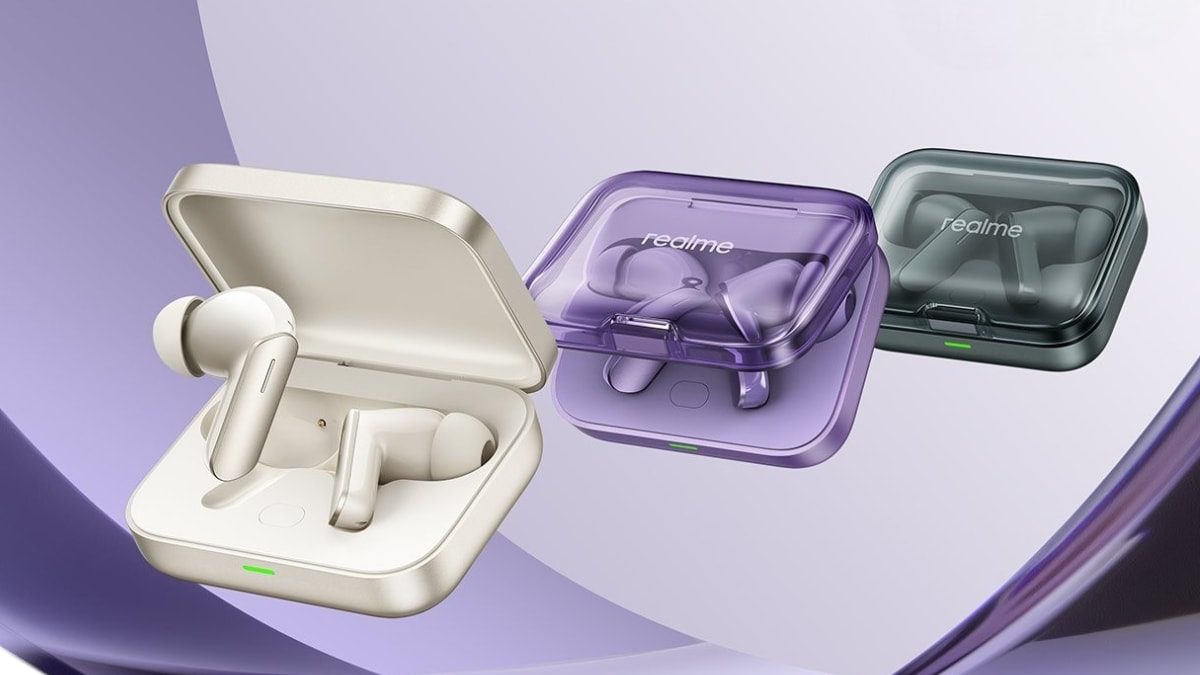
Realme Buds Air 7 have been launched in India. The TWS earphones are claimed to offer a battery life of up to 13 hours on a single charge. They are said to provide a total playback time of up to 52 hours with the case. The earphones have an IP55 dust and splash resistance rating. They support dual-device connectivity, LHDC 5.0 audio codec, up to 52dB active noise cancellation (ANC) and carry 12.4mm brass drivers. The headsets were unveiled in China in February.
Realme Buds Air 7 Price in India, Availability
Realme Buds Air 7 price in India is set at Rs. 3,299. Including all offers and discounts, customers can get them for the lowest effective price of Rs. 2,799. They will go on sale starting at 12pm IST on March 24. The TWS earphones are offered in Ivory Gold, Lavender Purple, and Moss Green colourways. They will be available for purchase via Flipkart, the Realme India e-store and other retail stores.
Realme Buds Air 7 Features, Specifications
The Realme Buds Air 7 are equipped with 12.4mm dynamic deep brass drivers with N52 neodymium magnets and copper SHTW coils. They carry Hi-Res Audio certification and support up to 52dB ANC as well as 360-degree spatial audio. The earphones have a six-mic system for call noise reduction as well.
Realme confirms that the Buds Air 7 support Bluetooth 5.4, SBC, AAC and LHDC 5.0 audio codecs as well as dual device connectivity. They support Swift Pair, and Google Fast Pair and are compatible with the Realme Link app. The headsets are said to offer up to 45ms low latency. The IP55 dust and splash-resistant earphones also support touch controls.
The Realme Buds Air 7 earphones pack a 62mAh battery each, while the case has a 480mAh cell. The earphones without ANC, at 50 percent volume in AAC quality, are said to offer up to 13 hours of usage on a single charge. Together with the case, they are claimed to last for up to 52 hours. A 10-minute quick charge is said to provide up to 10 hours of usage.
Affiliate links may be automatically generated – see our ethics statement for details.
Oppo F29 5G series will be unveiled in India on March 20. The company previously confirmed several features of the base Oppo F29 5G and the F29 Pro 5G, including design and colour options. Now, the chipset, battery, and charging details of the handsets have been revealed. Oppo has also listed the RAM and storage configurations of the phones on its official microsite. Notably, recent leaks have also hinted at the expected price range of the Oppo F29 5G series in the country.
Oppo F29 5G, Oppo F29 Pro 5G Key Features
The standard Oppo F29 5G will come with a Snapdragon 6 Gen 1 chipset, according to a press release by the company. It is said to have an AnTuTu score of over 7,40,000. The official microsite of the phone revealed that it will be offered in 8GB + 128GB and 8GB + 256GB RAM and storage configurations.
Meanwhile, the Oppo F29 Pro 5G will be powered by a MediaTek Dimensity 7300 Energy SoC with an AnTuTu score of 6,50,000, Oppo confirmed. The handset will be available in RAM and storage options of 8GB + 128GB, 8GB + 256GB, and 12GB + 256GB.
The base Oppo F29 5G will be backed by a 6,500mAh battery with 45W SuperVOOC charging support, while the Pro variant will carry a 6,000mAh cell with support for 80W SuperVOOC charging.
Both Oppo F29 5G series handsets will support AI LinkBoost Technology and a Hunter Antenna Architecture, which is claimed to boost signal strength by 300 percent. They will have 4×4 MIMO support for B40, B3, and B39 frequency bands.
The Oppo F29 5G and F29 Pro 5G are claimed to meet IP66, IP68, and IP69 ratings for dust and splash resistance. They will have 360-degree Armour Body and military-grade MIL-STD-810H-2022 certifications as well. The phones are teased to support underwater photography.
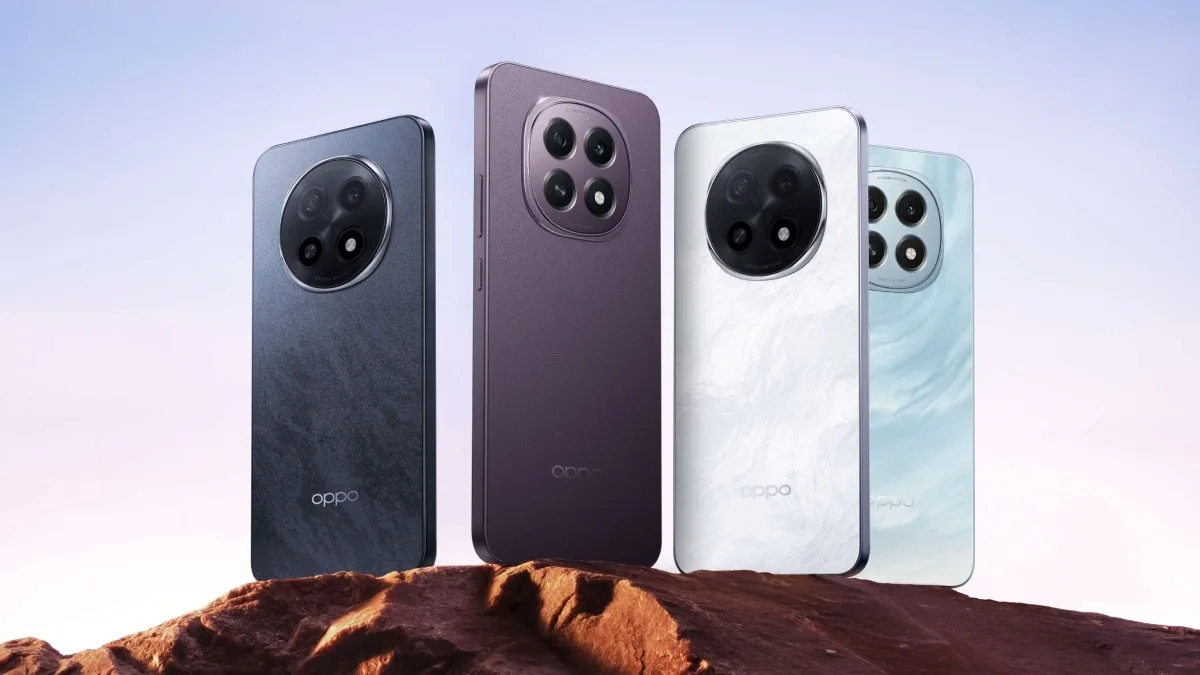
Oppo F29 5G will be offered in Glacier Blue and Solid Purple colourways, while the F29 Pro 5G will come in Granite Black and Marble White finishes. The phones will launch in India on March 20 and can be purchased via Amazon, Flipkart, and the Oppo India e-store.
Affiliate links may be automatically generated – see our ethics statement for details.
TV tech in 2025 is evolving rapidly, offering viewers ever more sophisticated ways to experience their favourite films, TV shows, and games with stunning realism and detail. The leading technologies among the best TVs are QLED, OLED, and micro-LED – three distinct display options that promise stunning visuals but differ in their core design, performance, and price points. Quantum Dot LEDs (QLED), a favourite of brands like Samsung, build upon traditional LED-LCD displays, enhancing brightness and colour accuracy via quantum dots. Its strength lies in its ability to perform well in brightly lit environments, making it a versatile option for general-purpose viewing. You may like Meanwhile, Organic Light-Emitting Diode (OLED), championed by LG, Samsung, and Sony, is known for its self-emissive pixels that deliver perfect blacks and infinite contrast, making the best OLED TVs a dream for cinephiles. The latest player in this arena is micro-LED, an emerging display tech that combines the self-emissive qualities of OLED with the brightness and durability of QLED. Still in its infancy, micro-LED has already begun to make waves with its modular designs and scalability, allowing for displays of unprecedented size and flexibility. All have their pros and cons, and today we’re going to explore them in detail, to help you make the right choice when buying a new TV. Samsung’s S95D OLED TV (Image credit: Future) QLED vs OLED vs micro-LED: What are the technologies? First up, Quantum Dot LED is an advanced display tech that builds on traditional LED-LCD panels, using a layer of quantum dots – microscopic particles that emit precise wavelengths of light – to enhance colour accuracy and brightness. Sign up for breaking news, reviews, opinion, top tech deals, and more. These quantum dots are illuminated by an LED backlight, resulting in vibrant colours and a wider colour gamut. In 2025, many QLED TVs also incorporate mini-LED backlighting, which uses thousands of tiny LEDs to improve local dimming and contrast. QLED is particularly well-suited for bright environments, making it a popular choice for living rooms and multi-purpose spaces. Organic Light-Emitting Diode tech, in contrast, relies on self-emissive pixels, where each pixel generates its own light, letting OLED TVs achieve perfect blacks and infinite contrast, as individual pixels can turn off completely. This capability creates stunning visuals with unparalleled depth, especially in darker scenes. OLED panels are also renowned for their excellent viewing angles, maintaining consistent colour and brightness even when viewed off-centre. However, OLED’s organic material can be prone to burn-in over time, where static images leave a ghostly imprint on the screen, though advancements in manufacturing have mitigated this risk. Micro-LED represents the next evolution in display technology, combining the self-emissive properties of OLED with the brightness and durability of QLED. Made up of millions of microscopic LEDs, each acting as its own light source, micro-LED panels deliver exceptional brightness, high contrast, and outstanding energy efficiency. Unlike OLED, micro-LED is not susceptible to burn-in, and its inorganic material ensures a much longer lifespan. Additionally, its modular design enables flexible screen sizes, from compact home displays to massive wall-sized installations. While it remains prohibitively expensive in 2025, micro-LED is expected to become more accessible in the coming years. These three technologies cater to different needs and priorities. QLED is a versatile and cost-effective option for most households, excelling in bright rooms. OLED continues to dominate in picture quality, making it the go-to choice for home theatre enthusiasts. While still in its infancy, micro-LED offers a glimpse of the future, with unmatched scalability and performance. LG’s flagship G4 OLED TV (Image credit: LG Global) QLED vs OLED vs micro-LED: Picture quality and performance When it comes to brightness and contrast, each option excels in different areas. QLED TVs are known for their exceptional brightness, which makes them ideal for well-lit rooms where glare might otherwise be an issue. They can achieve peak brightness levels significantly higher than OLED, making colours appear vivid even under challenging lighting conditions. However, QLED relies on LED backlighting, which can limit its ability to achieve perfect blacks, as some light leakage inevitably occurs in dark areas of the screen. OLED, by contrast, shines in darker environments, with its self-emissive pixels delivering true blacks and an infinite contrast ratio, creating unparalleled depth in dark scenes. Micro-LED strikes a balance, offering brightness levels comparable to QLED while maintaining contrast and black levels close to OLED, thanks to its self-emissive design. Colour accuracy is another area of difference: All three deliver wide colour gamuts and can support advanced HDR formats like Dolby Vision and HDR10+, ensuring vibrant and true-to-life colours. However, OLED and micro-LED lead in off-axis viewing, with minimal loss of colour or contrast when viewed from the side. The Samsung QN90D mini-LED TV (Image credit: Future) QLED vs OLED vs micro-LED: Cost and availability Anyone looking for a new TV will have seen that, overall, prices for LED-based TVs are way down from even a few years ago, but high-tech options do cost more. In 2025, QLED TVs remain the most accessible option for consumers, offering a wide range of models at various price points. From budget-friendly models with standard LED backlighting to premium ones featuring mini-LED backlighting technology, QLED caters to different budgets without compromising significantly on quality. OLED, while becoming more affordable in recent years, continues to command a higher price, particularly for larger screen sizes. But that pricing reflects its superior picture quality, especially for home theatre enthusiasts who prioritise contrast, black levels, and color richness and detail. However, there is some good news: increased competition among manufacturers like LG, Samsung, Sony, Panasonic, and Philips, as well as improvements in production efficiency, have steadily driven prices down over the years. Micro-LED is the most expensive option, with availability largely limited to high-end custom installations. Its manufacturing process, which involves producing millions of microscopic LEDs and assembling them with extreme precision, remains costly and complex. As a result, micro-LED TVs are primarily targeted at luxury markets and early adopters willing to invest heavily in cutting-edge tech, and while prices are expected to decrease as production scales up, micro-LED is not yet a practical option for the average consumer. A luxury home theater installation using a micro-LED display instead of a projector (Image credit: Samsung) QLED vs OLED vs Micro-LED: Applications and future proofing Each TV display type serves different applications based on viewing environments and user needs, and this should influence your choice. QLED is ideal for bright rooms, where its high brightness combats screen glare, making it a great choice for general-purpose viewing such as live TV and sports, while its affordability and versatility cater to the widest audience. OLED, on the other hand, excels in dark rooms and home cinema setups, where its perfect blacks and infinite contrast create an unparalleled viewing experience for films and TV shows, especially when combined with the best Dolby Atmos soundbars. For those seeking luxury and customisation, Micro-LED stands out with its modular design, making it ideal for large-scale or premium installations. In terms of future-proofing, micro-LED shows the most promise with its durability, resistance to burn-in, and adaptable modular capabilities, ensuring a long-term investment for high-end users, albeit at a high cost right now. OLED continues to improve its panel tech, addressing limitations like burn-in and brightness, while QLED benefits from advancements in mini-LED backlighting and quantum dot technology. Across all three, sustainability and energy efficiency remain priorities, with micro-LED leading in energy savings and OLED offering efficient power use in darker scenes. (Image credit: Al Griffin) QLED vs OLED vs micro-LED: Which is best? Choosing the best TV in 2025 depends on your priorities, budget, and viewing habits. QLED remains the most accessible option for general-purpose use, offering vibrant colours, high brightness, and affordability. However, its reliance on backlighting means it can struggle to achieve the perfect blacks or infinite contrast that OLED and Micro-LED can deliver. OLED is the go-to TV choice for those building a home cinema and who prioritise picture quality above all else. Its higher price point reflects this premium performance, but increasing competition has made smaller OLED models more accessible to mid-range buyers. Meanwhile, micro-LED represents the pinnacle of TV tech, offering the brightness of QLED, the self-emissive qualities of OLED, and unparalleled durability. Its modular design and cutting-edge performance make it ideal for luxury setups, though its cost remains prohibitive in 2025. Ultimately, the best TV tech for you will depend on your specific needs. We hope this guide will help to make your choice.
A striking nebula shaped by the dynamic interactions of two young stars has been observed in unprecedented detail by the James Webb Space Telescope (JWST). The structure, identified as Lynds 483 (LBN 483), is located approximately 650 light-years away. The nebula’s intricate shape is a result of powerful outflows generated by the formation of a binary star system. As material from a collapsing molecular cloud feeds these stars, bursts of gas and dust are expelled, shaping the surrounding nebulosity into a striking hourglass-like formation. The interaction of these stellar winds and jets with surrounding matter continues to sculpt the nebula over time, providing valuable insight into the mechanisms of star formation.
Star Formation and Nebular Evolution
According to reports, the two protostars at the core of LBN 483 play a crucial role in shaping the nebula. The presence of a lower-mass companion star, identified in 2022 through observations by the Atacama Large Millimeter/submillimeter Array (ALMA), suggests complex interactions within the system. Material accreted onto the stars periodically fuels energetic outflows, which in turn crash into the surrounding gas and dust. The JWST’s infrared imaging has revealed intricate structures within these lobes, including dense pillars and shock fronts where ejected material meets older expelled gas.
Impact of Magnetic Fields on Nebular Shape
Radio observations from ALMA have detected polarised emissions from cold dust within the nebula. These emissions indicate the presence of a magnetic field, which influences the direction and structure of the outflows. The study highlights a distinct 45-degree kink in the field at a distance of approximately 1,000 astronomical units from the stars. This deviation is attributed to the migration of the secondary star over time, altering the system’s angular momentum and consequently shaping the nebular outflows.
Implications for Star Formation Studies
LBN 483 presents a unique opportunity for astronomers to study star formation outside of massive stellar nurseries such as the Orion Nebula. The nebula’s isolation allows researchers to examine the formation process without interference from external stellar activity. Findings from this study contribute to refining theoretical models of star formation by integrating real observational data into numerical simulations. Scientists continue to analyse such systems to gain a deeper understanding of how stars, including the Sun, evolved from collapsing clouds of gas billions of years ago.
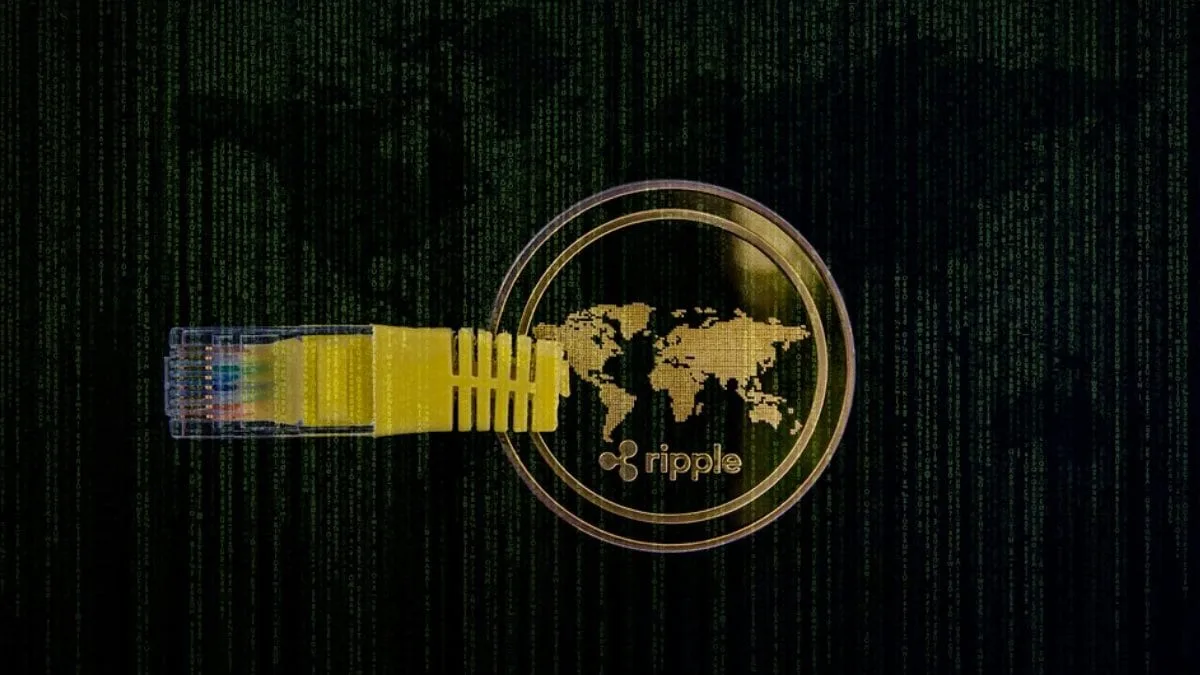
Ripple Labs is reportedly looking to expand its custody services with a digital wallet offering. In February, the XRP issuer filed a trademark application titled “Ripple Custody,” seeking approval for “downloadable software” for crypto custody—potentially hinting at a wallet service. The application also indicates Ripple’s intent to store and manage both cryptocurrencies and fiat currencies as part of its financial services
In 2024, Ripple introduced a crypto custody service for banks and fintech firms but has yet to offer a wallet service. Instead, its ecosystem members rely on third-party wallets like Ledger and Trust Wallet for token storage and transactions. This has led to reports speculating that Ripple’s recent trademark filing aims to prioritise a wallet service.
For now, Ripple has neither confirmed nor denied plans for a crypto wallet.
Cryptocurrency wallets, whether hardware-based or app-based, enable users to create accounts and store their digital assets. Access to these wallets is secured through private keys, which can be stored either within the wallet platform or by the users themselves. As per a report by Research and Markets, the crypto wallet market grew from $7.52 billion (roughly Rs. 65,098 crore) in 2023 to $9.25 billion (roughly Rs. 80,068 crore) in 2024. It is estimated to reach $32.75 billion (roughly Rs. 2,83,486 crore) by 2030, with a CAGR of 23.39 percent.
With a surge of wallet apps flooding the crypto market, Ripple has been working to educate its community on trusted options. In December, the company published a blog outlining various types of crypto wallets and listing those supporting its stablecoin, RLUSD. Through this blog, Ripple emphasised four key factors users should consider when choosing a wallet service — private key ownership, security, privacy, and user experience.
If Ripple launches a crypto wallet, it could provide greater support to its community while generating transaction fee revenue for the company, a CoinTelegraph report noted.
Ripple’s crypto custody service for banks and fintech firms, also called Ripple Custody, was launched last October, offering bank-grade custody solutions to fintech and crypto businesses. For now, it appears that a potential wallet service could be introduced under the Ripple Custody brand. However, an official confirmation from Ripple is still awaited.
Meanwhile, the San Francisco-based company continues expanding its global footprint. This month, it secured a licence to provide crypto services to businesses and financial institutions in the UAE.
Just about every online service requires visitors to create an account, and that typically means more passwords than you can possibly remember. With repetitive passwords considered a poor security practice, using password managers becomes imperative as they help to generate and store complex, unique passwords for each of your accounts.
Among the top password managers on the market are NordPass and Bitwarden. While NordPass is notable for its quality encryption and VPN integration, Bitwarden’s open-source and self-hosting options make it a worthy alternative. But how do you determine which to use? Let’s find out.
NordPass: Best for ease of use and suite of security programs with the Nord Security family of software.
Bitwarden: Best for open source password management and generous free version.
NordPass offers two subscription tiers: Personal and Business. All of NordPass’ premium plans have a 30-day money-back guarantee and the Free plan includes a 30-day Premium free trial you can avail of as well. Meanwhile, NordPass also offers a 14-day free trial of its Business subscription.
Personal:
Free plan
Premium plan
Family plan
1-year plan
Free
$1.69 per month
$3.69 per month
2-year plan
Free
$1.29 per month
$2.79 per month
Feature differences
Autosave and autofill; secure storage; one user per session
All Free features plus access on multiple devices, password health, data breach scanner, and file attachments
All Premium features for six user accounts
Business:
Teams plan
Business plan
Enterprise plan
1-year plan
$1.99 per user, per month
$3.99 per user, per month
$5.99 per user, per month
2-year plan
$1.79 per user, per month
$3.59 per user, per month
$5.39 per user, per month
Users
Up to 10 users only
From 5 to up to 250 users
Unlimited users
Feature differences
Company-wide settings and Google Workspace SSO
All Teams features plus Security Dashboard, Shared Folders
All Business features plus SSO with Entra ID / MS ADFS / Okta, User and Group Provisioning, Sharing Hub
Bitwarden pricing
Bitwarden also offers a variety of plans under their Personal and Business tiers. Bitwarden has a seven-day free trial for its Families plan and a seven-day trial for its Teams subscription on the business side.
Below is an overview of pricing and feature differences for both.
All Free features plus integrated authenticator, emergency access, security reports, and file attachments
Up to 6 users; All Premium features plus unlimited sharing and collections, organization storage
Business:
Teams plan
Enterprise plan
Custom plan
$4 per month, per user
$6 per month, per user
Contact Sales for price quote
Secure data sharing, event log monitoring, SCIM support, Directory integration
All Teams features plus Custom Roles, Passwordless SSO, Free Families Plan for all users, Self-host option, Enterprise policies
Depends on your customized requirements
NordPass vs Bitwarden: Feature Comparison
When it comes to features, both NordPass and Bitwarden offer solutions for security, password sharing, encryption, and more. I’ve included their standout features below:
Authentication
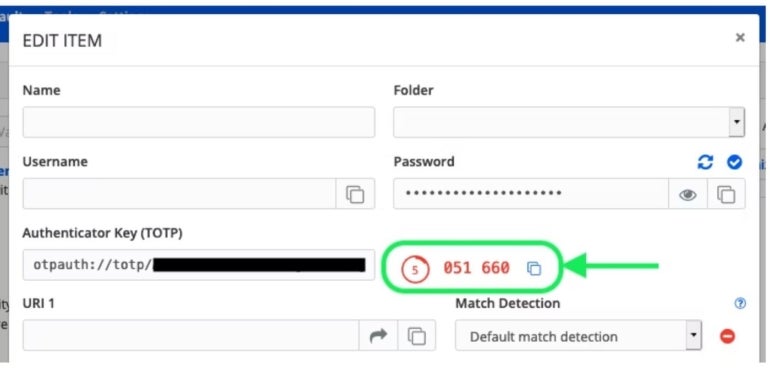
Both NordPass and Bitwarden offer two-factor authentication (2FA) solutions to add an extra layer of protection for your accounts. NordPass Authenticator uses biometric, possession and knowledge-based authentication methods. Its time-based one-time passwords (TOTPs) expire every 30 seconds and serve as the second login factor you input alongside your password. The Authenticator also comes with QR code scanning and manual key entry options for easy setup.
Bitwarden’s Authenticator also utilizes TOTPs for secure logins and offers options for QR code setup and manual key entry. Everyone can store authenticator keys in Bitwarden, but generating the codes requires a premium account or membership in a paid subscription such as a Families, Teams, or Enterprise plan..
Bitwarden Authenticator. Image: Bitwarden
Password import and export
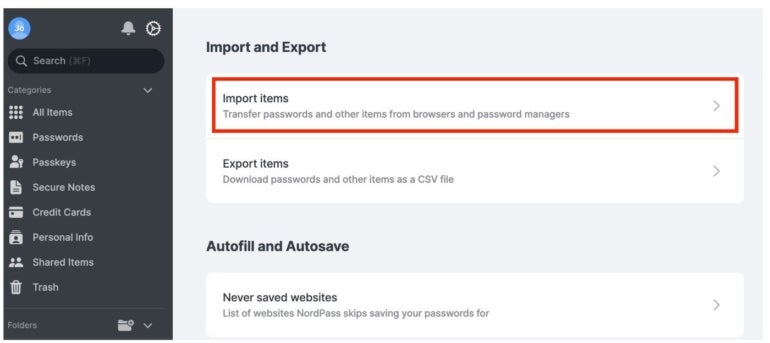
You can import your saved passwords from other password managers like 1Password and LastPass using NordPass on desktop devices or import passwords from browsers using the Android app. Note: To import files into NordPass, you need to organize the CSV file accordingly.
NordPass password import. Image: NordPass
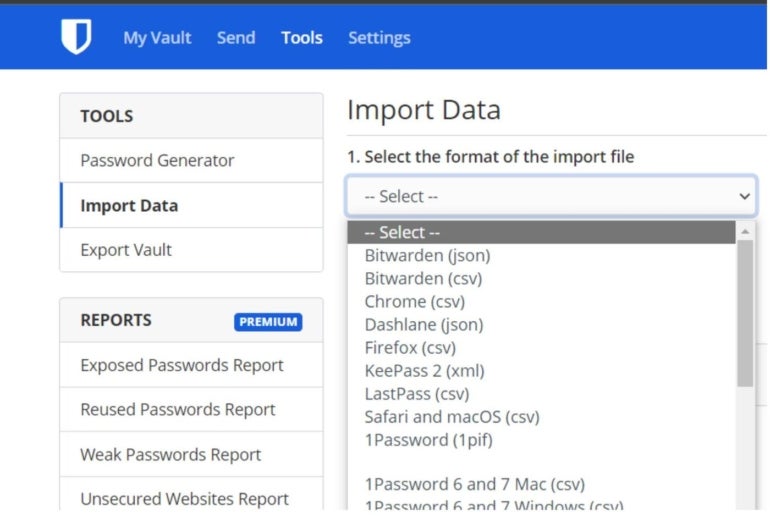
Bitwarden also supports importing and exporting data via its Password Safe in CSV. Data must be imported to Bitwarden from the web vault or Command Line Interface (CLI). In my testing, I found that importing data into the Bitwarden vault does not check for duplicates, so this should be done carefully.
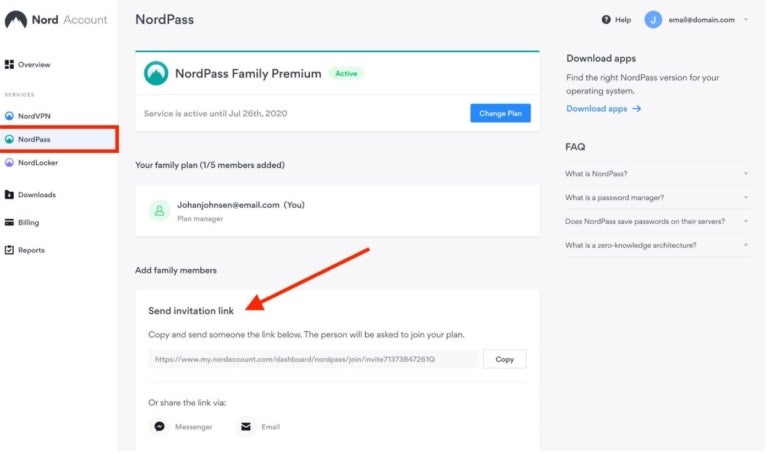
NordPass offers secure password sharing across most of its plans. You can send passwords securely via the NordPass app, or you can use NordPass Sharer, which allows you to safely share passwords or other vital information via a secure link. This secure one-time link is valid for 24 hours, or once opened.
Sharing invitation link on NordPass. Image: NordPass
Bitwarden offers two methods for sharing passwords: Bitwarden Organizations for sharing very sensitive information like business accounts, where you create collections and share them with users within your organization, controlling access levels; and Bitwarden Send for less sensitive information like sharing a streaming service account, where you share usernames, passwords and notes. Using this method allows you to control access duration and the number of times your shared item can be accessed.
Security features
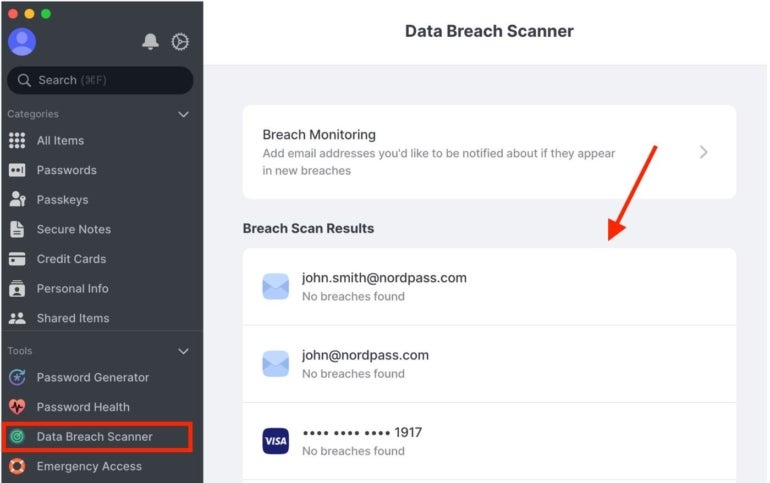
NordPass offers multi-factor authentication, which acts as an additional layer of security and prevents unauthorized users from accessing your accounts. It also uses advanced encryption algorithms like XChaCha20 to ensure the security of your vault. Additionally, with NordPass Enterprise, you can take advantage of other security features such as Single Sign-on (SSO), Data Breach Scanner, Password Health, and Secure Item Sharing.
NordPass Data Breach Scanner. Image: NordPass
Bitwarden offers open-source security and utilizes the following key security measures to protect user data: AES-CBC 256-bit encryption, PBKDF2 SHA-256, and salted hashing. All cryptography keys are generated and managed by Bitwarden on your devices, and all encryption is done locally. Bitwarden also has vault health reports, offers SSO for Enterprise users and a two-step login using YubiKey OTP, Duo, FIDO2 WebAuthn, Email, and the Authentication app.
Automatic device sync
NordPass can automatically back up and sync your credentials and files. This allows you to access your data in the vault from anywhere — whether it’s the app on your phone or a browser extension.
With Bitwarden, items owned by you in the web vault will always remain in sync. Items owned by an organization will sync across users and client applications every 30 minutes. Other Bitwarden apps — such as browser extensions, mobile apps, desktop apps, and CLI — will sync automatically at login and regularly when unlocked.
NordPass pros and cons
Pros
Data Breach Scanner available.
Viable encryption option.
Offers a free plan.
Free trials for most plans.
Secure password sharing.
Live chat support.
Cons
Only one device is supported on the free version.
The free tier has very limited features.
Bitwarden pros and cons
Pros
It’s open source.
Supports both graphical and command-line interfaces.
One free account can run on multiple devices, although with limited features.
Advanced two-step login.
It can be self-hosted or cloud-based.
Cons
SSO integration and admin password reset are not available in some plans
Desktop UI requires improvement.
Only offers a 7-day free trial.
Should your organization use NordPass or Bitwarden?
Choosing between NordPass and Bitwarden depends on your priorities. NordPass offers seamless integration with other Nord products like NordVPN and NordLocker, ensuring a unified security ecosystem for an organizational setting. The interface is user-friendly and simple, and it can integrate with many popular apps and browser extensions. NordPass’ shared folders allow users to securely share information and sensitive data stored in their vaults, making it easier for team collaboration; plus, it includes a data breach scanner on the dashboard for easy password breach scans.
Bitwarden is an open-source security password manager, prioritizing transparency, strong security, and customization for budget-conscious individuals or enterprises. It allows self-hosting for advanced users, and it integrates very well with SSO providers like Azure Active Directory and Okta to streamline the log-in process for various team members in an organization.
The pricing for both NordPass and Bitwarden are fairly similar, but Bitwarden offers more flexibility. Its free version offers more features and supports unlimited device connections, unlike NordPass, whose free version supports only one device.
I evaluated NordPass and Bitwarden by assessing their user interfaces, security features, and ease of use. For real-life experience, I installed the free versions of each app on my Android, Windows devices, and Chrome browser. This approach helped me test features like password generation, autofill, responsiveness, lengths of passwords, and cross-platform functionality. Both scored well on these benchmarks; however, I noticed that NordPass was faster with its prompts but found it easier to use Bitwarden on my Chrome browser. My assessment also showed that users can generate random strings of digits, letters, and symbols of up to 128 characters on Bitwarden compared to NordPass’ 60 characters.
The products’ sites were also taken into account to provide a comprehensive overview of pricing.
Samsung recently rolled out the latest One UI 7 Beta update for the Galaxy S24 series and it brings a new way to record videos, as per a report. The new iteration of the Android 15-based operating system (OS) is said to enable support for capturing LOG (logarithmic footage) videos on the Galaxy S24, Galaxy S24+, and the Galaxy S24 Ultra. As per the South Korean technology conglomerate, this allows users to record a wider dynamic range where the luminance of both very dark and very bright areas is captured by the camera sensor.
Additionally, the One UI 7 Beta 5 update is also said to fixe issues related to Now Bar, lock screen, Notification History, and more.
Support for LOG on Samsung Galaxy S24 Series
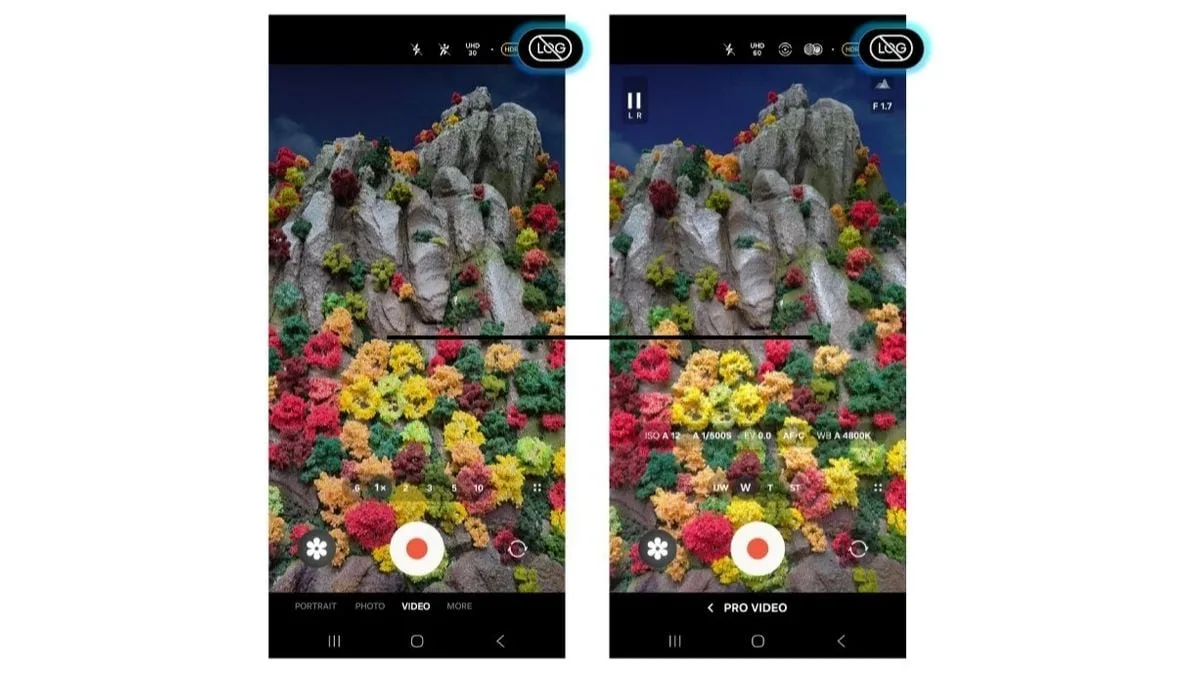
According to a SammyFans report, all three Galaxy S24 series models — the base model, Plus variant, and the Galaxy S24 Ultra, now get support for LOG video capture with the latest One UI 7 Beta 5 update. This feature was first reported in the One UI 7 Beta 4 update but was only said to be available on the Ultra model from last year.
Samsung says this video recording format retains more image data compared to standard filming, allowing greater flexibility during post-production. It is claimed to reduce the production time while also enabling improved options for controlling colours, shadows, highlights, colour tones, and other image data. Samsung LOG offers a 10-bit HEVC codec which is said to enable better accessibility to codec compatibility and storage.
While the company introduced LOG video capture with the Galaxy S25 series in January, it is also rolling out support for older devices, starting with the Galaxy S24 lineup following the release of One UI 7 Beta 5.
Alongside this new feature, the update is reported to contain fixes for several reported issues. Samsung says it fixes an intermittent display error of the Now Bar controller. It also rectifies problems which caused icons to appear small on the Widget Setting screen, operation failure of the Gallery Edit button, and partial Font/Image overlap issues.
Further, the update is reported to improve media playback to display as a real-time notification, Quick action menu spacing, a Notification History operation error fix, along with other system improvements.
We’ve seen a couple of price drops for the Sony Bravia XR X90L in the last few months, and one of the models has just dropped to its lowest ever price. The 65-inch X90L is $949.99 (was $1,199), a saving of $250 at Best Buy. That’s the lowest we’ve seen this TV listed for; the previous low was $998. And it’s not the only X90L discount Best Buy is currently offering. The 55-inch is down $300 to $849; the 75-inch drops $400 to $1,299; the 85-inch is down $500 to $1,599; and the massive 98-inch model gets a massive $1,700 off, taking its price down to $4,499. All those deals are available from the same Best Buy product page. But it’s the 65-inch model that I think sits in the sweet spot for most buyers: it’s big but not too big, and it comes in comfortably under the $1,000 mark. I’d say that makes it a very good deal on a very good TV. Today’s best Sony Bravia X90L deal This is Sony’s mid-range QLED TV with full-array local dimming for very impressive HDR performance. In our Sony X90L review, we said that it was “a great choice for movie viewing, [and] with 4K 120Hz and Dolby Vision gaming support, it’s also a fine option for gaming.” Picture quality on the X90L is a noticeable step up from its predecessor, the Sony X90K, and it delivers significantly higher brightness and better local dimming. It may from 2023 originally, but it’s still a very high-quality TV with meticulous and natural pictures. The sound system’s pretty good too – and far better than almost any other mid-range TV. It also supports Acoustic Center Sync, so you can use your TV’s speakers as part of a larger sound system with a Sony soundbar. For gamers, there’s 4K 120Hz, VRR, ALLM and Dolby Vision gaming support via the two HDMI 2.1 connections – plus Auto HDR Tone Mapping and Auto Genre Picture Mode, which are special modes for when the TV detects a PS5. That means this TV can proudly proclaim itself ‘Perfect for PlayStation 5’. Although the speakers in this TV work great, if I were you I’d use some of the savings here to get one of the best soundbars – it’ll make a huge difference to your experience and it’s the one upgrade I’d recommend for even the best TVs. You don’t need a basic soundbar here in the way that some TVs cry out for one – but a big beefy home theater system is better for such a good-looking TV. I’d also suggest taking a look at our guide to the best TV deals this month. This is quite a crowded part of the market now, with lots of big brands juking it out, and that means it’s very much a buyer’s market. You might also like
Punjabi cinema’s latest release, Mittran Da Challeya Truck Ni, directed by Rakesh Dhawan, hit theatres worldwide on October 11, 2024. The film, featuring Amrinder Gill, Sunanda Sharma, and Sayani Gupta, explores an unconventional relationship between a truck driver and an independent woman. Despite moderate performance in India, it has gained significant traction overseas. With a storyline revolving around personal struggles, cultural contrasts, and lighthearted moments, the film has drawn attention for its engaging execution and vibrant portrayal of two distinct worlds.
When and Where to Watch Mittran Da Challeya Truck Ni
The movie was released in cinemas on October 11, 2024. It will be released on March 27 on Chaupal App.
Official Trailer and Plot of Mittran Da Challeya Truck Ni
The trailer provided glimpses of a narrative interwoven with humour, emotions, and cultural diversity. Amrinder Gill plays Satta, a truck driver seeking a practical wife, while Sunanda Sharma’s Jindi dreams of luxury. Their paths cross unexpectedly, leading to a dynamic relationship that challenges traditional romance norms. A subplot follows a man overcoming childhood bullying and stammering, gaining legal knowledge through his uncle’s courtroom experiences. The film blends these elements, creating a story of resilience, aspirations, and relationships.
Cast and Crew of Mittran Da Challeya Truck Ni
The film boasts an ensemble cast, including Amrinder Gill, Sunanda Sharma, Sayani Gupta, Hardeep Gill, Sayaji Shinde, Jarnail Singh, Sukhi Chahal, Deedar Gill, Vishwanath Chatterjee, and Mohini Toor. It is produced by Karaj Gill and Darshan Sharma under the direction of Rakesh Dhawan.
Reception of Mittran Da Challeya Truck Ni
The film has received positive feedback, particularly from international audiences. On IMDb, it holds a rating of 9.2/10
Sony is celebrating 20th anniversary of God of War, one of PlayStation’s biggest franchises, on March 22. The company has announced new in-game content for God of War Ragnarök, 20th anniversary merchandise, an art exhibition and more to mark the occasion. As part of the celebration, the PlayStation parent is releasing the Dark Odyssey Collection for the latest game in the series that includes character and weapon skins, armour sets and more.
God of War Ragnarök Update
The free Dark Odyssey Collection update for God of War Ragnarök will be rolled out on PS5 and PC later this week on March 20, Sony announced on the PlayStation Blog on Friday. The collection will bring the black and gold skin for Kratos seen on God of War 2. In addition to the special appearance, the character will also get a Dark Odyssey armour set, including breastplate, bracers and belt.
The collection also includes Dark Odyssey-themed armour for companion characters Atreus and Freya. In addition to player skin and armour sets, the update comes with Dark Odyssey weapon appearances and attachments for the three weapons in the game — the Leviathan Axe, the Blades of Chaos and the Draupnir Spear.
Kratos’ shields get new appearances, too, in addition to a new Dark Odyssey-themed Rond attachment. The update will also add the ability to edit appearances of weapon and shield attachments.
Aside from the God of War Ragnarok update coming later this week, PlayStation has already released a God of War 20th anniversary fan kit that includes banners, icons, desktop and mobile wallpapers. On March 20, Sony will also add anniversary-themed items to the Steam Points Shop for PC players, while PS5 players will get a free 20th anniversary-themed PlayStation Network Avatar.
Sony has also planned a 20th anniversary art exhibition in Los Angeles, US, new merchandise, two-volume retrospective book that covers the history of the series, art prints, limited edition vinyl set and more.
Finally, PS Plus Extra and Deluxe/Premium tier members can access both God of War (2018) and God of War Ragnarök on the Game Catalog, while Premium subscribers get access to God of War III Remastered via the Classics Catalog.
For PC users, God of War and its sequel, God of War Ragnarök, are on sale on Steam and Epic Games Store until March 20.