Posted on

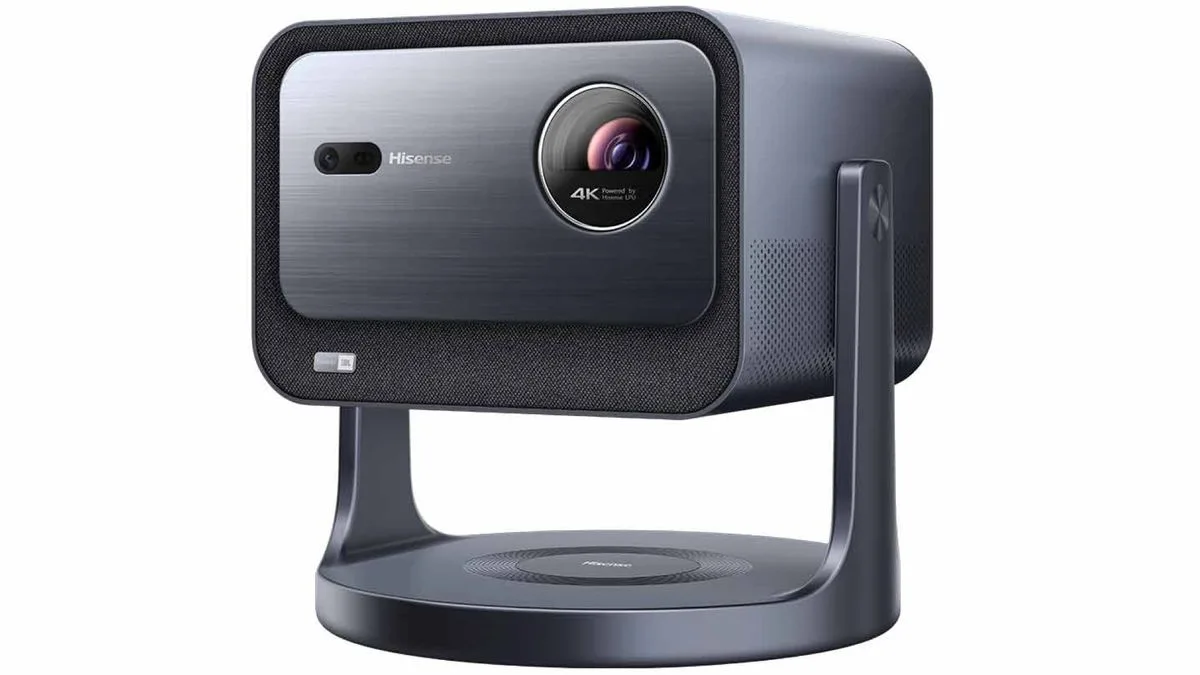
Hisense’s small 4K laser projector can go up to 300 inches, plus has 120Hz support and JBL sound

Hisense
is
launching
an
entry
level
version
of
its
C2
Ultra

4K
short-throw
projector.
The
new
Hisense
C2
lacks
some
of
the
more
powerful
bits
of
its
Ultra
sibling,
but
it
comes
in
at
a
considerably
lower
price
and
includes
many
of
the
most
important
features.
The
C2
hasn’t
launched
globally
yet
but
the
full
specification
has
been
published
along
with
marketing
materials
by
a
German
retailer,
as
spotted
by

Notebookcheck.

The
C2
has
a
triple-laser
light
system
just
like
its
more
expensive
sibling,
and
the
brightness
is
2,000
ANSI
lumens
– impressive
for
a
laser
projector,
although
the
C2
Ultra
is
even
brighter.
The
contrast
ratio
is
1,700:1
and
there’s
support
for
HDR10,
HDR10+,
HLG
and
Dolby
Vision.

Hisense
C2
4K
projector:
key
features
and
pricing

The
C2
doesn’t
have
the
zoom
lens
of
the
Ultra,
so
it’s
got
a
fixed
projection
ratio
of
1.2:1.
That
enables
you
to
project
an
image
from
65
inches
to
300
inches,
and
there’s
motorized
focus
adjustment
and
automatic
keystone
correction
to
deliver
images
in
the
right
proportions.

The
quoted
refresh
rate
is
60Hz
at
4K,
but
you
can
double
that
to
120Hz
for
gaming
if
you
drop
down
to
2K/1080p
resolution;
4K
is
delivered
using
a
technique
called
pixel
shifting.
Instead
of
projecting
a
true
4K
image,
pixel
shifting
outputs
multiple
1920
x
1080
images
that
overlap
to
give
the
impression
of
4K.
It’s
been
common
as
a
technique
among
the

best
4K
projectors
for
a
long
time,
although
it’s
often
known
by
different
names:

Epson
calls
it
4K
Enhancement,
BenQ
prefers
XPR
and
JVC
calls
it
E-Shift.
The
big
benefit
here
is
simple:
it
makes
4K
projection
possible
for
a
fraction
of
the
expense,
though
purists
far
prefer
‘native’
4K
resolution

and
also,
this
projector
isn’t

that
cheap.

There
are
two
HDMI
inputs
here,
one
with
ALLM
for
games
consoles,
and
there
are
twin
USB
3.0
plus
ethernet
and
a
headphone
jack.
There’s
also
an
integrated
sound
system
by
JBL
with
a
total
output
of
20W.
You
can
stream
with
the
built-in
apps
for
now
and
AirPlay
support
will
be
available
soon
via
a
software
update.

We
don’t
know
global
pricing
yet
but
the
German
listing
has
a
price
tag
of
€1,999,
which
is
roughly
$2,200
/
£1,700
/
AU$3,200.

You
might
also
like

Sign
up
for
breaking
news,
reviews,
opinion,
top
tech
deals,
and
more.

Posted on

I saw Philips’ ultra-bright new OLED TV with awesome built-in Dolby Atmos sound – and it’s really going to shake things up

Philips
has
unveiled
the
full
details
of
its
2024
flagship

OLED
TV,
the
Philips
OLED+959.
It
will
be
available
in
a
65-inch
size
only,
with
a
launch
price
of
£3,999.
First
models
are
set
to
be
shipped
in
mid-October
2024.
Philips’
TVs
sadly
aren’t
available
in
the
US,
so
the
OLED+959
is
a
UK
only
set.

I
recently
saw
the
OLED+959
in
action
at
the
legendary
Abbey
Road
Studios
in
London,
and
you
can
read
about
what
I
saw
below

but
first
the
specs.

The
OLED+959
uses
a
META
2.0
OLED
panel
with

micro
lens
array
(MLA)
tech
for
added
brightness

the
same
one
found
in
one
of
the

best
TVs
of
this
year,
the

LG
G4,
although
Philips
claims
the
OLED+959
will
hit
3,000
nits
of
peak
brightness,
which
is
way
beyond
what
the

LG
manages.
It
also
uses
a
‘Dual
Engine’
version
of
Philips’
8th
Generation
P5
AI
processor,
an
enhanced
version
of
the
processor
found
in
the
excellent

Philips
OLED909
and

Philips
OLED809.

This
processor
comes
packed
with
AI
features,
including
AI
Machine
Learn
Sharpness
V2
for
sharper
textures
and
details;
Ambient
Intelligence
V3,
which
optimises

HDR
performance
to
match
the
TV’s
Ambilight
feature;
and
Smart
Bit
Enhancement
V3,
which
boosts
8-bit
video
colour
to
a
14-bit
level
to
correct
for
banding
and
contrast
loss.

There’s
also
an
AI
Sports
Optimisation
mode
that
detects
when
football
is
on
screen
and
optimises
processing
to
reduce
judder
and
improve
picture
clarity.
Philips
has
confirmed
that
the
mode
is
currently
exclusive
to
football
but
will
look
to
expand
to
other
sports
in
the
future.

The
OLED+959
also
includes
Ambilight
Plus,
an
upgraded
version
of
its
Ambilight
tech
that
enables
192
lighting
zones
for
more
dynamic,
vibrant
and
faster
response
to
what’s
on-screen.

Elsewhere,
the
OLED+959
features
a
5.1.2-channel
Bowers
&
Wilkins
speaker
array.
This
uses
18
drivers
totalling
102W
of
power
output,
with
front
left,
centre
and
right
channels,
two
additional
side-firing
channels,
two
up-firing
channels
and
a
rear
subwoofer.

Sign
up
for
breaking
news,
reviews,
opinion,
top
tech
deals,
and
more.

The
OLED+959
also
has
four
HDMI
ports,
with
two
HDMI
2.1
plugs
that
support
a
plethora
of
gaming
features
such
as

4K
144Hz,
Dolby
Vision
gaming,
VRR
(including

AMD
FreeSync
Premium
Pro
and

Nvidia
G-Sync),
HGiG
and
ALLM.
Philips
claims
a
5ms
input
lag
at
120Hz
and
13ms
at
60Hz.

The
OLED+959
uses

Google
TV
as
its
smart
TV
platform,
and
there
will
be
no
Freeview
Play
with
its
associated
apps
such
as
BBC
iPlayer
and
ITVX
but
this
can
be
solved
by
plugging
in
an

Amazon
Fire
Stick
or
other
streaming
device.

Brighter
pictures
and
Ambilight

The
Philips
OLED+959
(left)
shows
higher
brightness,
more
defined
details
and
bolder
colours
than
the
OLED909
(right).

(Image
credit:
Future)

For
Philips’
demo,
the
OLED+959
was
initially
shown
next
to
the
step-down
OLED909
to
showcase
its
Dual
Engine
P5
processor.
The
TVs
were
both
in
Crystal
Clear
picture
mode.
This
is
Philips’
version
of
Vivid/Dynamic,
a
mode
we
would
typically
recommend
against,
opting
instead
for
the
more
accurate
Filmmaker
or
Home
Cinema
modes.
However,
Crystal
Clear
mode
looked
good
on
the
OLED+959,
with
the
Dual
Engine
processor
enhancing
details
with
a
high
level
of
refinement.
Colours
were
still
over-saturated
in
places,
but
it
was
nonetheless
watchable.

I
also
received
a
demo
of
the
AI
Sports
Optimisation
feature,
which
did
a
good
job
of
reducing
the
halo
effect
around
players
of
compressed
video
while
lowering
the
motion
judder
not
only
on
the
pitch,
but
in
panning
camera
shots
across
the
crowd.

Next
up
was
a
demo
of
the
new
Ambilight
Plus
technology.
As
you
might
expect,
Ambilight
Plus
goes
one
step
further
than
standard
Ambilight,
adding
more
brightness
and
saturation
to
the
TV’s
coloured
backlight,
plus
a
more
dynamic
effect
through
increased
motion.
In
the
demo,
a
cyclist
on
a
bright,
neon-clad
bicycle
tore
through
a
forest,
and
Ambilight
Plus
conveyed
a
strong
sense
of
movement
in
the
lights
and
an
added
sense
of
immersion
even
beyond
what
you
normally
get
from
the
tech.

TV
sound
elevated

The
Philips
OLED+959
showcased
excellent
built-in
sound

arguably
its
most
exciting
feature.

(Image
credit:
Future)

The
most
exciting
OLED+959
demo
was
of
its
built-in
Bowers
&
Wilkins
5.1.2-channel
speaker
system
While
the

best
soundbars
often
improve
on
a
TV’s
built-in
sound,
some
of
the

best
TVs
for
sound
such
as
the

Sony
Bravia
9
and

Panasonic
MZ2000
are
good
enough
that
they
don’t
need
a
soundbar.
From
what
I
heard
during
this
event,
the
OLED+959,
too,
will
enter
that
category.

Starting
with
a
Dolby
Atmos
track,

So
We
Find
Ourselves
by
Fink,
the
OLED+959
demonstrated
plenty
of
detail,
clarity
and
a
wide
soundstage.
It
was
a
rare
experience
to
hear
a
TV
playing
music
so
accurately,
with
the
OLED+959
easily
conveying
the
song’s
delicate
piano
and
warm
bass.
On
a
more
bass-heavy
electronic
track,
the
OLED+959
showcased
thumping
bass
and
pulsing
synths
that
again
wouldn’t
be
out
of
place
on
a
modest
hi-fi
system.

But
it
was
during
movies
where
the
OLED+959
came
to
life.
Using
the
empty
bar
scene
from

Blade
Runner:
2049,
where
Joe
speaks
to
Deckard
properly
for
the
first
time,
the
OLED959+
had
an
excellent
sense
of
placement
and
spatial
awareness,
capturing
the
cavernous
and
echoey
nature
of
the
bar
as
glasses
thumped
onto
the
bar
and
all
the
creaks
and
scraping
stones
extended
beyond
the
screen.
Even
Harrison
Ford’s
famously
gravelly
delivery
of
his
lines
was
crisp
and
clear,
yet
still
authentic.

As
the
scene’s
action
intensified,
the
pounding
bass
of
the
explosions
gave
the
right
amount
of
rumble
and
even
pushed
at
a
high
volume,
there
was
no
sense
of
distortion.
Punches
carried
real
weight
and
the
OLED+959’s
soundstage
felt
expansive
and
wide.
Dolby
Atmos
effects
also
seemed
fully
pronounced
and
present
in
the
mix,
thanks
to
the
up-firing
speakers.

Although
this
was
in
a
controlled
environment,
the
OLED+959’s
speakers
were
nonetheless
impressive
and
I
personally
can’t
wait
to
get
some
real
testing
time
with
it.
Obviously,
the
built-in
sound
won’t
beat
the

best
Dolby
Atmos
soundbars,
such
as
the
excellent

Samsung
HW-Q990D,
but
for
those
who
don’t
like
the
idea
of
the
soundbar,
the
OLED+959’s
sound
could
be
good
news.

Final
thoughts

The
Ambilight
Plus
system
on
the
OLED+959
showed
more
dynamic
lighting
than
standard
Ambilight

(Image
credit:
Future)

There
is
no
getting
around
the
fact
that
at
£3,999
for
a
65-inch
model,
the
OLED+959
is
a

very
premium
TV.
For
comparison,
the

Samsung
S95D
and
LG
G4
are
both
pierced
at
roughly
£2,499.
But
from
what
I
saw
in
these
demos,
the
OLED+959
really
does
look
set
to
shake
up
the
TV
market
with
its
sound
system
and
brightness
and
put
some
of
the

best
OLED
TVs
on
notice

I’m
excited
to
see
what
it
can
do
when
I
some
true
testing
time
in.

You
might
also
like

Posted on

This box can send Dolby Atmos over power lines, for easier home theater setup

There
are
many
terrible
things
in
this
world,
and
I
think
we
can
all
agree
that
running
speaker
cables
is
one
of
the
worst.
That’s
one
of
the
reasons
why
the

best
soundbars
now
have
wireless
subwoofers
and
sometimes
wireless
surround
speakers
too,
but
many
of
those
options
are
manufacturer-specific
and
some
wireless
connections
are
laggy
or
lossy.

US
firm
Fasetto
thinks
it
has
a
better
option:
Dolby
Atmos
via
your
home’s
power
lines.
Its
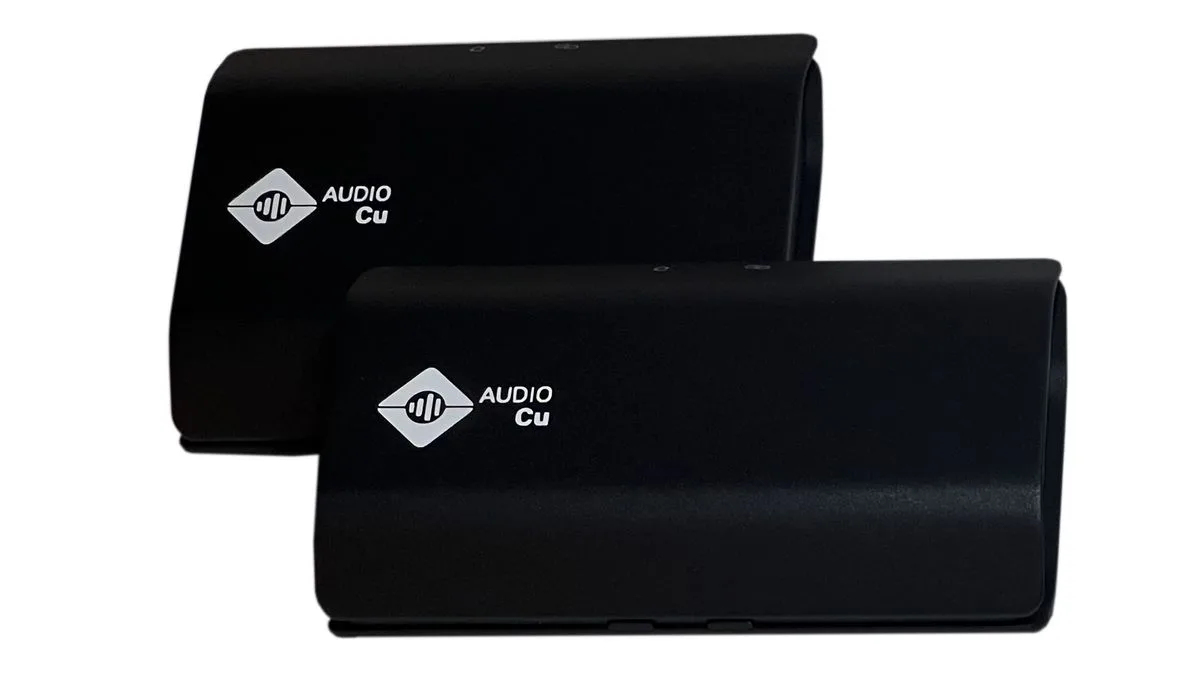
Audio
Cu
system
delivers
audio
without
lengthy
cabling,
and
it’s
just
been
certified
for
Dolby
Atmos.

Audio
Cu
works
in
much
the
same
way
as
powerline
networking
devices
do:
it
sends
signals
over
the
in-wall
wiring
in
your
home.
Audio
signals
are
sent
from
a
transmitter
attached
to
your
TV
or
AV
receiver,
decoded
by
boxes
that
receive
the
signals,
and
then
sent
to
your
speakers
as
normal.
The
system
supports
surround
sound
setups
up
to
7.1.2
with
Dolby
Atmos
and
should
work
with
any
speakers
with
the
familiar
black
and
red
wiring
terminals. 

That’s
the
good
news.
Now
for
the
potentially
not-so-good.

How
much
does
wireless
surround
sound
cost?

We
don’t
know
the
price
yet,
but
it
isn’t
likely
to
be
cheap.
We
know
that
you’ll
need
an
Audio
Cu
receiver
for

each
speaker
as
well
as
the
main
Audio
Cu
transmitter
you’ll
attach
to
one
of
the

best
TVs
or
an
audio
source;
each
receiver
will
need
to
be
its
own
amplifier
as
well
as
a
receiver,
and
of
course
that
ups
the
cost
somewhat.
As
the
technology
is
largely
the
same
as
powerline
networking,
a
look
at
the

best
powerline
adapters
gives
some
indication
of
what
the
prices
will
be
at
a
minimum.

Is
it
worth
it?
According
to
the
firm,
latency
is
down
to
less
than
20
milliseconds,
there’s
virtually
no
packet
loss,
and
the
signals
are
not
affected
by
interference,
which
can
be
an
issue
with
over-the-air
wireless
connections.
A
single
transmitter
can
handle
up
to
10
channels
of
audio,
and
if
you
have
a
mansion
you
can
run
up
to
six
transmitters
in
separate
setups
in
the
same
home,
with
a
max
of
32
audio
channels
in
total.
You
don’t

need
an
AV
receiver
(though
if
you
have
one
of
the

best
4K
projectors,
you
may
well
be
using
one
anyway),
and
all
the
EQ
and
configuration
is
done
in
the
iOS
or
Android
app.
You’ll
also
be
able
to
control
the
volume
via
your
TV
or
projector.

According
to
Fasetto,
“The
future
of
home
audio
connectivity
has
arrived
with
AUDIO
Cu”
and
the
firm
is
“the
only
company
that
has
overcome
all
the
obstacles
of
moving
data
cleanly
over
power
lines
in
all
environments”.
If
the
system
is
as
good
as
it
sounds,
it
could
be
an
interesting
option
for
people
who
want
a
home
theater
setup
without
installing
cables
or
running
them
across
the
floor.
You
can
find
out
more
on
the

Fasetto
website. 

Sign
up
for
breaking
news,
reviews,
opinion,
top
tech
deals,
and
more.

You
might
also
like

Posted on

Philips OLED909 review: a superb OLED TV with a great feature LG and Samsung can’t match

Philips
OLED909
review:
Two
minute
review

The
Philips
OLED909
covers
pretty
much
every
base,
whether
it’s
picture,
sound,
gaming
or
design,
and
easily
inserts
itself
into
the
running
for
the

best
TVs
of
the
year.
It
may
be
pricier
than
some
of
the
other

best
OLED
TVs,
but
it’s
a
top-notch
performer
with
plenty
to
like.

Picture
quality
is
nothing
short
of
spectacular
on
the
Philips
OLED909.
Vibrant,
accurate
colours
mix
with
superb
contrast
and
deep
black
levels
to
create
a
well-balanced
picture.
Details
and
textures
are
lifelike
and
its
motion
handling
is
very
good.
It
may
not
have
the
upscaling
chops
of
the

LG
G4
or
the
same
level
of
detail
as
the

Samsung
S95D,
but
the
OLED909’s
picture
is
dynamic,
punchy
and
just
downright
stunning.

While
some
TVs
have
unimpressive
built-in
sound,
the
OLED909
easily
competes
with
the

best
TVs
for
sound,
such
as
the

Sony
Bravia
8.
With
a
Bowers
&
Wilkins
speaker
system
that
provides
real
power,
accuracy
and
plenty
of
immersion,
you
might
not
have
to
invest
in
one
of
the

best
soundbars.
Dolby
Atmos
effects
are
a
little
lacking,
but
bass,
dialogue
clarity,
and
sound
effects
placement
are
all
brilliant.

Ambilight,
a
Philips
tech
that
projects
coloured
lights
onto
the
wall
behind
the
TV,
gives
the
OLED909
an
even
greater
sense
of
immersion
than
other
TVs,
especially
when
viewed
in
darker
lighting
conditions.
The
OLED909
feels
every
bit
premium.
The
swivelling
central
stand
found
on
the
step-down

Philips
OLED809
is
more
useful
than
the
OLED909’s
metal
feet,
but
that’s
my
only
real
complaint
about
this
otherwise
beautifully
designed
TV.

Google
TV
serves
as
a
solid,
functional
smart
TV
platform,
but
it’s
a
shame
there’s
no
access
to
Freeview
Play
and
its
associated
apps
such
as
BBC
iPlayer,
ITVX,
and
Channel
4.
(Pick
up
an

Amazon
Fire
Stick
or
other
streaming
device
to
solve
this
issue.)
But,
there
are
plenty
of
picture
and
sound
settings
for
people
to
experiment
with,
and
navigation
is
user-friendly
enough.

The
OLED909
comes
equipped
with
an
excellent
stock
of
what
we
look
for
in
the

best
gaming
TVs,
including

4K
144Hz,
Dolby
Vision
gaming,
and
VRR
(in
multiple
formats).
It
only
comes
with
two
HDMI
2.1
ports,
however,
but
this
is
one
of
the
few
downsides
of
an
otherwise
superb
gaming
TV
with
picture
quality
and
performance
to
match
its
features.

The
OLED909
undoubtedly
sits
at
the
pricier
end
of
the
TV
market,
with
the
55-inch
model
I
tested
retailing
for
£1,999.
This
is
significantly
more
expensive
than
mid-range
OLEDs
such
as
the

LG
C4
and
even
slightly
more
expensive
than
flagship
OLEDs
such
as
the

Samsung
S95D.
But,
the
OLED909
offers
a
premium
experience,
so
expect
to
pay
the
higher
price
that
comes
with
that.

The
Philips
OLED909
delivers
powerful
contrast
with
an
excellent
balance
between
bright
and
dark
tones.

(Image
credit:
Future)

Philips
OLED909
review:
Prices
&
release
date

Release
date:
August
2024

55-inch:
£1,999

65-inch:
£2,499

77-inch:
£4,499

The
Philips
OLED909
is
the
upper
mid-range

OLED
series
in
Philips’
2024
TV
lineup,
sitting
above
the
OLED809
and
OLED759
and
below
the
flagship
OLED+959.
It
is
available
in
55-,
65-
and
77-inch
sizes.

For
the
55-inch
model
I
tested,
you’ll
be
looking
to
pay
£1,999,
which
is
pricier
than
both
the
flagship
Samsung
S95D
and

LG
G4
OLED
models,
both
of
which
are
priced
at
roughly
£1,799.
Since
its
release,
prices
haven’t
dropped
as
it’s
only
been
around
for
a
number
of
weeks,
so
we
could
see
some
discounts
in
the
future.

Philips
OLED909
review:
Specs

Swipe
to
scroll
horizontally

Screen
type:

OLED
(MLA)

Refresh
rate:

144Hz

HDR
support:

Dolby
Vision,
HDR10+,
HDR10,
HLG

Smart
TV:

Google
TV

HDMI:

4
(2x
HDMI
2.1)

Philips
OLED909
review:
Benchmark
results

The
Philips
OLED909
55-inch
features
support
feet
as
opposed
to
the
central,
swivel
stand
found
on
the
Philips
OLED809.

(Image
credit:
Future)

Philips
OLED909
review:
Features

2nd
Generation
Micro
Lens
Array
(MLA)
OLED
panel

Four-sided
Ambilight

Bowers
&
Wilkins
3.1-channel
speaker
array

The
OLED909
is
equipped
with
a
second-generation
MLA
OLED
panel

the
same
you’ll
find
in
the
LG
G4
and
the
step-up
Philips
OLED959.
This
provides
a
brightness
boost
over
both
standard
W-OLED
models,
such
as
the
LG
B4,
and
even
OLED
EX
models,
such
as
the
LG
C4
and
the
OLED909’s
step-down
sibling,
the
Philips
OLED809.

The
OLED909
supports
both
the
Dolby
Vision
and
HDR10+

high
dynamic
range
formats.
It
also
supports
IMAX
Enhanced
content
and
has
a
picture
mode
compatible
with
Portrait
Displays’
Calman
colour
calibration
software
for
those
who
expect
to
have
their
TV
professionally
calibrated.

As
with
many
Philips
TVs,
a
prominent
feature
is
Ambilight
tech,
which
projects
coloured
lights
onto
a
wall
behind
the
TV.
Ambilight
can
be
customised
in
different
ways,
such
as
following
the
video
or
audio
or
displaying
a
single
colour
to
create
a
mood.
The
OLED909
features
the
full
four-sided
version
of
Ambilight,
with
an
extra
strip
at
the
bottom
of
the
rear
panel,
as
opposed
to
the
three-sided
Ambilight
version
found
on
the
OLED809
and
other
step-down
Philips
TVs.

For
audio,
the
OLED909
features
a
3.1-channel
speaker
array
made
by
Bowers
&
Wilkins,
totalling
80W
of
power.
Both
Dolby
Atmos
and
DTS:X
audio
formats
are
supported
and
it
features
an
AI
Sound
mode,
Dolby
Bass
Enhancement,
Night
Mode
and
Room
Calibration.

Gaming
is
well
covered
on
the
OLED909,
with
support
for
4K
144Hz,
Dolby
Vision
gaming,
VRR
(including

AMD
FreeSync
Premium
and

Nvidia
G-Sync),
HGiG
and
ALLM.
There
is
also
a
new
game
bar
that
can
be
used
to
adjust
gaming
settings
and
even
save
customised
profiles
for
each
game
or
console.
Like
other
current
TVs
not
made
by
LG
or
Samsung,
the
OLED909
only
features
two
HDMI
2.1
ports
and
not
the
full
four
favoured
by
gamers.

The
OLED909
uses
Google
TV
as
its
smart
TV
platform,
with
access
to
popular
streaming
apps
such
as
Netflix,
Prime
Video,
Disney
Plus
and
more.
There
is
no
support
for
UK-based
apps
such
as
BBC
iPlayer,
ITVX
and
Channel
4,
or
Freeview
Play
and
other
associated
apps,
however.

Features
score:
4.5/5

The
Philips
OLED909
delivers
a
versatile
picture.

(Image
credit:
Future)

Philips
OLED909
review:
Picture
quality

Stunning,
accurate
colours

Rich
contrast

Lifelike
detail
and
textures

The
OLED909’s
second-generation
MLA
OLED
panel
yielded
peak
brightness
results
of
1,403
and
1,265
nits
in
Standard
and
Filmmaker
Mode
respectively
when
measured
using
a
10%
HDR
white
window
pattern.
This
is
roughly
30%
brighter
than
the
step-down
OLED809,
which
yielded
results
of
1,088
and
927
nits
on
the
same
tests.
The
LG
G4,
which
uses
the
same
panel,
achieved
a
higher
peak
brightness
in
Filmmaker
Mode,
hitting
1,489
nits.

Full-screen
brightness
measured
on
a
100%
HDR
white
window
pattern
was
264
and
249
nits
in
Standard
and
Filmmaker
Modes
respectively,
which
is
only
marginally
lower
than
the
LG
G4’s
259
nits
Filmmaker
Mode
result.
The
Samsung
S95D,
which
uses
a
QD-OLED
panel,
achieved
a
result
of
318
nits
on
this
same
test.
Note
that
these
full-screen
numbers
pale
in
comparison
to
the
best
mini-LED
TVs,
which
easily
achieve
over
500
nits

a
factor
due
to
the
automatic
brightness-limiting
controls
used
by
OLED
TVs
to
protect
the
display
panel.

Starting
with
lower-resolution
TV
shows
to
evaluate
the
OLED909’s
upscaling,
textures
were
on
the
fuzzy
side,
but
it
was
a
marginal
improvement
over
the
Philips
OLED809
when
I
tested
it.
High-definition
movies
and
TV
shows
looked
cleaner
and
had
more
detail,
though
the
OLED909
did
not
reach
the
same
level
as
other
OLEDs
such
as
the
Samsung
S95D.

Watching
a
4K
Dolby
Vision
stream
of

Star
Wars:
The
Last
Jedi
via
Disney
Plus,
reds
in
the
throne
room
fight
scene
had
a
bold,
vivid
look.
HDR
highlights
in
lightsabers
and
flames
popped
against
the
darker
floors
and
Ambilight
added
an
extra
layer,
with
the
bold
reds
surrounding
the
screen.
Crucially,
these
colours
also
maintained
a
natural
quality
but
were
still
eye-catching.
Textures
and
details
in
clothing
and
skin
were
also
lifelike,
and
black
levels
looked
accurate.

The
OLED909’s
measured
colour
gamut
coverage
was
98.3%
(against
the
claimed
99%)
and
74.04%
for
UHDA-P3
and
BT.2020
colour
spaces
respectively,
both
of
which
are
excellent
results.

Measuring
the
OLED909’s
colour
accuracy,
its
Delta-E
values
(the
margin
for
error
between
the
generated
test
pattern
and
what
appears
on
screen)
was
1.1
in
Filmmaker
Mode,
which
is
a
phenomenal
result
(we
look
for
anything
below
3).

Ambilight
adds
even
more
to
the
Philips
OLED909’s
already
stunning,
vibrant
picture.

(Image
credit:
Future)

The
next
movie
I
watched
was

The
Batman
on
4K
Blu-ray,
primarily
to
test
the
OLED909’s
contrast
and
black
levels.
With
the
TV’s
Dolby
Vision
Filmmaker
Mode
active,
the
OLED909
delivered
rich
contrast
with
deep
blacks
during
the
opening
crime
scene,
where
details
in
the
room
and
clothing
were
well-defined
even
during
low-brightness
sequences.
While
the
OLED909
did
a
good
job
of
handling
reflections
from
overhead
lights
in
our
testing
lab,

The
Batman
looked
best
in
dimmed
lighting
conditions.

Watching

Oppenheimer,
the
OLED909
displayed
the
black
and
white
scenes
with
a
high
level
of
accuracy,
striking
a
good
balance
between
the
black
and
white
tones
and
grey
ones
in
between.
Blacks
looked
rich
and
white
highlights
were
bright
without
being
overblown.

La
La
Land
is
filled
with
bright
colours
throughout
and
the
OLED909
once
again
demonstrated
brilliant
colour
reproduction,
particularly
in
the
opening
and
closing
dance
numbers
which
are
filled
with
yellows,
blues,
greens
and
other
colors.
In
the
‘Lovely
Night’
scene,
the
OLED909
did
a
great
job
displaying
Mia’s
vibrant
yellow
dress
against
the
dark
background.
The
OLED909
displayed
accurate
film
grain
levels
in
Filmmaker
Mode,
though
this
can
also
be
reduced
if
preferred
by
increasing
Noise
Reduction
in
the
picture
settings.

Motion
handling
was
generally
very
good
on
the
OLED909.
Watching
sports
including
Football
and
Rugby,
there
was
minimal
judder
or
blur
with
motion
settings
turned
off,
but,
there
are
preset
motion
modes
and
customisable
motion
smoothing
settings
for
those
who
like
a
smoother
look.
For
sports,
I
generally
found
Personal
(which,
out-of-the-box,
resembles
the
Standard
picture
modes
on
other
sets)
to
be
the
best
picture
mode,
while
the
Crystal
Clear
mode
oversaturated
colours.

Watching

Top
Gun:
Maverick,
the
OLED909
generally
handled
twisting
camera
shots
and
high-action
sequences
well
in
Dolby
Vision
Filmmaker
Mode,
but
I
did
see
some
judder
with
motion
settings
turned
off
in
panning
shots,
including
a
scene
where
Maverick
rides
his
bike
into
the
air
base.
Motion
wasn’t
as
well
handled
by
the
OLED909
as
on
other
OLEDs
such
as
the
Samsung
S95D,
but
it
was
for
the
most
part
pretty
smooth.

I
also
saw
some
black
crush
in
darker
scenes
in

Top
Gun:
Maverick
,
resulting
in
shadow
detail
loss
that
wasn’t
present
when
watching

The
Batman.
Facial
textures
in
close-ups,
however,
demonstrated
the
OLED909’s
natural
rendering
of
details.

Picture
quality
score:
4.5/5

The
Philips
OLED909
features
a
powerful
front
speaker
that
adds
to
its
fantastic
built-in
sound,
and
it
looks
stylish
too.

(Image
credit:
Future)

Philips
OLED909
review:
Sound
quality

External
speaker
adds
more
power

Excellent
sound
placement

Punchy
bass
and
clear
dialogue

The
OLED909’s
built-in
sound
quality
is
brilliant
and
while
it
won’t
provide
the
same
cinematic
impact
as
the

best
Dolby
Atmos
soundbars,
many
people
will
be
pleased
with
its
level
of
audio
quality.
Entertainment
is
the
best
out-of-the-box
sound
preset,
but
Personal
allows
for
extensive
customisation
for
those
looking
to
experiment.

Aided
by
an
external
speaker,
the
OLED909’s
built-in
sound
system,
which
is
made
by
audio
powerhouse
Bowers
&
Wilkins,
delivers
powerful,
direct,
and
immersive
sound.
While
watching
the
chaotic
Batmobile
chase
scene
from

The
Batman,
the
OLED909
offered
punchy
bass
that
captured
the
rumble
of
the
Batmobile’s
engine
while
also
delivering
crystal-clear
dialogue.
Placement
of
sound
effects
around
the
screen
was
precise
and
accurate,
with
every
bullet,
screeching
tyre
and
crunching
crash
coming
from
the
area
on
screen
where
you’d
expect,
and
the
sound
even
extended
beyond
the
screen’s
borders.

Moving
to

La
La
Land,
the
OLED909
reproduced
the
bombastic,
bright
jazzy
score
of
opening
number
‘Another
Day
of
Sun’
with
excellent
detail
and
balance.
Even
in
more
subtle
and
delicate
songs
such
as
‘City
of
Stars’,
piano
and
soft
strings
sounded
clear,
and
subtle
effects
such
as
closing
doors
or
tapping
shoes
could
be
heard
during
more
lively
dance
sequences.

While
there
are
many
positives,
the
OLED909
struggles
with
Dolby
Atmos
height
effects,
with
the
driving
rain
in

The
Batman
and
overhead
jets
in

Top
Gun:
Maverick
sounding
less
pronounced
than
on
the
best
TVs
for
sound
such
as
the

Sony
Bravia
8.
Still,
for
a
3.1-channel
setup,
the
OLED909’s
built-in
sound
is
very
impressive.

Sound
quality
score:
4.5/5

The
Philips
OLED909’s
unique
Ambilight
feature
gives
it
an
edge
over
rivals.

(Image
credit:
Future)

Philips
OLED909
review:
Design

Spectacular,
four-sided
Ambilight

Excellent
build
quality

Useful
central
stand

The
OLED909
features
a
four-sided
version
of
Philips’
Ambilight
tech
and
while
Ambilight
may
be
a
polarising
feature
in
the
TV
world
(it
can
also
be
switched
off),
I
love
it.
I
found
that
Ambilight
added
to
nearly
every
scene
I
watched,
particularly
those
with
bold
colours
such
as

Star
Wars:The
Last
Jedi
and

La
La
Land.

Aside
from
Ambilight,
the
OLED909
is
a
premium-looking,
solidly
built
TV
with
a
trim
profile
apart
from
the
sections
that
house
the
Ambilight
LED
modules.
It
has
a
near
bezel-less
screen
to
allow
the
picture
full
space
and
the
external
speaker
is
covered
in
a
grey
fabric
that
adds
to
the
OLED909’s
premium
look.

The
OLED909
comes
with
two
weighty
and
solidly
built
metal
feet,
as
opposed
to
the
useful
central
swivel
stand
found
on
the
OLED809.
My
preference
is
for
the
OLED809’s
stand,
but
this
is
a
minor
gripe.

The
supplied
remote
is
the
same
one
found
with
the
OLED809,
and
it
sets
the
standard
for
TV
remotes.
Made
of
a
black,
burnished
metal
material
that
reflects
the
OLED909’s
premium
price,
it
can
be
recharged
via
USB-C
or
the
rear
solar
panel
and
its
buttons
light
up
when
in
use

perfect
for
those
who
view
in
dark
conditions.

Design
score:
4.5/5

The
Philips
OLED909
uses
Google
TV,
which
is
solid
but
not
quite
as
good
as
some
rival
smart
TV
interfaces.
It’s
also
missing
Freeview
Play
apps.

(Image
credit:
Future)

Philips
OLED909
review:
Smart
TV
&
menus

Google
TV
smart
TV
platform

No
Freeview
Play
apps

Easy
to
navigate
menus

The
OLED909
uses
Google
TV
as
its
smart
TV
platform.
Apps
such
as
Netflix,
Prime
Video,
Disney
Plus
and
Apple
TV+
are
all
included,
but
there
is
no
Freeview
Play
or
its
associated
UK-based
apps
such
as
BBC
iPlayer,
ITVX,
and
Channel
4.
These
can
be
accessed
via
an
external
streaming
device
such
as
an
Amazon
Fire
Stick
for
those
who
miss
them.

Google
TV
requires
a
sign-in
to
a
Google
account
to
use
apps
not
already
built-in
to
the
TV,
but
this
is
rewarded
with
more
tailored
recommendations
and
even
quicker
navigation
to
the
shows
you’re
watching
via
the
home
screen.
There
is
no
escaping
the
large
banner
ad
at
the
top
of
the
home
page,
however,
which
does
take
up
a
good
portion
of
the
screen.

There
are
a
good
number
of
settings
to
adjust
the
OLED909’s
picture
and
sound
for
those
who
like
to
tweak,
with
the
number
of
sound
settings
on
offer
being
more
extensive
than
on
other
TVs.
Menu
navigation
is
easy
enough
with
a
Quick
Menu
in
the
top
corner
during
viewing,
although
it
doesn’t
feel
quite
as
fluid
as
LG’s
webOS.

Smart
TV
&
menus
score:
4/5

The
Philips
OLED909
is
an
excellent
gaming
TV.

(Image
credit:
Future)

Philips
OLED909
review:
Gaming

4K
144Hz,
Dolby
Vision
gaming,
and
VRR

12.6ms
input
lag
time

Only
two
HDMI
2.1
ports

The
OLED909
is
well
stocked
for
gaming
and
supports
up
to
4K
144Hz
refresh
rate,
VRR
(both
AMD
FreeSync
Premium
and
Nvidia
G-Sync
formats
included),
HGiG,
Dolby
Vision
gaming
and
ALLM.
It
also
features
a
game
mode
and
game
bar
where
settings
can
be
adjusted
and
saved
to
individual
profiles
for
later
use
or
with
particular
games
or
consoles.
The
OLED909
does,
however,
only
have
two
HDMI
2.1
ports
as
opposed
to
the
four
found
on
LG
and
Samsung
TVs.

In
terms
of
performance,
the
OLED909
is
responsive
and
feels
smooth,
even
during
graphically
intense
sequences.
Playing

Battlefield
V
on
Xbox
Series
X
at
120fps,
gaming
was
fast-paced
and
fun,
with
target
selection
and
camera
adjustments
feeling
snappy
and
accurate.
The
OLED909’s
measured
input
lag
was
12.6ms,
which
is
a
good
result,
though
it
doesn’t
match
some
of
the

best
120Hz
TVs
such
as
LG’s
OLEDs,
which
all
hit
9.1ms
in
Boost
Mode,
or
Samsung’s
sets,
which
often
hit
below
10ms.

The
OLED909’s
handling
of
graphics
is
impressive
too,
displaying
bold
colours,
well-defined
textures
and
plenty
of
detail
along
with
rich
contrast
and
black
levels.
Environments,
weapons
and
facial
features
all
get
an
added
sense
of
depth
thanks
to
the
OLED909’s
picture
prowess.

Gaming
score:
4.5/5

The
Philips
OLED909’s
remote
feels
every
bit
as
premium
as
the
TV
itself

(Image
credit:
Future)

Philips
OLED909
review:
Value

Pricier
than
some
rival
OLEDs

Premium
design

Good
features
and
picture
quality
for
the
money

The
OLED909
is
undoubtedly
a
premium
TV,
with
the
55-inch
model
I
tested
priced
at
£1,999.
This
puts
it
above
flagship
OLEDs
such
as
the
Samsung
S95D
and
LG
G4,
both
of
which
are
priced
at
£1,799.
You
do
get
the
benefit
of
Ambilight
on
the
OLED909,
but
miss
out
on
a
full
four
HDMI
2.1
ports
for
gaming.

The
OLED909
nonetheless
delivers
a
premium
viewing
experience
across
the
board,
from
its
stunning
picture,
dazzling
Ambilight,
plentiful
gaming
features
and
immersive
built-in
sound,
so
you
should
expect
to
pay
a
premium
price.

Other
TVs
such
as
the

TCL
C855
and

Hisense
U8N,
two
fantastic
mini-LED
TVs
that
offer
excellent
features
and
performance
for
less,
demonstrate
better
value,
but
the
OLED909
does
mostly
justify
its
price
tag,
even
if
that
price
may
be
too
much
for
some
people.

Value
score:
4/5

The
Philips
OLED909
accurately
displays
both
bright
and
dark
colours.

(Image
credit:
Future)

Should
I
buy
the
Philips
OLED909?

Swipe
to
scroll
horizontally

Philips
OLED909

Attributes

Notes

Rating

Features

Excellent
features
including
Ambilight,
gaming
and
picture

4.5/5

Picture
quality

Plenty
of
detail
and
rich
contrast
with
bold,
vivid
colours

4.5/5

Sound
quality

Immersive,
accurate
and
punchy
sound
is
better
than
on
a
lot
of
other
sets

4.5/5

Design

Stunning
Ambilight
adds
an
entire
layer
to
viewing.
Premium,
solid
build
quality

4/5

Smart
TV
and
menus

Google
TV
is
a
dependable,
user-friendly
smart
TV
platform,
but
is
still
bested
by
LG’s
webOS

4/5

Gaming

Extensive
suite
of
gaming
features
covers
nearly
all
the
bases,
but
only
two
HDMI
2.1
ports

4.5/5

Value

Pricier
than
closest
rivals
and
carries
a
premium
price,
but
delivers
for
the
money

4/5

Buy
it
if…

Don’t
buy
it
if…

Also
Consider

Swipe
to
scroll
horizontally

Row
0

Cell
0

Philips
OLED909

LG
G4

Samsung
S95D

Price
(55-inch)

£1,999

£1,799

£1,799

Screen
type

OLED
EX
(MLA)

OLED
EX
(MLA)

QD-OLED

Refresh
rate

144Hz

144Hz

144Hz

HDR
support

Dolby
Vision/HDR10+/HDR10/HLG

Dolby
Vision/HDR10/HLG

HDR10+/HDR10/HLG

Smart
TV

Google
TV

webOS
24

Tizen

HDMI
2.1
ports

2

4

4

(Image
credit:
Future)

How
I
tested
the
Philips
OLED909

Tested
with
both
SDR
and
HDR
sources

Viewed
in
different
lighting
conditions

Objective
measurements
recorded
using
Portrait
Displays
Calman
color
calibration
software

I
began
my
testing
of
the
OLED909
with
casual
viewing
to
establish
its
most
accurate
picture
mode

Filmmaker
Mode
in
this
case.

After,
I
began
my
critical
viewing
using
SDR
sources
such
as
broadcast
TV
and
standard-definition,
as
well
as
high-definition
TV
shows
and
movies,
4K
Blu-ray
and
4K
streaming.
I
used
these
to
test
the
OLED909’s
colour,
contrast,
shadow
detail,
black
level,
motion
handling
and
upscaling.

For
4K
Blu-rays,
I
used
the

Panasonic
DP-UB820
4K
Blu-ray
player,
watching
the
same
reference
scenes
I
use
in
all
of
my
testing.
For
gaming
testing,
I
used
an
Xbox
Series
X.

I
then
moved
on
to
objective
testing,
where
I
used
specialised
equipment
to
measure
the
OLED909’s
SDR
and
HDR
brightness
on
a
variety
of
window
patterns
ranging
from
1-100%.
I
also
measured
colour
and
greyscale
accuracy
and
HDR
colour
gamut
coverage.

I
used
a
test
pattern
generator
and
colourimeter
to
take
these
results
and
recorded
them
with
Portrait
Displays’

Calman
color
calibration
software.

I
also
tested
the
OLED909’s
input
lag
using
a
Leo
Bodnar
4K
HDMI
Input
Lag
Tester.

You
can
read
an
in-depth
overview
of

how
we
test
TVs
at
TechRadar
at
that
link.

Posted on

Sony Bravia Theater Bar 8 review: a competent performer struggling to be heard in a crowded market

Sony
Bravia
Theater
Bar
8:
One-minute
review

When

Sony
announced
its
2024
AV
lineup,
it
wasn’t
just
its
TVs
that
received
a
more
straightforward
naming
system,
but
its
soundbars
too.
This
year,
the
potentially
tricky-to-remember
model
numbers
have
been
replaced
with
a
much
simpler
Bravia
branding.
The
Sony
Bravia
Theater
Bar
8
replaces
the
HT-A5000
as
the
company’s
mid-range
model

sitting
below
the
Theater
Bar
9
and
the
Bravia
Theater
Quad
four-speaker
audio
system

and
arrives
with
the
aim
to
be
one
of

best
soundbars.

As
with
the
HT-A5000,
this
latest
model
is
a
standalone
Dolby
Atmos
soundbar.
There
are
no
wireless
rear
speakers
included,
nor
is
there
a
wireless
subwoofer,
but
these
can
be
added
as
optional
extras
if
you
wish
to
create
an
even
more
immersive
surround
sound
experience.
Despite
the
Sony
Bravia
Theater
Bar
8
cramming
11
speakers
into
its
slimline
body
to
create
a
“bubble
of
sound”
in
Sony’s
words,
we
would
recommend
true
movie
buffs
consider
adding
at
least
a
subwoofer
to
handle
the
low-end.

The
Bar
8
is
smaller
than
its
predecessor

by
some
30%

and
is
low
in
height,
meaning
it
slots
effortlessly
in
front
of
a
TV.
Connectivity
is
good
rather
than
great
with
just
two
HDMI
ports,
one
of
which
is
eARC
to
connect
to
your
TV.
Thankfully,
however,
the
other
HDMI
input
is
the
2.1
standard
and
it
supports

8K/60Hz
and

4K/120Hz
passthrough,
meaning
you
can
confidently
connect
external
devices
including
games
consoles
and
4K
Blu-ray
players.
Elsewhere
there
is
Spotify
Connect,
AirPlay
2
and
Bluetooth
for
streaming
music.

While
some
may
expect
more
from
a
soundbar
that
costs
$999
/
£999
/
AU$1,499,
where
connections
or
additional
rear
speakers
are
concerned
there’s
no
denying
the
Sony
Bravia
Theater
Bar
8
does
an
excellent
job
of
boosting
the
sound
of
your
TV.
Although
as
for
true
Dolby
Atmos
it
does
fall
a
little
short
of
the
competition.
The
company’s
360
Spatial
Sound
Mapping
tech
does
work
in
creating
phantom
speakers,
but
we
found
during
our
testing
that
the
soundfield
was
more
of
a
half-dome
as
opposed
to
a
full-dome
covering
an
entire
room.

We
also
found
that
the
Bravia
Bar
8
performed
at
its
best
in
small
to
medium-sized
rooms,
as
it
seemed
to
lack
the
power
to
fill
a
larger
open
space.
Adding
the
optional
rear
speakers
and/or
a
subwoofer
will
undoubtedly
help
(we
didn’t
have
them
for
this
review),
but
the
total
cost
of
such
a
package
adds
up
to
far
more
than
tried
and
tested
complete
Dolby
Atmos
soundbar
packages,
despite
the
Bravia
Bar
8
receiving
what
seem
to
be
permanent
price
cuts
globally
(as
of
September
2024,
it’s
typical
street
price
is
generally
around
$849.99
/
£799
/
AU$1,249).

So
while
it
might
not
be
the
outright
best
option
for
your
main
TV
viewing
room,
the
Sony
Bravia
Bar
8
can
certainly
find
a
spot
in
a
bedroom
or
smaller
TV
room.
The
only
question
you’ll
need
to
ask
yourself
is
if
you’d
rather
opt
for
the

Sonos
Arc.
It
doesn’t
cost
that
much
more
than
the
Sony,
handles
music
better
and
has
the
added
potential
benefit
multiroom
functionality.

Sony
Bravia
Theater
Bar
8
review:
Price
and
release
date

Launched
in
July
2024

List
price
of
$999
/
£999
/
AU$1,499

Has
received
price
cuts
since
launch

The
Sony
Bravia
Theater
Bar
8
was
announced
in
April
2024
and
went
on
sale
in
July
2024
in
the
US,
UK
and
Australia
for
$999
/
£999
/
AU$1,499.
That
puts
it
right
in
the
firing
line
of
the
Sonos
Arc,
which
also
goes
without
a
wireless
subwoofer
or
rear
speakers
included.

It’s
less
than
the
MSRP
of
the

Samsung
HW-Q990D

our
current
favorite
Dolby
Atmos
soundbar
on
our
list
of
the

best
soundbars

although
recent
price
drops
against
Samsung’s
soundbar
make
it
approximately
the
same
price
as
the
Sony
Bravia
Theater
Bar
8
in
most
regions.

Samsung’s
flagship
bar
comes
with
a
wireless
subwoofer
and
rear
speakers
included,
although
the
rears
do
require
constant
power.
Sony’s
selection
of
optional
rear
speakers
run
off
rechargeable
batteries
and
so
could
prove
to
be
a
more
appealing
option
for
anyone
short
on
power
outlets
in
their
room.

Sony
Bravia
Theater
Bar
8
review:
Specs

Swipe
to
scroll
horizontally

Dimensions
(W
x
H
x
D)

1200
x
140
x
245
mm

Speaker
channels

5.0.2

Connections

1x
HDMI
out
(with
eARC),
1x
HDMI
in,
Wi-Fi,
Bluetooth

Dolby
Atmos/DTS:X

Yes/Yes

Sub
included

No

Rear
speakers
included

No

Features

360
Spatial
Sound
Mapping,
Acoustic
Center
Sync,
DSEE
Ultimate
upscaling,
AirPlay
2,
Chromecast,
HDMI
2.1
120Hz
pass-through

Sony
Bravia
Theater
Bar
8
review:
Features

5.0.2
speaker
channels

Phantom
speakers
for
extra
‘virtual’
channels

HDMI
2.1
with
4K
120Hz
support

(Image
credit:
Future
/
Max
Langridge)

As
you’ll
find
with
soundbars
from
the
likes
of

LG
and
Samsung,
the
Sony
Bravia
Theater
Bar
8
can
connect
to
a
Sony
TV
from
2021
or
newer
and
use
it
as
a
center
channel
via
Bravia
Acoustic
Center
Sync.
It
would
have
been
nice
for
this
to
have
worked
via
HDMI

whereby
the
soundbar
should
be
able
to
detect
it’s
connected
to
a
Sony
TV

but
you
have
to
connect
them
together
using
the
included
cable.
If
you
don’t
own
a
Sony
TV,
but
your
TV
has
an
S-Center
speaker
input,
you
can
take
advantage
of
this
feature
via
the
same
3.5mm
cable
wired
connection
(the
3.5mm
port
on
the
rear
of
the
Bravia
Bar
8
can
only
be
used
for
this
feature
and
can’t
be
used
as
an
input
from
external
devices).

There
are
only
two
HDMI
ports
on
the
Bravia
Bar
8,
and
with
one
needed
to
connect
to
a
TV
via
eARC,
there
is
just
one
spare
for
external
devices.
Fortunately,
this
input
does
support
8K/60Hz
and
4K/120Hz
passthrough
and
gamers
will
appreciate
that
it
supports
auto
low
latency
mode
(ALLM)
and
variable
refresh
rate
(VRR).
Having
just
one
spare
HDMI
input
shouldn’t
alienate
too
many
users,
but
the
previous
HT-A5000
had
two
spare,
so
it’s
peculiar
as
to
why
Sony
has
dropped
one
this
time
around.

Setting
up
the
Bravia
Bar
8
is
incredibly
easy.
Simply
connect
it
to
your
TV
via
the
aforementioned
HDMI
port,
open
up
the
Bravia
Connect
app
on
your
iOS
or
Android
device
and
connect
it
to
your
network.
Once
done,
you’ll
want
to
run
a
calibration
to
ensure
the
soundbar
is
optimized
for
your
specific
room.
It’s
a
process
that
only
takes
around
20
seconds
and
sees
the
soundbar
emitting
various
tones
to
determine
the
acoustics
of
your
room
to
optimize
the
sound
output
based
on
your
usual
seating
position.

Image
1
of
3

(Image
credit:
Future
/
Max
Langridge)

(Image
credit:
Future
/
Max
Langridge)

(Image
credit:
Future
/
Max
Langridge)

There’s
no
option
to
manually
adjust
speaker
channel
settings
as
you
can
with
other
soundbars
such
as
the
Samsung
HW-Q990D,
but
you
can
choose
from
three
height
modes

lower,
default
and
higher

and
three
different
sound
field
settings.
The
default
option
here
is
Sony’s
360
Spatial
Sound
Mapping,
but
you
also
have
the
option
of
DTS
Neural:X
or
Dolby
Speaker
Visualizer.
You
can
also
turn
the
sound
field
mode
off
entirely
if
you
wish
(I’ll
discuss
the
effects
of
this
further
down
in
the
performance
section).
And,
when
rear
speakers
are
connected,
the
Sony
Bravia
Theater
Bar
8
can
deliver
an
IMAX
Enhanced
certified
audio
presentation.

There
aren’t
any
sound
modes
along
the
lines
of
‘Movie’
or
‘Music’,
which
is
an
interesting
omission,
and
there’s
also
very
little
mention
of
AI
being
used.
The
only
AI-related
feature
of
the
Theater
Bar
8
is
to
detect
human
voices
and
make
them
clearer
via
“AI
sound
separation”.

If
you
want
to
play
music
through
the
Bar
8,
you
can
do
so
via
HDMI,
Bluetooth,
Spotify
Connect
or
AirPlay
2.
Hi-Res
audio
is
supported
from
compatible
sources
along
with
Sony’s
LDAC
wireless
codec.
You
can
also
stream
songs
mixed
in
Sony’s
own
360
Reality
Audio
via

Amazon
Music
Unlimited.

Features
score:
3.5/5

Sony
Bravia
Theater
Bar
8
review:
Performance

Powerful
with
genuine
height

Bass
handling
would
benefit
from
a
dedicated
subwoofer

With
11
speakers
inside
the
bar,
including
two
up-firing
and
two
new
side-firing
drivers,
the
Sony
Bravia
Theater
Bar
8
is
certainly
capable
of
delivering
powerful,
expansive
sound
into
your
room.
But
expansive
doesn’t
necessarily
mean
enveloping,
as
I
found
it
to
produce
more
of
a
half-dome
of
sound
rather
than
a
complete
bubble
to
include
sounds
coming
from
behind
my
viewing
position.

I
began
my
testing
in
a
smaller
room
of
the
house,
with
the
soundbar
connected
to
the

Sony
Bravia
8
OLED
TV
and
a
scene
from

The
Incredibles
streaming
on
Disney
Plus

the
part
where
the
children
are
in
the
jungle
escaping
from
Syndrome’s
henchmen.
There
was
obvious
height
and
width
to
the
sound,
with
the
flying
saucer-like
vehicles
shooting
across
the
screen
and
up
above
the
listening
position
when
they
went
off
screen.

Image
1
of
2

The
Bravia
Theater
Bar
8
nestles
perfectly
in
front
Sony’s
own
65-inch
Bravia
8
OLED
TV.(Image
credit:
Future
/
Max
Langridge)

Optional
feet
can
be
attached
to
the
Bravia
Bar
8,
so
that
it
slides
over
the
feet
of
2024
Sony
Bravia
TVs.(Image
credit:
Future
/
Max
Langridge)

For
the
majority
of
my
testing,
I
had
the
height
sound
setting
set
to
‘higher’
as
it
provided
the
most
immersive
experience.
I
toggled
between
‘default’
and
‘lower’
settings
but
found
both
to
have
a
negative
impact
on
the
movie
I
was
watching.
I
wasn’t
personally
able
to
find
a
scenario
where
either
of
these
settings
would
be
useful
when
watching
a
film.

Sony
says
the
Bravia
Bar
8
is
capable
of
bouncing
sound
off
the
ceiling
to
create
phantom
speakers
behind
the
listening
position,
but
I
wasn’t
able
to
distinguish
these
during
my
testing.
Dedicated
rear
speakers
would
no
doubt
alleviate
this,
as
they’ll
be
on
hand
to
actually
deliver
sound
from
behind
the
viewing
position.

Dialogue
was
notably
impressive,
however,
coming
through
crystal
clear
even
when
the
volume
was
turned
up.
I
also
found
the
Voice
Mode

activated
within
the
Bravia
Connect
app
or
on
the
supplied
remote
control

did
indeed
give
dialogue
a
boost
without
sacrificing
too
much
of
the
rest
of
the
soundtrack.
And
as
for
the
Bravia
Bar
8’s
bass
handling
during
the
same
scene
in

The
Incredibles,
I
was
pleasantly
surprised
by
the
depths
it
could
go
to,
especially
given
the
absence
of
a
wireless
subwoofer.

But,
those
same
opinions
didn’t
translate
over
to
the
chase
scene
in

The
Batman

I
loaded
up
a
4K
Ultra
HD
Blu-ray
on
a
PlayStation
5
and
was
left
a
little
disappointed.
The
engine
growl
from
the
Batmobile
was
lacking
impact
and
the
chase
as
a
whole
lacked
excitement.
The
bass
output
from
the
Theater
Bar
8
is
good,
but
it
was
apparent
it
had
a
limit
to
its
capabilities.
A
subwoofer
would
help
here
as
it
would
take
away
much
of
the
low-end
duties
from
the
soundbar,
leaving
it
to
focus
on
other
tasks.

A
positive
to
come
from
this
sequence,
however,
was
that
bullets
fired
at
the
Batmobile’s
windows
did
pierce
through
the
presentation,
which
is
something
I’ve
found
other
soundbars
such
as
the
Sonos
Arc
can
falter
on.

There
are
just
two
HDMI
2.1
connections
on
the
Sony
Bravia
Theater
Bar
8
soundbar,
one
of
which
is
reserved
for
an
eARC
connection.

(Image
credit:
Future
/
Max
Langridge)

I
also
streamed
music
to
the
Bravia
Bar
8
via
AirPlay
from
my
iPhone
using
Amazon
Music
Unlimited.
I
loaded
up
a
few
tracks
that
had
been
mixed
in
Sony’s
360
Reality
Audio
format,
but
that
were
also
available
in
Ultra
HD

Amazon’s
version
of
Hi-Res

so
I
could
switch
between
the
two.

Put
simply,
songs
streamed
in
the
latter
format
sounded
much
better.
Miley
Cyrus’

Flowers,
for
example,
was
delivered
with
extremely
good
vocal
clarity
and
decent
low-end
bass
when
streaming
in
the
Ultra
HD
format.
Having
the
soundbar’s
360
Spatial
Sound
Mapping
soundfield
selected
also
added
some
extra
expanse
to
the
performance,
resulting
in
something
that
was
perfectly
enjoyable
and
listenable.
However,
switching
it
to
the
default
setting
did
yield
a
more
natural-sounding
performance.

It
wasn’t
such
good
news
when
moving
over
to
the
360
Reality
Audio
version
of
the
same
song.
Bass
was
essentially
eradicated
and
the
overall
performance
sounded
tinny
and
not
too
dissimilar
to
a
very
cheap
Bluetooth
speaker.
I
tried
to
fix
it
by
turning
off
the
soundfield
setting,
but
it
didn’t
make
a
huge
amount
of
difference,
other
than
removing
any
notion
of
height
from
the
song.

Performance
score:
3.5/5

Sony
Bravia
Theater
Bar
8
review:
Design

Premium
build
with
cloth
wrapping

Suits
55-inch
to
75-inch
TVs

A
front
display
would
be
nice

Sony’s
website
claims
the
Bravia
Theater
Bar
8
outputs
sound
in
a
5.0.2-channel
configuration

the
same
as
the
Sonos
Arc

but
we’ve
also
been
told
directly
from
Sony’s
product
managers
that
this
isn’t
so
definitive.
This
is
because
the
sound
output
will
be
different
for
every
room,
as
Sony’s
360
Spatial
Sound
Mapping
technology
calibrates
the
output
on
a
room-by-room
basis.
Plus,
it
makes
use
of
phantom
speakers
with
the
intention
of
creating
a
bubble
of
sound.

The
Bravia
Theater
Bar
8
is
pretty
attractive
by
soundbar
standards.
It
measures
1100
x
64
x
113
mm,
making
it
slightly
shorter
than
a
55-inch
TV
(which
roughly
measures
1200mm).
I
had
it
setup
in
front
of
a
65-inch
Sony
Bravia
8

OLED
and
a
77-inch
LG
G4
OLED
TV
(top
image)
during
my
testing
and
in
both
instances
it
looked
perfectly
fine,
meaning
it
would
be
well-suited
to
be
placed
in
front
of
a
75-inch
TV,
too.
Coincidentally,
55-,
65-
and
75-inch
are
the
three
sizes
the
Sony
Bravia
8
OLED
TV
is
available
in
and,
to
further
highlight
how
both
8-series
TV
and
soundbar
are
ideal
partners,
Sony
includes
a
set
of
feet
in
the
box
with
the
soundbar
to
raise
it
slightly
so
that
it
can
slide
over
your
TV’s
feet
if
your
TV
bench
isn’t
deep
enough
to
accommodate
both.

Image
1
of
3

Sony
supplies
optional
feet
and
screws
to
attach
to
the
bottom
of
the
Sony
Bravia
Theater
Bar
8
soundbar.(Image
credit:
Future
/
Max
Langridge)

(Image
credit:
Future
/
Max
Langridge)

(Image
credit:
Future
/
Max
Langridge)

If
you
want
to
add
rear
speakers
to
the
Bravia
8,
you
have
a
choice
of
the
SA-RS3S
or
SA-RS5,
although
only
the
latter
pair
features
dedicated
up-firing
speakers.
As
for
subwoofers,
you
can
pair
the
Bravia
Bar
8
with
either
the
200W
SA-SW3
or
300W
SA-SW5.

The
entire
soundbar
is
covered
in
a
cloth
fabric
which
means
when
you’re
watching
TV
the
soundbar’s
top
panel
won’t
reflect
the
screen
above
it.

A
small
LED
is
the
only
indicator
for
power
and
input.

(Image
credit:
Future
/
Max
Langridge)

One
feature
I
would
have
liked
to
see
is
a
proper
front
panel
display
for
information
such
as
current
input
or
even
volume
level.
There
are
two
small
LEDs
on
the
front
right
of
the
Bar
8,
one
to
indicate
when
you’re
adjusting
the
volume
and
one
to
indicate
the
current
source.
An
HDMI
device
shines
white,
for
example,
while
Bluetooth
is
expectedly
blue.
For
more
information
relating
to
volume
level
and
source
input,
you
need
to
open
up
the
Bravia
Connect
app.

Design
score:
4/5

Sony
Bravia
Theater
Bar
8
review:
Setup
&
usability

Quick
sound
calibration

Bravia
Connect
app
and
remote
for
easy
control

HDMI
eARC
connection
to
TV

(Image
credit:
Future
/
Max
Langridge)

Setting
up
the
Sony
Bravia
Theater
Bar
8
is
a
relatively
straightforward
affair.
All
you
need
to
do
is
connect
an
HDMI
cable
from
the
soundbar
to
your
TV
(Sony
supplies
one
in
the
box),
wait
for
it
to
register
and
you’re
away.
You’ll
need
to
turn
to
the
Sony
Bravia
Connect
app
for
iOS
and
Android
to
get
it
connected
to
your
home
Wi-Fi
network
and
to
carry
out
the
speedy
sound
optimization
calibration.

A
remote
control
is
supplied
too,
for
those
moments
when
you
don’t
want
or
need
to
use
the
app.
There
is
a
central
button
for
volume
control
(you
can’t
press
and
hold
to
turn
the
volume
up
and
down),
along
with
a
dedicated
button
to
adjust
the
bass
level,
turn
the
soundfield
mode
on
or
off
(but
not
toggle
through
them),
and
toggle
voice
mode
and
night
mode.
The
Bar
8
does
work
via
HDMI-CEC,
allowing
you
to
adjust
the
volume
using
your
TV’s
remote
control.

Setup
&
usability
score:
4.5/5

Sony
Bravia
Theater
Bar
8
review:
Value

Premium
price

Similarly-priced
competitors
include
rear
speakers
and
subwoofer

Not
a
class
leader

While
it
launched
at
$999
/
£999
/
AU$1,499,
the
Bravia
Theater
Bar
8
appears
to
have
received
a
regular
discount
in
all
territories,
seeing
its
price
drop
to
$849.99
/
£799
/
AU$1,249.
In
the
US
at
the
time
of
writing,
it
can
be
picked
up
with
a
further
discount
of
$150.
At
its
MSRP,
the
Bravia
Bar
8
was
immediately
pitted
against
the
Sonos
Arc,
which
we
consider
to
be
one
of
the
best
standalone
Dolby
Atmos
soundbars
and
which
does
outperform
the
Sony.

Now
it
appears
to
have
received
a
price
cut,
it’s
a
more
appealing
option
and
somewhat
helps
stomach
the
extra
cost
for
a
wireless
subwoofer
and/or
wireless
rear
speakers,
should
you
want
to
add
them.
Considering
its
performance
isn’t
quite
at
the
level
we
were
expecting,
it’s
not
the
obvious
choice
for
anyone
looking
to
create
a
Dolby
Atmos
experience
at
home.

Our
current
pick
for
the
outright
best
Dolby
Atmos
soundbar
is
the
Samsung
HW-Q990D,
which
can
regularly
be
found
for
much
less
than
its
launch
price
in
all
territories.
If
you
have
one
of
Sony’s
2024
Bravia
TVs,
then
the
Bravia
Theater
Bar
8
is
a
natural
pairing,
but
for
anyone
else,
the
Samsung
soundbar
still
gets
our
vote.

Value
score:
3.5/5

Should
I
buy
the
Sony
Bravia
Theater
Bar
8?

Swipe
to
scroll
horizontally

Section

Notes

Score

Features

A
good
set
of
connection
and
sound
adjustment
options,
but
comparable
soundbars
offer
more.

3.5
/
5

Performance

Powerful
in
its
delivery
with
great
object
placement
and
capable
of
reaching
great
heights,
but
a
sub
is
almost
an
essential
and
music
playback
can
suffer.

3.5
/
5

Design

An
attractive,
slimline
soundbar
but
a
more
informative
front
display
would
have
been
nice.

4
/
5

Setup
&
usability

Quick
and
easy
connection
and
sound
calibration
and
plenty
of
control
via
remote
or
Bravia
Connect.

4.5
/
5

Value

Borderline
expensive
for
a
standalone
unit,
the
additional
cost
to
create
true
surround
sound
needs
careful
consideration.

3.5
/
5

Buy
it
if…

Don’t
buy
it
if…

Sony
Bravia
Theater
Bar
8
review:
Also
consider

Swipe
to
scroll
horizontally

Header
Cell

Column
0

Sony
Bravia
Theater
Bar
8

Sonos
Arc

Samsung
HW-Q990D

Dimensions

1200
x
140
x
245
mm

1141.7
x
87
x
115.7mm

Soundbar:
1309.0
x
595.0
x
277.0
mm,
Subwoofer:
220.0
x
413.0
x
410.0
mm
,
Rear
speaker:
129.5
x
201.3
x140.4
mm

Speaker
channels

5.0.2

5.0.2

11.1.4

Connections

1x
HDMI
out
(with
eARC),
1x
HDMI
in,
Wi-Fi,
Bluetooth

HDMI
input
(ARC),
optical
digital
audio
to
HDMI
converter,
Bluetooth,
Ethernet
port,
802.11b,g
Wi-Fi,
Apple
AirPlay
2,
IR
receiver

Two
HDMI
2.1
input,
One
HDMI
output,
optical
output,
Wi-Fi,
Bluetooth

Dolby
Atmos/DTS:X

Yes/Yes

Yes/No

Yes/Yes

How
I
tested
the
Sony
Bravia
Theater
Bar
8

Connected
to
the
Sony
Bravia
8
and
LG
G4

Tested
with
a
variety
of
sources

All
soundfield
modes
tested

I
tested
the
Sony
Bravia
Theater
Bar
8
over
a
period
of
two
weeks.
I
connected
it
to
a
Sony
Bravia
8
TV
in
a
small
room
to
test
its
sound
output
and
any
same
brand
exclusive
features.
I
also
moved
it
to
a
much
larger
room
and
connected
it
to
an
LG
G4.

The
majority
of
testing
was
conducted
with
the
highest
soundfield
setting
enabled,
although
I
did
toggle
between
the
other
options
to
analyze
the
sound
output.

I
played
content
from
streaming
services
and
4K
Blu-ray
discs
to
test
the
Bravia
Theater
Bar
8’s
ability
to
handle
Dolby
Atmos
soundtracks,
and
analyzed
not
only
its
spatial
sound
performance,
but
also
bass,
trebles
and
vocal
clarity.

I
also
streamed
music
via
Bluetooth
and
Wi-Fi
to
test
music
playback.
I
played
hi-res
audio,
Atmos
and
Sony
360
Reality
Audio
tracks
via
Amazon
Music
Unlimited
and

Apple
Music.

Read
more
about
how
we
test

First
reviewed:
September
2024

Posted on

Disney’s 4K Blu-rays are finally getting Dolby Vision HDR – including two of this year’s biggest movies

Dolby
Vision

HDR
support
is
finally
coming
to
Disney’s
future

4K
Blu-ray
releases,
as
reported
by

Forbes

and
the
first
two
releases
to
include
this
are
both
summer
blockbusters.

Disney
has
announced
that

Deadpool
&
Wolverine,
set
for
release
October
22,
and

Alien
Romulus,
set
for
release
on
December
3,
will
both
support
Dolby
Vision
HDR,
marking
the
first
Disney
releases
(other
than
some
James
Cameron
titles)
since

Star
Wars:
The
Last
Jedi,
which
was
released
in
2018,
to
support
Dolby
Vision.

Dolby
Vision
is
a
popular
HDR
format
that
is
seeing
increasing
support
in
the

best
TVs
available

even
budget
models
such
as
the

Amazon
Fire
TV
Omni
QLED
support
it.
Dolby
Vision
improves
picture
quality
on
Dolby
Vision
compatible
displays
by
improving
color,
contrast
and
brightness
to
give
a
wider
dynamic
image
and
better
handling
of
highlights
and
dark
tones
in
difficult
scenes
depending
on
what
your
TV’s
capable
of.

Disney
initially
only
used
the
standard
HDR10
format
on
its
Blu-rays,
and
it’s
not
entirely
clear
why
it
has
now
decided
to
support
Dolby
Vision
(considering
it
supports
it
on
the
Disney
Plus
streaming
platform
already)

although
it’s
possible
that

Sony’s
acquisition
of
Disney’s
physical
media
production
may
have
something
to
do
with
it,
as

Sony
itself
is
a
big
user
of
Dolby
Vision
in
its
TVs,
including
the
Sony
Bravia
9,
and
some
of
the

best
4K
Blu-ray
players.

Whatever
the
reason
why,
it’s
great
news
for
home
theater
fans.

More
4K
Blu-ray
good
news

(Image
credit:
Future)

It’s
no
secret
that
the
state
of
4K
Blu-ray
and
physical
media
has
been
looking
bleak
in
recent
years,
with
Disney
all-but-signaling
a
shift
away
from
it
when
it
announced
it
would

no
longer
sell
4K
Blu-ray
in
Australia
last
year.
It
came
down
to
the
efforts
of
publishing
houses
such
as
Arrow
Video,
Criterion
Collection
and
more
to
keep

4K
Blu-ray
from
dying.

However,
earlier
this
year,

2
big
stores
in
the
US
announced
they
would
stock
discs
and
in
the
UK,
HMV,
a
major
AV
retailer,
announced
that

its
physical
media
sales
were
on
the
rise.

Sign
up
for
breaking
news,
reviews,
opinion,
top
tech
deals,
and
more.

With
the
arrival
of
Dolby
Vision
on
Disney’s
4K
Blu-rays,
it
hopefully
signals
even
more
investment
into
the
field
that
seemed
to
be
in
its
‘dying
days’
not
too
long
ago.
Starting
with
a
major

Marvel
release
in

Deadpool
&
Wolverine
could
bring
more
exposure
into
the
benefits
of
Dolby
Vision
in
home
media,
and
in
turn
lead
to
a
further
resurgence
in
the
physical
media
sector

showing
streaming
sites
such
as
Netflix,
Prime
Video
or

Disney
Plus
and
Hulu,
both
of
which
recently
announced
further
price
hikes,
that
making
streaming
platforms
more
expensive
is
not
a
good
look.

You
might
also
like

Posted on

Majority Elias review: an affordable Dolby Atmos soundbar with disappointing audio

On
the
face
of
it,
the
Majority
Elias
is
an
audio-visual
phenomenon.
Why?
Because
it
offers
upfiring
speakers

a
key
component
of
‘true’
Dolby
Atmos

at
less
than
£100.
When
coming
to
this
realization,
I
expected
the
soundbar
to
be
the
ultimate
budget
option
for
those
seeking
spatial
audio,
but
alas,
my
expectations
were
shattered.

Ok,
I
know
that
sounds
a
little
dramatic,
but
really,
this
thing
is
disappointing.
Don’t
get
me
wrong,
the
Majority
Elias
certainly
offers
an
upgrade
in
several
areas
over
typical
TV
audio,
but
there
are
serious
shortcomings
in
sound
quality
that
make
me
feel
Majority
may
have
bitten
off
more
than
it
can
chew.

Before
I
get
into
the
criticisms,
I’ll
prove
that
I
can
be
nice
from
time
to
time.
In
terms
of
setup,
it
doesn’t
get
any
easier
than
this.
You
can
hook
the
Majority
Elias
up
to
your
TV
via
HDMI
and
a
power
cable,
so
there’s
no
need
to
go
through
a
tricky
setup
process.
The
inclusion
of
HDMI
also
enables
you
to
use
your
normal
TV
remote
to
adjust
volume,
making
the
Elias
a
practical,
easy-to-use
soundbar.

Another
thing
I
really
liked
straight
off
the
bat
was
the
soundbar’s
design.
When
I
unboxed
it,
I
was
struck
by
its
classy
wraparound
speaker.
The
Elias
has
both
the
Majority
and
Dolby
Atmos
logos
included
on
the
body
in
silver,
which
makes
a
tidy
splash
of
detail.
All
in
all,
it
appears
well
made,
avoiding
the
overly
plasticky
look
that
a
lot
of
budget
soundbars
go
for.
This
helps
the
Elias
appear
as
if
it
costs
a
fair
bit
more
than
£100,
so
when
it
comes
to
style,
it
stacks
up
well
against
budget
competitors,
even
those
in
our
guide
to
the

best
soundbars.

(Image
credit:
Future)

It’s
at
this
point,
though,
that
I
feel
the
need
to
reveal
some
harsh
truths
about
the
Majority
Elias.
Sure,
it
can
score
well
in
usability
and
even
look
great
while
doing
it,
but
as
a
soundbar
these
things
are
subordinate
to,
well…sound.

Let’s
kick
things
off
in
the
audio
department
by
talking
about
Dolby
Atmos

the
key
selling
point
of
the
Majority
Elias.
The
inclusion
of
upfiring
speakers
gave
me
high
hopes,
despite
the
pretty
low
price
point.
In
the
end,
I
wasn’t
blown
away
by
what
I
heard,
but
the
added
expansiveness
and
verticality
were
certainly
noticeable.
To
test
Atmos,
I
first
streamed
some
video
content
on
Netflix
with

Top
Gun
Maverick.
During
one
scene,
Tom
Cruise’s
character
flies
his
aircraft
up
at
a
rapid
pace
and
the
directional
sense
was
more
true-to-life
than
my
TV’s
audio.

I
also
tested
Season
One
of

The
Boys
on

Amazon
Prime
Video.
In
one
episode,
two
of
the
main
characters
find
themselves
on
a
plane
during,
let’s
say,
a
turbulent
time.
In
this
scene,
I
was
listening
out
for
how
the
Elias
would
handle
sharp
movements,
loud
exclamations
and
the
chaos
of
a
distress-filled
action
sequence.
Again,
the
sense
of
positioning
was
solid,
although
I
wasn’t
getting
the
most
incredible,
room-filling
spatial
audio.
It’s
worth
keeping
in
mind,
though,
that
the
Elias
isn’t
a
particularly
large
soundbar
and
doesn’t
have
a
subwoofer
or
rear
speakers
to
help
deliver
full-on
surround
sound
so,
for
what
it
offers,
I
was
decently
pleased.
If
you
want
to
really
feel
the
action,
however,
it
may
be
worth
seeking
out
a
budget
5.1
channel
soundbar
system
alternative

more
on
this
in
the

Also
Consider
section.

(Image
credit:
Future)

Even
though
I
did
get
a
sense
of
relatively
competent
spatial
audio,
there’s
one
overriding
issue
holding
the
Elias
back

sound
quality.
The
overall
audio
experience
is
a
pretty
negative
one
out
of
the
box.
You
can
select
from
four
different
sound
modes:
3D;
Movie;
Music;
and
News.
Now,
each
of
these
settings
has
unique
sound
profiles

something
that
a
few
competitors
fall
flat
on

but
none
can
save
the
Elias
from
emitting
disappointing
audio.

I
started
by
testing
out
3D
Mode,
with
the
hope
that
it
would
enhance
the
Dolby
Atmos
effect.
It
did
add
more
than
the
other
EQ
modes
and
while
watching

The
Boys,
dialogue
sounded
palatable

at
least
more
than
it
did
in
Movie
Mode,
which
was
pretty
muddy.
Sound,
however,
still
felt
constrained
and
unnatural,
meaning
that
even
when
compared
to
standalone
TV
audio,
it
wasn’t
very
impressive.

During
Movie
Mode
testing,
I
watched
Episode
1
of

Cowboy
Bebop
on
Netflix.
One
high-octane
fight
scene
felt
more
impactful
with
the
Elias
than
it
did
with
TV
audio.
The
action
segment
contained
melee
combat,
gunshots,
screeching
cars,
flying
aircraft,
frantic
dialogue

you
name
it.
Thanks
to
the
Elias’
meatier
(albeit
still
lacking)
bass
for
low-frequency
sounds
like
explosions
and
more
expansive
soundstage,
it
was
able
to
capture
the
craziness
decently
well.
However,
once
again,
audio
still
sounded
muddied
and
lacked
definition

a
big
miss
for
scenes
with
a
vast
amount
of
sounds,
especially
when
some
are
in
the
same
frequency
range.

(Image
credit:
Future)

To
test
Music
Mode,
I
connected
the
Elias
to
my

Samsung
Galaxy
Z
Flip
4
using
Bluetooth
and
threw
on
some
tunes
via
Spotify.
The
first
track,

Black
Eye
by
Allie
X,
instantly
let
me
know
what
I
was
in
for,
with
the
intro’s
explosive,
pumping
bass
sounding
seriously
hampered
and
lacking
the
impact
I’d
expect.
I
also
listened
to

St
Thomas
by
Sonny
Rollins

a
less
bass-heavy
track

and
although
it
didn’t
sound
quite
as
bad,
the
sharpness
of
percussion
was
limited
and
slightly
tinny.
Songs
with
a
more
complex
mix

like

I
Want
You
by
Moloko

really
exposed
the
Elias’
shortcomings,
with
higher-pitched
vocals
lacking
clarity,
bass
missing
its
boom
and
densely
layered
instruments
devoid
of
definition
and
separation.

It’s
worth
noting,
though,
that
in
my
view,
music
isn’t
a

crucial
part
of
a
budget
soundbar.
Very
few
can
replicate
music
to
a
good
standard,
and
if
you’re
expecting
the
sort
of
quality
you’d
get
from
one
of
the

best
Bluetooth
speakers,
you’ll
likely
feel
let
down.
At
this
price
point,
I’m
more
concerned
with
performance
for
movies
and
TV
shows

especially
for
the
Elias
with
its
inclusion
of
upfiring
speakers
and
Dolby
Atmos

but
I’m
not
convinced
you
get
enough
in
this
area
either.

I
also
tested
gaming
performance
by
playing
a
rhythm
game,

Taiko
no
Tatsujin:
Drum
‘n’
Fun!
Usually,
I’d
stick
with
Movie
Mode
for
gaming,
but
for
this
title

which
is
focused
around
playing
to
the
beat
of
various
tracks

I
tried
Music
Mode
too.
Performance
here
was
mediocre
at
best.
The
main
issue
was,
of
course,
that
for
a
game
centered
around
its
excellent
soundtrack,
the
poor
audio
quality
worsened
the
experience
substantially.

Also,
the
Elias
wasn’t
perfectly
responsive,
meaning
there
was
a
little
bit
of
latency
with
sound
versus
the
appearance
of
notes
on
the
screen,
which
was
an
issue
for
this
game
specifically,
as
it
made
me
get
the
timing
wrong
on
more
notes
than
with
standalone
TV
audio.
If
you’re
a
gamer
who
needs
highly
responsive,
precise
audio,
the
Majority
Elias
is
probably
not
for
you.

The
final
sound
setting,
News
Mode
served
its
purpose
decently
well.
I
tuned
into
BBC
News
to
test
this
and
felt
that
while
voices
sometimes
had
a
slight
hiss
or
lacked
crispness,
they
were
still
relatively
forward
and
clear.
So,
overall
audio
quality
is
mediocre
with
the
Majority
Elias,
but
even
though
none
of
the
EQ
modes
can
save
it
from
its
sonic
shortcomings,
they
all
have
a
unique
sound
signature.

(Image
credit:
Future)

Apart
from
Dolby
Atmos
and
the
four
sound
modes,
there
aren’t
many
features
to
speak
of
with
the
Majority
Elias.
The
included
remote
allows
you
to
adjust
bass
and
treble
levels,
switch
between
EQ
modes,
toggle
3D
audio
on
and
off,
and
adjust
the
volume.
When
switching
between
modes,
the
soundbar
conveniently
shows
which
mode
you’re
in
using
LED
lighting

it
also
uses
this
to
indicate
when
Dolby
Atmos
is
active.
That’s
all
really,
but,
for
a
budget
soundbar,
you
wouldn’t
expect
much
more
feature-wise.

Before
I
sum
up,
I
have
one
more
minor
complaint
about
the
Majority
Elias

its
lack
of
clarity
around
HDMI
eARC.
HDMI
eARC
is
key
for
many
soundbars,
given
that
it
can
enable
lossless
audio.
However,
even
when
using
an
HDMI
cable
capable
of
eARC
connectivity,
the
soundbar
simply
displayed
ARC.
The
user
manual
also
specifies
that
the
included
HDMI
cable
is
for
ARC
connectivity.
All
in
all,
I’m
not
convinced
the
benefits
of
HDMI
eARC
are
truly
realized
regardless,
but
this
did
leave
me
confused
for
a
while.

The
Majority
Elias
is
a
device
that
dares
to
pack
incredibly
high-quality
performance
at
an
incredibly
low
price
point.
Ultimately,
it
cuts
corners
on
sound
quality,
leaving
a
bit
of
a
sour
taste.
Despite
this,
it
isn’t
a
terrible
soundbar.
You
still
get
more
powerful
audio
than
from
a
typical
TV
and
more
immersive,
expansive
sound
thanks
to
Dolby
Atmos.
On
top
of
that,
it
has
an
attractive
design
and
a
solid
set
of
connectivity
options.
If
you’re
looking
to
add
bolder
sound
to
your
TV
setup,
the
Majority
Elias
isn’t
the
worst
choice
but
it’s
outclassed
by
a
number
of
competitors.
As
a
result,
I’d
suggest
checking
out
our
guide
to
the

best
Dolby
Atmos
soundbars
and
speakers
to
find
a
stronger
alternative.

(Image
credit:
Future)

Majority
Elias
review:
Price
and
release
date

£99.95
(about
$130
/
AU$190)

Launched
on
March
2024

The
Majority
Elias
is
still
pretty
fresh,
having
only
been
released
a
few
months
back.
Thankfully,
this
means
you
get
modern
features
like
Bluetooth
5.3
connectivity
and
HDMI
eARC.
At
£99.95
(about
$130
/
AU$190),
you’re
looking
at
a
super-cheap
soundbar.

Sure,
there
are
lower-priced
alternatives
out
there,
like
the

Saiyin
DS6305
for
instance,
but
for
a
soundbar
with
Dolby
Atmos
and
upfiring
speakers,
this
is
still
a
low
price
point.
However,
the
low
price
comes
with
a
significant
degree
of
sacrifice

mostly
in
the
audio
quality
department.
There
are
some
clear
upsides,
such
as
its
tidy
design,
but
I’d
recommend
checking
out
some
higher-quality
budget
options

see
the

Also
Consider
section
for
this.

Majority
Elias
review:
Specs

Swipe
to
scroll
horizontally

Dimensions

24
x
3.9
x
2.7
inches
/
610
x
99
x
69mm

Speaker
channels

2.1.2

Connections

HDMI
(e)ARC,
digital
optical,
AUX,
USB,
Bluetooth
5.3

Dolby
Atmos
/
DTS:X

Yes
/
No

Sub
included

No

Rear
speakers
included

No

Other
features

4x
sound
modes

(Image
credit:
Future)

Should
you
buy
the
Majority
Elias?

Swipe
to
scroll
horizontally

Attributes

Notes

Rating

Features

Not
lots
to
play
with,
but
sound
modes
are
solid,
as
are
bass/surround
controls.

3.5/5

Audio
performance

Sound
isn’t
high
quality
nor
super
clear,
but
it’s
rarely
grating
and
pretty
powerful.

3/5

Design

A
little
cheap-looking,
but
quite
well
sized.

4/5

Setup
and
usability

Wiring
to
rear
speakers
may
frustrate
some,
but
setup
is
simple.

4/5

Value

Issues
with
quality
are
easily
made
up
for
by
an
incredibly
low
price.

3/5

Buy
it
if…

Don’t
buy
it
if…

Majority
Elias:
Also
consider

Swipe
to
scroll
horizontally

Header
Cell

Column
0

Majority
Elias

Amazon
Fire
TV
Soundbar

Ultimea
Poseidon
D50

Price

£99.95
(about
$130
/
AU$190)

$119.99
/
£119.99
(about
AU$180)

$119.99
/
£149.99
(about
AU$180)

Dimensions

24
x
3.9
x
2.7
inches
/
610
x
99
x
69mm

24
x
3.5
x
2.6
inches
/
610
x
90
x
65mm

Soundbar:
15.7
x
2.8
x
3.5
inches
/
400
x
70
x
90mm;
Subwoofer:
6.1
x
9.6
x
8.5
inches
/
155
x
244
x
215mm;
Rear
speakers:
5.3
x
2.8
x
3.5
inches
/
135
x
70
x
90mm

Speaker
channels

2.1.2

2.0

5.1

Connections

HDMI
(e)ARC,
digital
optical,
AUX,
USB,
Bluetooth
5.3

HDMI
ARC,
digital
optical,
Bluetooth

HDMI
ARC,
digital
optical,
AUX,
USB,
Bluetooth
5.3

Dolby
Atmos
/
DTS:X

Yes
/
No

No
/
No

No
/
No

Sub
included

No

No

Yes

Rear
speakers
included

No

No

Yes

Other
features

4x
sound
modes

3x
sound
modes,
DTS:Virtual
X
processing

Ultimea
BassMax,
3x
sound
modes,
surround
sound
controls

Majority
Elias
review:
How
I
tested

Tested
for
two
weeks

Connected
to
my
Hisense
U7K
TV
at
home

Predominantly
used
the
HDMI
ARC
connectivity
option

I
tested
the
Majority
Elias
at
home
over
the
course
of
two
weeks.
I
mainly
used
HDMI
ARC
when
connecting
the
soundbar
to
my

Hisense
U7K
TV.

I
put
the
Majority
Elias
to
the
test
watching
a
variety
of
TV
shows,
videos
and
movies
across
streaming
services,
including
Netflix
and

YouTube.
I
also
played
multiple
video
games
on
the
PlayStation
5
and
Nintendo
Switch
consoles
and
listened
to
music
from
the
TechRadar
testing
playlist
on
Spotify
by
pairing
my

Samsung
Galaxy
Z
Flip
4
with
the
Majority
Elias
via
Bluetooth.

First
reviewed:
August
2024

Read
more
about

how
we
test

Posted on

HDMI ARC and HDMI eARC: the differences explained

Behind
every
good

home
cinema
setup,
there
is
an

HDMI
cable

or
so
the
saying
goes
(sort
of).
While
HDMI
cables
might
not
be
the
most
exciting
things
in
an
AV
system,
it’s
hard
to
overstate
how
essential
they
are
to
its
proper
operation. 

Besides

iPhone
chargers,
HDMI,
which
was
introduced
in
2002,
may
well
be
the
most
common
cable
that
the
world
owns,
transferring
up
to

8K
video
and
multichannel
audio
to
the

best
TVs
of
any
size
or
type. 

Today,
we’re
taking
a
look
at
two
innovations
in
the
HDMI
cable
connection
standard:
HDMI
ARC
and
HDMI
eARC. 

ARC
stands
for
Audio
Return
Channel,
and
eARC
stands
for
Enhanced
Audio
Return
Channel.
ARC
was
introduced
as
part
of
the

HDMI
1.4b
Specification,
and
allows
for
the
two-way
travel
of
audio
data
over
an
HDMI
cable
to
and
from
a
TV.
A
standard,
pre-ARC
HDMI
port,
in
contrast,
only
supports
video
and
audio
transmitted
from
a
source
device
directly
to
a
TV
or
another
type
of
display. 

The
biggest
practical
application
of
ARC
is
to
have
just
one
cable
that
connects
a
smart
TV
and
one
of
the

best
soundbars
or
another
external
sound
system,
which
would
have
previously
required
multiple
cables.
In
2024,
the

best
TVs
across
all
price
ranges
will
come
with
HDMI
ARC
or
eARC
ports. 

(Image
credit:
Future)

How
HDMI
ARC
and
eARC
differ
from
regular
HDMI
ports

As
just
discussed,
HDMI
ARC

or
Audio
Return
Channel

offers
one
huge
benefit:
as
well
as
receiving
audio
and
video
like
normal,
your
TV
can
send
audio
back
over
the
same
HDMI
cable.
That
means
audio
from
the
TV’s
built-in
streaming
apps
like
Netflix,
as
well
as
source
devices
connected
to
the
TV
via
its
other
HDMI
ports
such
as
a
gaming
console
or
one
of
the

best
4K
Blu-ray
players,
can
be
routed
to
an
external
speaker
system
like
a
soundbar
or
AV
receiver. 

The
result:
fewer
cables
(or
even
just
one
cable
connecting
the
TV
and
a
soundbar)
in
your
home
theatre
setup.
 

Sign
up
for
breaking
news,
reviews,
opinion,
top
tech
deals,
and
more.

(Image
credit:
bomg
/
A_R_Uzzal
/
Shutterstock)

The
difference
between
HDMI
ARC
and
HDMI
eARC

So,
what’s
the
new
thing
that
the
“e”
in
eARC
introduces?
What
does
“enhanced”
mean
for
an
HDMI
connection? 

The
answer
is
that
eARC,
introduced
as
part
of
the

HDMI
2.1
standard,
brings
several
important
improvements,
most
notably
in
the
quality
and
type
of
audio
formats
it
can
handle. 

While
HDMI
ARC
is
limited
to
compressed
audio
formats
like
Dolby
Digital,
Dolby
Digital
Plus,
and
DTS,
HDMI
eARC
is
a
significantly
higher-bandwidth
connection
that
allows
for
the
transmission
of
lossless,
high-quality
audio,
including
Dolby
Atmos
and
DTS:X,
providing
a
richer
and
more
immersive
listening
experience.

Briefly,

Dolby
Atmos

a
technology
you
might
have
seen
more
and
more
about
in
recent
years

adds
a
3D
element
to
surround
sound
by
producing
sounds
above
the
listener,
as
well
as
sounds
that
come
from
front
and
behind
in
a
traditional
5.1
or
7.1
setup. 

Given
that
you’re
reading
this
article,
we
imagine
you
care
about
these
somewhat
small
details,
so
eARC
is
definitely
a
benefit
if
you
want
to
harness
the
full
power
of
your
home
theatre
rig. 

(Image
credit:
Sonos)

TV
and
cable
requirements

Let’s
get
into
the
nuts
and
bolts.
In
terms
of
TVs,
HDMI
ARC
is
supported
on
most
modern
models,
but
only
one
HDMI
port
is
typically
designated
as
ARC-compatible.
If
you’re
using
a
soundbar
or
AV
receiver,
you’ll
need
to
make
a
connection
from
its
ARC
port
to
the
ARC
port
on
your
TV.
For
eARC,
you’ll
need
a
TV
with
an
HDMI
2.1
port,
which
is
found
on
newer
models. 

For
making
ARC
connections,
a
high-speed
HDMI
cable
is
recommended.
For
eARC,
both
a
standard
HDMI
Cable
with
Ethernet
and
a
high-speed
HDMI
Cable
with
Ethernet
will
work,
according
to
HDMI
Licensing. 

Even
though
many
existing
high-speed
HDMI
cables
will
work
fine
with
both
connection
types,
ultra-high-speed
HDMI
cables
offer
more
robust
performance
for
higher
bandwidth
needs,
such
as
8K
and

4K
120Hz
video
and
uncompressed
Dolby
Atmos
audio.

(Image
credit:
Bose)

So
do
I
need
HDMI
ARC
or
eARC? 

Good
question! 

The
answer
is
most
probably
yes,
given
the
upsides
of
two-way
audio
transfers,
better
audio
quality,
and
generally
keeping
up
with
technological
trends. 

Of
course,
if
your
current
AV
setup
is
working,
and
you’re
happy
with
it,
ripping
everything
apart
to
fit
in
a
new
ultra-high
speed
HDMIcable
probably
doesn’t
make
sense.
But
for
your
next
TV
purchase,
definitely
keep
these
standards
in
mind. 

The
convenience
of
only
having
to
run
a
single
cable
from
your
smart
TV
to
your
soundbar
makes
the
dream
of
a
“cable-less”
setup
from
a
viewer’s
perspective
much
easier
than
it
was
before. 

You
might
also
like…

Posted on

LG’s next OLED TVs will include ultra-fast Bluetooth for gaming controllers, and the tech was shown off in a mystery TV

LG’s
next
generation
of

OLED
TVs
will
support
Bluetooth
ultra-low
latency
for
split-second
gaming
performance.
The
firm
has
collaborated
with
chipset
maker
MediaTek
and
gaming
hardware
experts

Razer
to
create
the
world’s
first
Bluetooth
ULL
(Ultra-Low
Latency)
controller,
which
it
says
delivers
“game-changing”
input
lag
of
just
1ms
(via

FlatpanelsHD).

That
doesn’t
mean
the
next
LG
G5
will
be
a
PS5
in
disguise;
even
the

best
TVs
lack
the
hardware
horsepower
for
high-end
gaming.
But
the
controller
will
improve
responsiveness
in
cloud-based
gaming,
such
as
in
the

Nvidia
GeForce
Now
and

Amazon
Luna
apps
that
are
both
currently
available
for
LG’s
webOS. 

LG
showed
off
the
controller
at
this
month’s
webOS
summit,
where
it
was
demonstrated
in
cloud
games
including
fighting,
racing
and
first-person
shooter
titles.
And
the
technology
it
uses
will
be
part
of
the
MediaTek
MT7921
chipset
that
LG
intends
to
use
in
next
year’s
faster
TVs.

Now
here’s
the
intriguing
question:
LG
shared
an
image
of
a
prototype
TV
running
the
new
hardware,
so
are
we
looking
at
an
early
version
of
the
LG
C5
or
G5
here?

(Image
credit:
LG)

TechRadar’s
Managing
Editor
for
TVs,
Matt
Bolton,
says
he
thinks
it’s
more
likely
that
they
paired
the
new
MediaTek
chip
with
an
existing
screen.
The
design
of
the
TV
above

particularly
the
little
‘chin’
in
the
center

looks
very
much
like
the

LG
C4.
Here’s
a
C4
pic
for
reference.

(Image
credit:
LG)

However,
that
doesn’t
rule
out
this
being
a
C5

LG
may
keep
the
same
physical
design
for
next
year’s
models
(it
wouldn’t
be
the
first
time).
But
for
now,
we’re
taking
the
stance
that
this
mystery
TV
is
probably
a
Frankenstein-ed
creation
rather
than
a
very
early
peek
at
a
full
2025
model.

LG
TVs
are
getting
better
for
gamers

In
addition
to
its
own
controller,
LG
is
also
launching
a
certification
program
for
third-party
game
controller
manufacturers.
That
means
you’ll
be
able
to
select
from
multiple
controllers
that
are
certified
to
work
seamlessly
with
webOS
TVs.
Razer,
unsurprisingly,
is
the
first
such
firm
to
get
the
certification. 

Sign
up
for
breaking
news,
reviews,
opinion,
top
tech
deals,
and
more.

LG
says
it
wants
to
make
webOS
“the
ultimate
gaming
platform
for
every
type
of
gamer”,
and
the
Bluetooth
ULL
technology
will
be
coming
to
its
gaming-focused
2025
OLED
and
QNED
TVs
with
refresh
rates
of
120Hz
or
higher.
The
same
chipset
that
features
Bluetooth
ULL
also
includes
Wi-Fi
6
for
speedy,
stable
and
low-latency
streaming.

LG
isn’t
the
only
TV
firm
in
this
market,
of
course:

Samsung
is
there
too
with
its

Samsung
Game
Hub,
which
currently
has
one
big
name
that
LG
doesn’t:
Xbox.
At
the
moment
there’s
no
Game
Pass
app
for
LG’s
webOS
TVs,
although
Microsoft
has
made
apps
for
Samsung
Smart
TVs
and
Amazon
Fire
TVs.
That’s
likely
to
change:
Microsoft
has
made
it
clear
that
it
sees
cross-platform

cloud
gaming
as
a
huge
part
of
the
Xbox’s
future.

You
might
also
like…

Posted on

Surface level up: how to supercharge work, play, and everything in between

Devices
like
smartphones,
tablets,
and
laptops
have
evolved
to
become
trusted
tools
that
let
us
achieve
our
very
best
work,
while
keeping
us
entertained
and
in
touch
during
all-important
downtime.
Whether
you’re
firing
off
emails
on
your
morning
commute,
collaborating
with
colleagues
across
scattered
time
zones,
or
unwinding
with
your
favourite
shows
after
a
long
day
of
client
calls,
our
trusty
tech
is
there,
diligently
ready
to
help
us
achieve
more.

But
not
all
devices
are
created
equal

a
fact
you’re
likely
all
too
familiar
with
if
you’ve
been
loyally
rocking
an
ageing
PCfor
one
too
many
years.
In
a
time
where
our
digital
and
physical
lives
are
more
intertwined
than
ever,
you
need
(deserve,
even)
tools
that
can
keep
up
with
your
needs

whether
that’s
smashing
your
side
hustle,
or
treating
yourself
to
a
well-deserved
Friday
night
Netflix
binge.

Whatever
you’re
after,
you
deserve
a
device
that’s
quick,
attractive,
and
handles
everything
you
throw
at
it
with
ease.
And
if
it’s
got
AI
smarts
to
help
adapt
to
your
preferences
to
make
you
even
more
productive?
Well
that’s
the
sweet
cherry
on
top
of
an
already
rather
tasty
cake. 

With
the
scene
set,
enter

Microsoft‘s
Surface
Laptop
and

Surface
Pro.
More
than
just
simply
pieces
of
beautifully
engineered
hardware
(though
their
sleek
design
certainly
helps
their
appeal),
they’re
a
pair
of
bona
fide
AI-powered
companions
designed
to
enhance
every
aspect
of
your
digital
life.
Because
you
deserve
to
do
what
you
want
to
do,
with
no
dela

Surface
Laptop:
intelligence
meets
performance

(Image
credit:
Future)

The
Surface
Laptop
isn’t
just
an
upgrade

it’s
a
leap
forward
in
laptop
technology.
Powered
by
blisteringly
powerful
Snapdragon
X
Elite
and
Plus
processors,
this
sleek
device
offers
an
impressive
86%
boost
in
performance
compared
to
the
Surface
Laptop
5.

But
raw
power
is
only
part
of
the
story.
The
Surface
Laptop
leverages
its
AI
capabilities
to
enhance
your
productivity
in
meaningful
ways.
When
you’re
working
on
a
presentation
and
need
to
find
facts
fast,
for
example,
Copilot
is
there
to
be
your
everyday
AI
assistant
n,
saving
you
valuable
time
and
frustration.

All
those
smarts
would
be
nothing
without
the
longevity
to
back
them
up.
Thankfully,
the
Surface
Laptop
has
exceptional
battery
life.
With
up
to
20
hours
of
video
playback,
you
can
confidently
work
or
enjoy
entertainment
throughout
the
day
without
worrying
about
finding
a
power
outlet.
This
is
particularly
useful
for
those
who
frequently
work
on
the
go,
or
students
who
need
their
laptop
to
last
through
a
full
day
of
classes
and
study
sessions.

Sign
up
for
breaking
news,
reviews,
opinion,
top
tech
deals,
and
more.

The
up-to
15in

HDR
touchscreen,
surrounded
by
a
minimal
bezel,
also
offers
an
immersive
viewing
experience
that’s
ideal
for
both
work
and
play.
Whether
you’re
analysing
data
visualisations
or
streaming
high-quality
video
content,
the
vibrant
colours
and
deep
contrast
ensure
a
crisp,
clear,
and
immersive
portal
to
a
world
of
productivity
and
entertainment.

Surface
Pro:
versatility
redefined

(Image
credit:
Microsoft)

For
those
who
require
flexibility
in
their
work
setup,
the
Surface
Pro
is
an
excellent
choice.
This
2-in-1
device
effortlessly
transitions
from
a
laptop
to
a
tablet,
adapting
to
your
needs
throughout
the
day.
Its
unique
kickstand
design
allows
you
to
use
it
in
various
modes

as
a
laptop
for
typing
reports,
a
tablet
for
taking
notes
in
meetings,
or
propped
up
for
hands-free
video
calls.

The
Surface
Pro
doesn’t
compromise
on
performance
or
battery
life
either.
With
up
to
14
hours
of
use
on
a
single
charge,
it’s
designed
to
keep
you
productive
on
the
go.
And
when
you
do
need
to
recharge,
the
ExpressCharge
feature
can
power
up
the
battery
to
80%
in
just
60
minutes

perfect
for
quick
top-ups
between
meetings
or
classes.

Longevity
aside,
one
of
the
Surface
Pro’s
most
impressive
features
is
its
optional

OLED
touchscreen.
With
a
1M:1
contrast
ratio,
it
delivers
a
wider
range
of
colours,
making
it
ideal
for
creative
professionals
who
demand
colour
accuracy.
Whether
you’re
editing
photos,
designing
graphics,
or
reviewing
detailed
documents,
the
OLED
display
brings
your
content
to
life
with
exceptional
clarity
and
vibrancy.

Copilot+
PCs:
A
new
era
of
AI

(Image
credit:
Microsoft)

Both
the
Surface
Laptop
and
Surface
Pro
are
Copilot+
PCs,
equipped
with
the
latest
and
greatest
AI
experiences
that
set
them
apart.
Here
are
just
some
of
the
innovative
features
that
can
enhance
your
productivity:

Cocreator:
This
tool
allows
you
to
describe
or
sketch
your
ideas
using
text
or
image
prompts,
then
watch
as
AI
generates
an
interpretation.
It’s
particularly
useful
for
quickly
visualising
concepts
or
creating
rough
drafts
of
designs.

Windows
Studio
Effects:
Enhance
your
video
call
experience
by
improving
lighting
and
blurring
backgrounds.
This
feature
ensures
you
always
present
yourself
professionally,
regardless
of
your
surroundings.

Live
Captions:
Never
miss
important
information
during
video
calls
or
presentations

Live
captions
provide
real-time,
accurate
subtitles,
ensuring
you
catch
every
detail,
even
in
noisy
environments
or
when
you
need
to
keep
the
volume
low. 

 You
can’t
go
wrong 

No
matter
which
device
you
go
for,
you’ll
be
in
safe
hands.
If
you
prefer
a
traditional
laptop
form
factor
with
exceptional
performance
and
battery
life,
the
Surface
Laptop
is
a
no-brainer

especially
for
power
users
who
spend
long
hours
typing,
coding,
or
working
with
complex
apps.
Though
it’s
more
than
suited
to
providing
hours
of
uninterrupted
entertainment
too.

If
flexibility
is
your
priority,
the
Surface
Pro
offers
the
best
of
both
worlds.
Its
versatile
design
makes
it
ideal
for
professionals
who
alternate
between
different
work
modes
throughout
the
day,
such
as
taking
notes
in
meetings,
giving
presentations,
and
working
at
a
desk.

If
you’re
ready
to
supercharge
your
digital
experience,
feel
free
to
visit

Currys
to
explore
the
full
range
of

Microsoft
Surface
devices.
With
expert
advice
and
competitive
pricing,
Currys
can
help
you
find
the
perfect
AI-powered
companion
to
meet
your
needs,
while
boosting
your
productivity
in
the
process.