Posted on

Yes, Analog Phones Work Just Fine Over a VoIP Gateway

Thinking about switching to Voice over Internet Protocol (VoIP) so you can make calls over the internet instead of landlines? With a VoIP gateway you won’t have to replace your existing phones, fax machines, or other equipment.

This saves money on new hardware and avoids the hassle of retraining employees who are comfortable with the current phone setup. Any modern business phone service is going to have a range of gateways available to help companies make the transition to the cloud.

A VoIP gateway acts as a bridge, allowing older analog devices — or even an entire office of them — to connect seamlessly to cloud-based communication systems. By converting traditional analog signals into digital packets, a VoIP gateway enables your legacy devices to work with the internet-based systems powering today’s communications.

In this guide, we’ll explore how VoIP gateways work, the different types available, and practical tips for ensuring optimal performance and security. Whether you’re transitioning one device or an entire office, we’ll cover everything you need to know to make the process smooth and effective.

Does every analog phone work with VoIP gateways?

I wanted to speak to this quickly before we get into the weeds about VoIP gateways, because there is a little more nuance than I could fit into the headline.

Now, I’ve never personally encountered an analog phone that didn’t work with a VoIP gateway — but I know that they exist.

Typically, these non-compatible phones are specialty models that require specific voltage levels or use fancy signaling that’s not supported by the VoIP gateway. You may also run into proprietary digital phones designed for specific PBX systems that don’t work without special hardware or adapters.

To avoid problems, confirm that your VoIP gateway supports the specific devices you plan to use. I would double check if you have any older or specialized equipment, like DECT devices, for example.

In general, though, most analog phones equipment should work just fine with a VoIP gateway. After all, the technology is really not that complicated.

A VoIP gateway converts signal to packets

As long as you know the basics of computer networking, this should all be pretty straightforward.

Think of a VoIP gateway as a bridge between different types of networks that allows organizations to integrate legacy telephony equipment with modern VoIP phone services.

Analog equipment was designed to send signals over the PSTN (Public Switched Telephone Network). The signal sent by these phones and fax machines doesn’t transmit over an IP network like the internet — it just won’t work at all — unless you have a VoIP gateway.

A VoIP gateway converts analog voice signals from traditional phone systems into digital data packets that can travel over an IP network. A VoIP gateway takes the voice from a phone, digitizes it, and sends it as packets over the internet or private network to the destination.

On the receiving end, it converts the digital data back into an analog signal for the recipient’s phone, enabling seamless communication. This two-way conversion process allows different types of communication systems — old and new — to work together efficiently.

VoIP gateway example

Consider a hotel that wants to lower costs with a VoIP phone system, but doesn’t want to have to buy new phones for every room. The VoIP gateway allows the hotel’s existing phones to connect to the hotel’s cloud phone system by converting the analog signals into digital data that can be sent over the internet.

This setup also opens the door to add useful VoIP features such as easier call routing, better voicemail options, and enhanced customer service, all without the need for a major overhaul of the hotel’s phone infrastructure.

Types of VoIP Gateways

There are a few different types of VoIP gateways that range from analog telephone adapters (ATAs) that support a single device and solutions designed to work for busy offices with hundreds of devices.

Single-port VoIP gateways are compact devices that connect one analog device, such as a fax machine or phone, to a VoIP network. These are ideal for small businesses or home offices with minimal communication needs, supporting a moderate number of concurrent calls, typically 10-30 depending on the device. They offer a cost-effective way to integrate analog equipment into a modern VoIP system without overhauling existing infrastructure.

For larger or busier environments, enterprise-grade VoIP gateways are designed to handle high call volumes and complex networks, such as in call centers or large offices. These devices are scalable and support both inbound and outbound communication, with advanced features like centralized control, CRM integration, and omnichannel support for voice, fax, and even video.

FXS (Foreign Exchange Station) gateways are used to connect multiple analog devices, such as phones and fax machines, to a VoIP network. They support multiple VoIP and fax codecs to ensure clear communication. and are a good option for businesses with multiple analog devices that need to transition to VoIP without replacing all hardware.

Fax-ATA (Analog Telephone Adapter) gateways are a specialized type of gateway designed for businesses that still rely on fax machines. These devices convert analog fax signals into digital data that can be transmitted over a VoIP network. Ideal for industries like healthcare or legal services, where faxing remains a key method of communication.

Session Border Controllers (SBCs) are used in conjunction with VoIP gateways to enhance security and ensure quality. SBCs monitor and manage traffic between networks, protecting against threats like fraud and VoIP Denial of Service (DoS) attacks, while also ensuring seamless communication between different VoIP systems. They are especially crucial in large-scale deployments or when connecting to external networks like the PSTN, ensuring smooth and secure VoIP operations.

Tips for using a VoIP gateway

1. Match VoIP codecs to business needs

VoIP codec selection directly affects both audio quality and bandwidth usage. Select one that fits your network’s capacity and the quality of calls you expect. G.729 offers low bandwidth usage while maintaining decent sound quality, ideal for networks with limited capacity. On the other hand, G.711 delivers high-quality sound but uses more bandwidth.

There’s not too much to think about here, but I wrote a whole post about choosing the right VoIP codec because it is important.

You can usually configure VoIP codecs in the settings of your VoIP gateway, PBX system, or individual IP phones. Depending on the system, you can set different codecs for different devices, users, or call types based on factors like bandwidth and call quality requirements.

2. Use a VoIP-friendly router

Not all routers are built to handle VoIP traffic effectively. Make sure your router supports Quality of Service (QoS) to prioritize voice traffic over data and other applications. VoIP routers handle voice data more efficiently and provide better stability for high-quality calls.

If your current router doesn’t support these features, consider upgrading to one designed specifically for VoIP use. It will be simpler to set up, perform better, and in the event something goes wrong, a good router will probably make finding and fixing common VoIP issues a lot easier.

3. Ensure reliable internet connectivity

A fast, stable internet connection is essential for VoIP. Run a free VoIP speed test if you are unsure about whether or not your connection can support all the new lines your gateway will enable.

Once it’s up, you will need to implement QOS settings to prioritize voice traffic and avoid disruptions from other high-bandwidth activities like video streaming or large downloads, especially during peak hours. Consider running VoIP on a VLAN as another way to separate voice traffic from the rest of the network. These are two important ways to optimize your VoIP network that ensure that real-time communications like VoIP get the steady connection they need.

4. Secure your gateway against threats

Both traditional and cloud phone systems are targeted by cybercriminals every day. There are always new forms of VoIP fraud, and these attacks that cost businesses millions of dollars every year. You should make yourself as unattractive a target for hackers as possible by following basic network security best practices, such as:

  • Change default passwords and usernames: Always change default login credentials on your VoIP gateway and devices to unique, strong passwords to avoid common security risks.
  • Update and patch regularly: Ensure that your VoIP gateway and connected devices are running the latest firmware and software updates to protect against security vulnerabilities.
  • Limit access to the VoIP gateway: Restrict access to the VoIP gateway’s administrative interface by allowing only trusted IP addresses or through a secure VPN to prevent unauthorized remote access.
  • Monitor for fraudulent calls: Set up alert systems to detect unusual call patterns, such as international calls or long-duration calls, which may indicate potential VoIP fraud.

5. Be proactive about network monitoring

Use network monitoring tools to track key metrics like latency, bandwidth usage, and packet loss. Persistent high latency or packet loss could signal hardware malfunctions, improper codec settings, or interference from other network traffic.

Watch for warning signs like frequent dropped calls, audio delays (latency), or choppy sound caused by jitter. If you notice unexplained call disruptions or poor quality despite a strong internet connection, it may be time to inspect your VoIP gateway’s configuration, firmware, or even its physical condition.

6. Avoid using Wi-Fi for VoIP

While wireless technology has done magnificent things for telephony, its instability and unpredictability pose challenges for VoIP calls. Wi-Fi technology increases the chances of network communication and VoIP quality issues like latency, network jitter, and packet loss.

These factors can significantly impact the clarity and reliability of voice calls, making Wi-Fi less ideal for VoIP gateways.

Encourage employees to use wired Ethernet connections whenever possible. Ethernet provides a stable and consistent connection, reducing the risk of call disruptions. Wired setups are especially beneficial in offices where high call quality is a priority, as they eliminate the variability associated with wireless networks.

When wired connections aren’t feasible, focus on optimizing wireless setups. Equip employees with high-quality Bluetooth VoIP headsets and ensure they have access to a strong, stable Wi-Fi signal.

Tools like Wi-Fi extenders or mesh networks can help minimize interference and improve call reliability, making wireless solutions a viable alternative in certain situations.

Posted on

Strategies for Cloud Contact Center Platform API Management

Cloud contact centers connect agents with customers across multiple channels, including voice, email, SMS, social media, live chat, and more. Cloud contact center platform API management plays a critical role in maintaining all of these channels.

Unlike traditional on-premises phone systems and hosted contact center solutions, cloud contact centers aren’t bound by physical locations or servers. Instead, all of your reps can access the software they need from anywhere via a computer, smartphone, or other VoIP-enabled device.

When implemented and managed correctly, APIs improve customer personalization, ensure agents have anytime access, boost agent productivity, and deliver real-time data for improved analytics.

Cloud contact center APIs ultimately unify communication channels with other business-critical tools. This allows you to provide better support through custom applications so you can future-proof your contact center at scale.

Overview of API management in cloud contact centers

APIs connect two or more applications, expanding the functionality of one or both of the systems. In many cases, an API passes data from one program to another or embeds functionality of one application into the other.

In terms of cloud contact centers, APIs extend communication methods into other pieces of software. For example, you can add calling capabilities within Microsoft Teams.

You can also use APIs to enable inbound and outbound texting, chat, and calling directly within your CRM. This integration gives agents the ability to communicate without switching back and forth between solutions. It also means agents can see caller information while they’re talking to them.

It can work the other way too — you can pull CRM data into your VoIP solution, allowing agents to see critical details about the caller before they answer.

APIs are commonly used to automate outbound text or email reminders for things like upcoming appointments, balances due, and order status updates via rules-based triggers and custom settings.

Another popular way cloud contact centers use APIs is to centralize social media communication. You integrate various platforms into a single solution so your agents can manage all inbound messages from Facebook, X, Instagram, WhatsApp, LinkedIn, and more without having to navigate to each platform.

With API access, modern contact centers can truly customize the way agents interact with customers and each other.

SEE: Learn how to use APIs, the different types of APIs, and all about API security

Strategies for the cloud contact center platform API management cycle

Cloud contact center APIs are not plug-and-play, one-click setups that you can configure once and move on. They require ongoing developer support and IT resources for deployment and regular maintenance.

Think about the resources you’d need to build and maintain any other type of software, like a mobile app or web application.

The same applies here because you’re essentially creating custom software that requires ongoing attention.

It’s particularly important for you because disruptions or outages will have immediate consequences to many people on your team, or even your customers. If agents are no longer able to receive calls in Salesforce, for example, everything will come to a grinding halt until it’s fixed.

The following cloud contact center platform API management strategies can help you avoid these problems and ensure everything runs as smoothly as possible.

Development

Before anything else, you’ll need to define the scope of your project and get a team of developers to help you accomplish your goals.

Large organizations setting up complex integrations may need multiple developers working on this together. It should be treated like any other software development project run by a project manager with sprint planning and other agile project management practices.

Your developers will likely need to use documentation provided by each piece of software you want to connect.

They typically provide developer guides that explain exactly what you can do with their APIs and how to do it. They may even provide sample code for your team to start with, plus resources for various programming languages (JavaScript, Java, Python, PHP, C#, Ruby, etc.).

The best vendors also provide a complete SDK (software development kit) that contains more than basic instructions. These include a full collection of tools, libraries, and documentation to simplify the development process. SDKs ultimately make it easier for your team to access and utilize the API for whatever specific functionality you’re looking for.

SEE: Check out the best API management tools to manage APIs at scale. 

Testing

Next, you need to ensure that the API works as intended. To do this, you’ll run various API calls to verify everything. You should also test more complex scenarios and situations in which the API should fail to validate that it works.

For example, you might have an agent answer a call from your CRM, send a text message, and set up an automated text reminder.

You can also test out more complicated workflows like real-time escalations to a manager, call transfers, handling duplicate contacts, screen pop, and more.

Beyond functionality, you’ll also need to test performance. At this stage, you should simulate high call volumes to ensure your setup can handle peak traffic. Many APIs have per-minute, per-hour, or simultaneous limits you have to comply with — this is often overlooked and can have frustrating consequences.

If something isn’t working properly or your team finds bugs, they should be fixed before you roll out the new solution to your entire team.

SEE: Learn about common API issues and how to fix them. 

Deployment

If everything’s good to go, you can roll it out. Depending on the complexity, this can take anywhere from a few minutes to several hours.

Even if you think it’s going to be a relatively quick deployment, I suggest doing this when most of your team won’t be using either piece of software. If you can’t avoid that, try to choose a timeline that’s historically low volume.

You can look back at historical data to determine specific days of the week and times you have the lowest usage. It’ll likely be in the middle of the night, on a weekend, or on a holiday.

Ideally, issues should have been resolved during the testing phase. But things don’t always go according to plan. Leave yourself plenty of wiggle room to identify and fix problems that arise before your team starts using it.

Monitoring

API monitoring should happen 24/7 whenever possible.

Developers and quality assurance agents can do this using third-party tools to gather data and analyze performance in real time. These are built to track different metrics, like API response time, error rate, availability, downtime, and more.

You can also set up automated alerts and ask your team or customers to let you know as soon as they spot something that isn’t working as intended.

Automatic alerts can help you stay ahead of potential problems before they start interfering with communication, so they should be your first line of defense.

Versioning

It’s important to track and manage changes to your cloud contact center APIs over time. There are several benefits of doing so, but the most common for contact centers is backward compatibility.

Cloud-based software can update at any time, and these updates can cause major problems with your APIs.

When updates happen, it’s important for your APIs to continue functioning as best as possible until you can resolve any unforeseen issues.

Versioning also helps your development team work on new features without affecting the version your agents and customers are actively using. It lets you test and make sure everything’s working without impacting anyone else.

Developers can release a beta or V1 so your team has something to work with while they focus on rolling out more features and putting together a more robust solution.

Check out our guide on versioning best practices to learn more.

Posted on

When to Use Cloud Network Security (And When to Avoid It)

From data storage to business applications and beyond, companies of all sizes rely on the cloud for day-to-day operations and critical business processes. Protecting cloud-based infrastructures with robust security standards is crucial for modern organizations.

Cloud network security is a popular approach. But is it right for your business? Read on to find out.

What is cloud network security?

Cloud network security is a broad term that covers all security measures a company uses to protect its private cloud network, public cloud network, or hybrid cloud network. It includes everything from the technology used to internal policies, processes, and controls.

It helps businesses defend against data breaches, cyber attacks, unauthorized access, service interruptions, and other threats to their infrastructure.

Network security (regardless of how it’s implemented) is just one of the many security layers that businesses use to protect themselves from vulnerabilities. But it’s arguably the most important, as your network is often the first line of defense against attacks.

Deploying cloud network security the right way can be the foundation of your company’s entire approach to IT security.

SEE: How your business can benefit from a network security policy.

How does cloud network security work?

Cloud network security uses multiple defense layers between infrastructure components and devices on your network.

First, software helps set security policies and pre-defined rules for the network. From there, the software inspects all of the data packets and traffic on the network to enforce those policies.

For example, approved users can be granted access to digital assets through an application on the cloud network while unauthorized users are blocked.

It can also integrate with other security protocols, such as gateways and firewalls, to provide organization-wide control over the network. With APIs and other integrations, IT security admins can use cloud network security processes to monitor networks in real time, segment networks, and detect threats based on network patterns.

Many modern cloud security systems depend on AI and machine learning to help detect and block threats, which is something that might not always work with a rules-based security system.

SEE: Check out the best threat protection solutions

Pros and cons of cloud network security

Like any IT security framework or methodology, cloud security has its pros and cons. For most, the positives outweigh the negative.

Benefits and advantages

  • Centralized management — Cloud network security gives IT admins a single place to configure and monitor security policies, including the ability to integrate with on-premises solutions.
  • Automated security monitoring — Once configured, cloud security systems automatically protect against threats without straining IT resources.
  • Data protection — Deploying a cloud network security system helps protect data stored in cloud servers and applications on your network (both in transit and at rest).
  • Compliance — You can set up your network security systems to comply with regulatory standards, like GDPR, PCI DSS, HIPAA, and more.
  • Data encryption — While encrypted data doesn’t prevent breaches or attacks, most cloud network security companies include encryption, which makes it more challenging for bad actors to access data if they breach your network.
  • Real-time threat detection and prevention — When working properly, cloud network security systems automatically detect and block threats to your network as they happen.
  • Scalability — Robust cloud security allows organizations to confidently scale processes and applications using cloud resources, knowing that they’ll have reliable access.
  • Policy-based enforcement — System admins have a more granular level of control based on custom policies that scale with your organization.
  • Reduce risk of breaches and attacks — A cloud network security solution can drastically reduce security vulnerabilities while preventing hacks, malware, ransomware, and other malicious incidents.

Potential drawbacks and challenges to consider

  • Misconfigurations — It can easily be misconfigured and it’s prone to human error.
  • Speed of change — As cloud resources change alongside access controls of different employees, malicious users can exploit vulnerabilities before your policies are updated.
  • DDoS attacks — Advanced DDoS attacks, which can overwhelm servers and disrupt cloud-based services, could prevent authorized users from accessing your system.
  • Accuracy — At times, cloud systems can yield false positives. This can be dangerous if policies are changed due as a result, opening the door for real threats to slip through the cracks.
  • Cost — Advanced cloud systems are expensive to deploy and maintain at scale, especially those using AI technology to monitor network traffic and detect threats in real time.
  • Insider threats — Someone with privileged access could unknowingly (or intentionally) attack systems from the inside.

When it makes sense to use cloud network security for your business

Any business that has heavily invested in cloud infrastructure is a good fit.

This is especially true if you have a lot of data or run numerous applications in the cloud.

It also makes sense for hybrid cloud environments. Because you have a combination of on-premises and cloud infrastructure, a cloud-based security system can help you centralize everything across your network.

Another common reason why businesses use it is to comply with industry-specific or location-specific compliance standards. You can set up your cloud network security policies to adhere to security protocols for GDPR in Europe, PCI compliance for payment acceptance, HIPAA compliance in the medical industry, and more.

If your organization has remote employees who access your network through an encrypted connection, you can also use cloud security to authenticate them and their devices.

When you should avoid cloud network security

Cloud network security is a necessity for most, but it’s not for everyone.

It may not be enough if you’re dealing with sensitive data that requires the strictest security standards. Organizations working on government contracts or handling confidential information may have to meet DoD standards, and not every cloud security system stacks up to those conditions.

Cloud network security solutions may also not be a good fit if you’re using older, legacy systems that can’t easily migrate to the cloud. In this case, you’ll likely need to use an on-premise security solution instead.

Aside from those two scenarios, it’s tough to deploy a cloud network security solution if you have limited IT security resources or your team isn’t familiar with these systems.

They require a lot of fine-tuned configuration. If you don’t have the resources, you can outsource to a third party (which can get very expensive).

Network security best practices

There are a set of standards that are generally considered best practices. Adhering to them is not only great for deploying a robust cloud network, but it can also help you overcome some of the common challenges and drawbacks we covered earlier.

Some of those best practices include:

  • Zero trust network access — The zero trust model requires authentication of every user, application, and device before accessing the network.
  • Micro-segmentation within your network — Limiting communication between applications and services within a network can help contain or isolate attacks.
  • Identity and access management (IAM) solutions — IAM systems can block unauthorized access at the user level, ensuring that even authorized users only have access to the areas they need to do their jobs.
  • Misconfiguration monitoring — Use cloud security posture management (CSPM) tools to identify misconfigurations that could be the result of human error and ensure your configurations are properly set up for specific regulatory compliance standards.
  • Continuous monitoring tools — Rather than periodically checking for attacks, you can use continuous monitoring tools to identify threats in real time.
  • Regular penetration tests — Your IT team should regularly perform penetration tests on your network to identify vulnerabilities and weaknesses. From there, they should work to fix them as fast as possible.
  • Training — Make sure your team understands the risks associated with breaches and cyberattacks so they know exactly what to do in these scenarios.

Ultimately, cloud network security is an ongoing initiative.

It’s not something you can implement once and move on. There are always going to be changes to your network and systems that need to be addressed plus new threats that your team should understand how to handle.

Posted on

Predictive Dialer vs Progressive Dialer (+ 3 Alternatives)

Before choosing between a predictive dialer and a progressive one for your outbound call strategy, you should decide your business’s priorities. Are you looking to increase productivity? Do you want to drive up customer satisfaction scores? This tradeoff is implicit in the design of each system.

The key difference between predictive and progressive dialers is how they start a call.

  • A predictive dialer dials several numbers simultaneously, assigning each rep a number as soon as they end the previous call.
  • A progressive dialer only dials one number at a time, which gives the rep time to research the potential client who will pick up the phone.

In this post, we’ll cover the vital advantages and tradeoffs that come with using both dialers. Plus, we’ll look at alternative types of call center dialers, if neither a predictive or progressive dialer sounds like the right fit for your business.

Both types of dialers are available with the leading business phone services and call center software. Typically, auto dialing capabilities are available as an add-on feature. You may also find standalone auto dialer software that integrates directly with your CRM software.

Predictive dialers reach more people (with a catch)

A predictive dialer is highly efficient because it can reach more people and reduce the amount of time agents spend waiting. It uses algorithms and predictive analytics to anticipate when agents will be available for the next call.

The system automatically dials multiple numbers simultaneously and filters out unproductive connections, such as busy signals and voicemails, ensuring that agents are only connected to live calls. The system adjusts its dialing pace based on real-time call center metrics like agent availability and call success rates, which help to minimize downtime and increase agent productivity.

By anticipating when agents will finish their current calls, the predictive dialer moves quickly to assign the next call, keeping agents busy without requiring manual input. This means that agents spend more time talking to customers and less time waiting for the next call, which can significantly increase call volume compared to manual or progressive dialing systems.

Predictive dialers can lead to significant improvements in call volume, with some vendors claiming up to a 300% increase in productivity over manual dialing.

However, the actual impact depends on factors like the quality of the contact list and agent readiness. In general, predictive dialers help ensure that agents are always connected to live calls, leading to more efficient use of their time.

Hidden costs of predictive dialers

Despite the benefits, predictive dialers come with hidden costs, including:

  • Higher call abandonment rates: Due to faster dialing, there’s a greater risk of calls being dropped before an agent can answer, which may negatively impact customer satisfaction.
  • Potential harm to customer satisfaction: A higher call abandonment rate may be particularly detrimental to existing customers, as they may feel neglected in favor of reaching new prospects.
  • Compliance risks: The Federal Communications Commission (FCC) mandates that call abandonment rates must not exceed 3% over 30 days. Exceeding this threshold can lead to legal consequences, requiring businesses to carefully balance dialing speed and compliance.

While predictive dialers offer the potential for greater efficiency, businesses must weigh these productivity gains against the potential downsides, ensuring they maintain a positive customer experience and stay within legal requirements.

Progressive dialers have lower call abandonment (at a cost)

Unlike predictive dialers, which dial multiple numbers at once, a progressive dialer calls one number at a time. It waits until the current call is completed before dialing the next one, giving agents more control over the calling process.

One of the main advantages of a progressive dialer is its lower call abandonment rate. By dialing only one number at a time, it minimizes wait times for customers, making it more likely they will stay on the line. When customers hear a live agent right away, they are less likely to hang up.

In contrast, if they are met with a recorded message or a long pause, the chances of abandonment increase.

This improved customer satisfaction is another major benefit. With progressive dialers, customers are connected to agents more quickly, leading to a smoother experience and higher satisfaction rates. For businesses that prioritize customer relationships or work in complex sales environments, progressive dialers allow reps to handle calls more thoughtfully and attentively.

In addition to customer benefits, progressive dialers offer compliance advantages. Because they only connect agents to live callers, they lower the risk of violating telemarketing regulations. Progressive dialers are inherently more compliant with the Telephone Consumer Protection Act (TCPA), which governs automated calling systems. These dialers ensure agents are always speaking to a real person, helping businesses stay within legal limits for things like prior consent and abandoned call rates.

For businesses that value personalization, deal with more intricate sales processes, or are looking to enhance contact center CX, a progressive dialer is a solid choice. Its lower call abandonment rate and higher level of control for agents make it ideal for creating a more tailored and compliant customer experience.

The hidden cost behind progressive dialers

Owing to the step-by-step approach to making calls, progressive dialers tend to exhibit lower total call volumes and productivity when contrasted with predictive dialers. The result is slower lead conversion rates and decreased operational efficiency for businesses that heavily depend on high call volumes.

So, predictive dialers may be a more efficient choice if you work in telemarketing or lead generation companies or any business that requires many outbound calls to be made in a short span.

Comparing predictive dialers vs. progressive dialers

Let’s compare these two systems side-by-side.

Predictive dialers work best for:

  • High call volume needs: It is ideal for businesses with many outbound calls that should be made within a narrow timeframe.
  • Automated call handling: It efficiently connects agents with live callers and maximizes how many calls can be made each day.
  • Data-driven decisions: It uses clever algorithms to predict call availability and optimize agent workloads.
  • Telemarketing and lead generation: It is particularly suitable for industries where high call volumes are essential.

Progressive dialers work best for:

  • Personalized interactions: It is specially designed to deliver hand-hewn and attentive customer experiences. It’s almost a premium option.
  • Complex sales processes: It is better suited for businesses with well-scripted sales procedures that require agent control.
  • Telemarketing regulations: It reduces the risk of compliance issues by only connecting agents with opted-in callers.
  • Lower call volumes: It is also better suited for businesses with lower call volume needs or those valuing quality over quantity.

Both systems aim to improve efficiency by automatizing the dialing process. But they rely on different mechanisms to achieve this goal. While progressive dialers emphasize maintaining high-quality interactions and providing agents with some control, predictive dialers focus on increasing the volume of calls handled per agent.

Three alternatives to predictive and progressive dialers

Here are three other types of dialers that offer a different set of benefits and tradeoffs than the two types we have looked at so far.

Preview dialers

Preview dialers give agents detailed customer information before each call, allowing them to prepare for personalized conversations. When integrated with a CRM, preview dialers can display a customer’s interaction history across multiple channels, helping agents deliver tailored service.

Unlike predictive or progressive dialers, preview dialers allow agents to decide whether or not to place a call, adding an extra layer of control.

Preview dialers are ideal for businesses focused on high-quality, personalized outbound interactions — especially when calling existing customers or handling complex cases where preparation is crucial. They’re a strong choice for teams prioritizing customer satisfaction over sheer call volume, offering a more thoughtful and deliberate alternative to other automated dialers.

Pros Cons
  • Enhanced customer satisfaction due to tailored interactions.
  • Lower call abandonment rates as customers are more likely to stay engaged.
  • Better adherence to regulations, with fewer accidental calls to unapproved numbers.
  • Lower call volume compared to other dialers because agents must review profiles.
  • Requires skilled agents to analyze and adapt calls based on customer data.

Power dialers

Power dialers select numbers from a predefined call list and dial them one at a time. When a call is answered, the system immediately connects the agent to the caller, ensuring no time is wasted. If the call goes unanswered, the power dialer automatically moves to the next number on the list, keeping the process efficient.

You could think of power dialers as a simplified version of a predictive dialer, lacking sophisticated algorithms that anticipate agent availability and call abandonment rates. It’s an easy way to automate one of the most time consuming elements of a call center workflow.

Still, this streamlined workflow eliminates manual dialing and minimizes downtime for agents. By maintaining a 1:1 dialing ratio, power dialers ensure agents are always prepared to engage with the customer, making them a reliable tool for teams focused on steady, high-quality interactions.

Power dialers are suitable for businesses that prioritize high call volume, are concerned about compliance, but prefer a simplified dialing system. They are a useful option for companies that don’t want to deal with the compliance exposure of predictive dialers, but still need agents to make a high number of calls per hour.

Pros Cons
  • Higher call volume than manual dialing, but not high as predictive dialers can achieve.
  • Guaranteed 1:1 dialing ratio means that customers will always be greeted by an agent.
  • Allows agents to leave voicemail, which not all types of dialers support.
  • Less efficient than predictive as agents may spend time waiting for calls.
  • Compliance requirements for automated dialing necessitate training and oversight.

Blended dialers

Blended dialers allow businesses to handle both inbound and outbound calls with the same system, maximizing efficiency and improving customer service. By automatically assigning outbound calls when agents are available and prioritizing inbound calls as they come in, these systems ensure that no time is wasted and customers receive timely responses.

The system works by monitoring call queues in real time. When an agent is free, the dialer connects them to an outbound call from the list. If an inbound call comes in while agents are busy with outbound calls, the system either places the call on hold or redirects it, depending on your setup. This allows your outbound team to jump in and help decrease call queue times during a spike in traffic..

This flexibility makes blended dialers a great fit for smaller teams or businesses looking to get the most out of their available agents.

Blended dialers are best suited for businesses that handle significant volumes of both inbound and outbound calls but need to optimize a smaller, unified team.

For larger call centers with specialized teams, separating inbound and outbound operations may be more effective. Smaller businesses often benefit most from blending calls, as it allows them to maximize efficiency without adding staff.

Pros Cons
  • Maximized agent productivity allows a smaller team to handle inbound/outbound.
  • Minimal front-end complexity for agents who can use a single system for all calls.
  • Improved satisfaction with prompt responses and consistent outreach.
  • Complex to manage compared to other dialers, and requires ongoing adjustment.
  • Risk of agent fatigue from handling diverse responsibilities can increase burnout.
Posted on

SD-WAN vs VPN: How Many Tunnels Do You Need?

A virtual private network (VPN) is a marvelous tool for protecting people and their data while browsing the internet, especially when working from unsecured or weakly protected networks like those at public libraries and coffee shops.

From a business perspective, VPNs keep business data secure when employees work with sensitive material like trade secrets and proprietary information. VPN tunnels are also instrumental, as they provide users with an encrypted connection between their device and the internet.

However, given the enriched data flow and volumetric information brought on by VPNs, you and/or your IT team should still monitor them regularly. The technical feedback you can gather by doing so will help you finetune and configure your VPN connections for optimal performance.

As an alternative to VPNs, SD-WAN (Software-Defined Wide Area Network) offers businesses many more use cases. For instance, organizations that lean heavily on Voice over Internet Protocol (VoIP) phone services can use it to simplify enterprise-scale network management.

What problems does SD-WAN solve?

I’m assuming most people interested in this post are comfortable with networking basics, like WAN (Wide Area Network) that spans a large geographic area, connecting multiple local networks (LANs) across cities, countries, or even continents. So we’re going to skip the basics. If not, check out this guide on essential networking fundamentals before continuing on.

SD-WAN represents a logical progression from traditional WAN, providing benefits like dynamic traffic management with centralized control. It allows users to deploy different connection types interchangeably by using software to abstract the network layer.

The fundamental benefit of SD-WAN over traditional WAN is its ability to intelligently route traffic across multiple connection types, optimizing performance, reducing costs, and providing greater flexibility and scalability.

SD-WAN offers businesses improved network performance, cost savings, enhanced security, and greater agility by enabling dynamic, intelligent traffic routing across diverse connection types, making it a more scalable and flexible solution compared to traditional VPNs.

Let’s walk through why

Traffic optimization and improved network efficiency

A key advantage of SD-WAN is its ability to avoid vendor lock-in by using a virtualized architecture, allowing businesses to combine various transport services. Unlike traditional network infrastructure, which is often rigid and hardware-dependent, the best SD-WAN vendors give organizations the flexibility to optimize bandwidth across multiple connection types, such as broadband, mobile, Wi-Fi, and satellite.

This flexibility enables network administrators to prioritize critical traffic more effectively, reduce reliance on centralized data centers by eliminating backhauling, and create more efficient, direct routing paths to improve overall network performance.

Providing cost-effective solutions

Even though WAN connectivity has been around for a while, one of its peskiest challenges has always been figuring out how to connect widely dispersed data centers in a cost-effective manner. Technologies like MPLS (Multiprotocol Label Switching), for instance, provided a respite — especially for organizations operating in rugged environments—but MPLS often brings a huge cost disadvantage.

SEE: Discover other reasons to avoid MPLS and better alternatives. 

SD-WAN, however, is more practical (to deploy) and much less expensive than MPLS because it doesn’t require specialized equipment to conduct routing over the internet.

Another cost-effective aspect of using SD-WAN is its ability to aggregate multiple, less expensive internet connections (such as broadband, LTE, and Wi-Fi) to create a more reliable and efficient network. This reduces the need for expensive, dedicated leased lines or private WAN circuits, allowing businesses to use more affordable and flexible transport services while maintaining high performance.

Increased control through application-level visibility

Nothing jams up the efforts of network administrators and cybersecurity professionals more than a lack of control over their organization’s online traffic.

That said, the application-level visibility provided by SD-WAN allows you to control traffic more effectively.

For instance, SD-WAN allows administrators to fine-tune Quality of Service (QoS) by prioritizing VoIP traffic over less critical data, ensuring consistent call quality. With real-time monitoring and dynamic traffic routing, SD-WAN can adjust network paths to avoid congestion, and ensure optimal performance for VoIP applications even during peak usage times.

Centralized management

SD-WAN is the network tool of choice for enterprises with multiple office branches that want to maintain a centralized oversight.

In general, a ton of network administrators face the challenge of having to orchestrate a gauntlet of deployed devices and endpoints, so

SD-WAN is a logical choice because it makes networks more manageable and cost-effective. With centralized management to handle data packets and workflows between branches, network operations are simplified company-wide.

Cybersecurity administration

Because of its centralized network management, SD-WAN allows you to deploy uniform security measures including dynamic encryption tunnels, IP security (IPsec), and next-generation firewalls (NGFW) to ensure that all traffic is protected. Additionally, SD-WAN offers advanced features like network segmentation, which isolates critical parts of the network to reduce risk, and intrusion protection to detect and block potential threats.

These built-in security features work together to provide end-to-end encryption, making SD-WAN a powerful solution for defending against network security threats, especially in environments with remote or distributed teams. By simplifying the process of managing network security, SD-WAN makes it easier for IT teams to protect sensitive data and maintain compliance with industry regulations.

What Problems Does a VPN Solve?

A VPN safeguards online activity by providing a measure of intrusion protection against unauthorized third parties and other rogue actors. They use encrypted data transmission to prevent the intercepting and eavesdropping of connections that can occur via packet sniffing and other snooping tactics.

The best enterprise VPN services achieve this protection through VPN tunneling, which creates an encrypted connection between the user’s device and the endpoint or remote server they are accessing. If you are potentially in the market for SD-WAN, I’d start with the enterprise VPN tools first, though you may be able to get by with the one of the best VPN solutions for small business if only a handful of your employees require the extra protections.

On the private side of things, everyday consumers use VPNs for streaming and non-commercial purposes.

Privacy and anonymity

A major role of VPNs is to provide users anonymity by hiding their identity and online activity. To achieve this, a VPN creates a private digital network from a public connection to mask the user’s IP address, making it difficult for anyone to track their internet activity.

Avoiding censorship

A VPN allows users to view content from anywhere in the world. As a result, users can access forbidden websites due to censorship or geo-restrictions. VPNs are legal in the United States, but this is not true in all countries.

Avoiding censorship and surveillance is a common practice for dissenting individuals and journalists residing in authoritarian regimes. It’s also common for people who want to stream shows that are blocked or too expensive where they live.

In addition to hiding your identity anonymously, VPNs also obscure your location by redirecting traffic through encrypted, remote servers. A good VPN ensures the user’s online activity remains invisible to their internet service provider (ISP), but it doesn’t always happen that way with all VPNs.

Providing stringent cybersecurity requirements

VPNs encrypt all data that moves through your network, fortifying and boosting an organization’s cybersecurity profile. They also minimize the effectiveness of Man-In-The-Middle (MITM) attacks, especially when employees are working remotely outside of their corporate networks. This safeguards corporate data from falling into the wrong hands if a staff member unknowingly works from a vulnerable or insecure connection.

Lastly, besides ordinary marketplace uses, many (if not all) national militaries deploy some kind of VPN for secure communication as a foundational part of their tactical kit.

Remote access connectivity

Users working off-site can use client-to-site VPNs on their personal devices to access their organization’s resources from a remote server. Naturally, remote access like this typically requires them to provide authentication credentials before they are granted access to company resources.

Setting up a remote access VPN is beneficial because you can utilize it for personal and professional purposes.

SEE: Learn more about the different types of VPNs and when to use them.

Network linking across multiple sites

Large and complex organizations often use site-to-site VPNs to scale their businesses. These VPNs enable them to combine and connect multiple internal networks across different locations within their organizations.

Intellectual property protection

VPNs enhance data security by preventing data interception in transit. This is key for safeguarding intellectual property such as trade secrets, industrial designs, and proprietary information — especially when companies need to share it with third parties and contractors.

SEE: Discover more ways to protect and secure your data.

Challenges managing access at scale with VPN vs SD-WAN

The biggest concerns with large-scale VPN deployments are performance bottlenecks from too many users, network latency issues caused by centralized traffic routing, and managing tunnels, as maintaining thousands of secure connections can overwhelm VPN servers and IT teams.

While VPNs have been a foundational tool for remote access, they face significant limitations as organizations grow. Here are the key challenges of scaling VPNs and why solutions like SD-WAN are becoming more critical for modern networks.

Scalability bottlenecks and tunnel overload:

VPNs struggle to handle large numbers of simultaneous connections, resulting in network congestion and degraded performance. Managing thousands of VPN tunnels can overwhelm servers and IT teams, creating bottlenecks that slow down critical applications and user access.

Performance and application latency:

VPNs route traffic through centralized servers, which introduces delays, especially when accessing cloud-based apps or services. This extra routing increases latency, reduces productivity, and impacts the performance of real-time applications like VoIP phone systems and video conferencing.

SEE: Learn how to future-proof your VoIP phone system

Security gaps in modern environments:

SD-WAN’s software overlay integrates well with modern security strategies like Zero-Trust Network Access (ZTNA) , offering a secure foundation for remote and hybrid workforces. Traditional VPNs rely on perimeter-based security models that don’t account for cloud services, IoT devices, or widespread remote work. They lack built-in tools like traffic inspection, micro-segmentation, and identity-based access controls, leaving organizations vulnerable to modern threats.

Connectivity flexibility and resource management:

Unlike VPNs, SD-WAN allows you to consolidate and control traffic across multiple networks, dynamically routing traffic based on conditions like bandwidth utilization to avoid congestion and packet loss. Its flexible, virtualized infrastructure lets IT teams make rapid changes within minutes, optimizing both performance and resource allocation.

What about both VPN and SD-WAN?

As organizations grow, the limitations of VPNs — like congestion, latency, and security gaps — become more obvious. While SD-WAN offers improved scalability, performance, and flexibility to meet the needs of modern networks, many businesses are combining both VPNs and SD-WAN alongside other security technologies. This approach helps companies balance the strengths of each solution, providing secure and reliable connectivity for remote and hybrid teams.

Looking ahead, cybersecurity trends indicate that organizations will increasingly adopt integrated network solutions that blend SD-WAN, VPNs, and advanced security models like zero-trust to stay agile, secure, and ready for future growth.

Posted on

RPA Contact Center: What Grindy Tasks Can it Get Rid Of?

RPA stands for robotic process automation. It represents some of the most cutting-edge technological developments of the modern era with its ability to improve efficiency gains in business operations. RPA uses software bots to automate tasks, eliminating the need for people to perform manual labor and other tasks that involve rote, repetitive processes.

RPA is deployed in many IT settings and is ideally suited for contact centers, which are intensely customer service-focused environments.

The clear case for RPA in contact centers

RPA bots act in place of human operators, having first gained prominence in the manufacturing industry where low-skilled, labor-intensive tasks were highly prevalent. The introduction of RPA bots was not necessarily to replace human labor, but to displace and reallocate it for more productive endeavors.

In places like contact centers, for instance, they do a lot of the repetitive and boring tasks so that human agents are free to focus on more creative, value-adding tasks.

Typically, RPA bots work using an API, but they can also function and interact at a graphical user interface layer to execute complex workflows.

While RPA accelerates productivity, not all tasks, processes, or environments are ideal for process automation.

RPA is primarily used for the following:

  • Tasks with standardized processes and functions that are predominately rule-based.
  • Mundane tasks that are labor-intensive and time-consuming.
  • Jobs that operate in reliable, data-rich, and data-driven environments.
  • Workplaces that process high-volume, monotonous tasks and need consistent handling without experiencing diminishing returns.
  • Business processes that use well-defined, standardized data sets that are easy to structure and categorize.
  • Tasks that deal with a large volume of digitized data that’s adequately readable.

After selecting the right vendor, deploying robotic process automation requires capturing the steps you want to automate, executing the pilot process with your preferred vendor, and then implementing it.

When a contact center deploys one or many automated bots, it allows the center to scale its operations while delivering high-volume processes swiftly, accurately, and consistently without a downgrade in quality or efficiency. Moreover, RPA bots provide these benefits at significant cost savings compared to human agents who would otherwise be wasted on menial tasks. Ultimately, they allow human capital to focus on tasks requiring intuitive judgment.

For contact center employees specifically, RPA can automate numerous workflow tasks that are part of a typical workday. These tasks rarely have an impact on customer satisfaction outcomes, so contact center employees benefit from having more time to focus on activities that are more productive.

Additionally, RPA technology can also streamline certain tasks and fortify data security practices for the company, taking some of that burden off the employees.

At the same time, RPA bots don’t need to take bathroom breaks and can work all day long without experiencing diminishing returns.

Unattended and attended bots

For the most part, contact centers use unattended bots that execute processes behind the scenes. These unattended RPA bots are primarily provisioned to tackle rule-based processes automatically, which allows them to automate back-office services at scale.

Meanwhile, attended RPA bots require human intervention and/or instruction to perform tasks, as they typically do things that depend on the knowledge and expertise of a contact center agent. For instance, an attended bot can act as a virtual assistant that is manually triggered to gather customer information while the agent interacts with a customer.

Furthermore, an assisted RPA bot can even take the information it gathers from an agent’s computer and fill in forms with personalized customer details during a call. This makes RPA bots especially useful for agents who deal with various support chats, Voice over Internet Protocol (VoIP) calls, and other routine data input processes.

The top opportunities for contact center RPA

Contact centers are filled with repetitive, time-consuming tasks that can drain efficiency and hinder customer satisfaction. RPA offers a powerful way to streamline these processes,  reduce errors from manual entry, and free up agents to focus on more valuable interactions.

Here are eight key opportunities where RPA can drive significant impact and transform operations

1. Enhanced customer verification

While traditional IVR systems are effective for basic customer authentication — such as verifying account numbers or PINs — RPA goes beyond simple queries to handle more complex, dynamic verification processes.

For example, RPA bots can:

  • Pre-validate customer information: Pull and cross-check data from multiple systems, such as CRM platforms and payment records, to ensure accuracy before escalating to an agent.
  • Handle conditional logic: Adapt verification steps based on the caller’s issue or account status. For example, if a payment dispute is flagged, RPA can pre-authorize verification layers like confirming recent transactions or linking a verified email.
  • Initiate advanced authorization: Request sensitive approvals, such as confirming account changes or processing refunds, without requiring the customer to repeat details to a live agent.

Beyond traditional identity verification, RPA also supports tasks like appointment confirmations. For businesses offering in-home services, RPA bots can proactively reach out to customers, verify service windows, and update scheduling systems — all without agent intervention.

This enhanced approach saves time, reduces friction for customers, and ensures agents are equipped with verified, up-to-date information when they step in to assist.

2. Automated self-service

Contact centers are often flooded with basic customer inquiries, like asking about product returns or how to file a warranty claim. These tasks don’t need a live agent, so they’re great candidates for automation.

A simple IVR phone tree can handle simple tasks, like pressing a number to check your account balance. However, IVR is limited in what it can do — if a customer needs to update their billing information, manage a return, or track an order status, it often can’t access the backend systems or process complex requests.

SEE: Learn best practices of setting up simple phone trees

RPA goes beyond that. For example, if a customer wants to return an item, an RPA bot can guide them through the return process, check the product’s return eligibility, and generate a shipping label — and this is all done without human assistance.

It can also assist with updating account details, processing refunds, or even tracking shipments by pulling data from multiple systems in real time. This not only makes things faster for customers, reduces the burden on agents, and helps you get call center queuing times down during peak hours.

3. Optimized agent support

RPA can greatly enhance the effectiveness of human agents in contact centers by streamlining repetitive tasks and providing valuable support during customer interactions.

For example, RPA can automatically route inquiries to the right agent based on their skills and workload, ensuring that customers are quickly connected to the best-suited person. This reduces wait times and helps agents focus on cases they are best equipped to handle. RPA goes beyond traditional skills-based IVR by automating both front-end and back-end tasks, such as gathering customer data and updating records in real time, while IVR systems focus primarily on routing calls or providing scripted responses.

Additionally, RPA can retrieve and display relevant call center knowledge base articles or troubleshooting steps in real time, enabling agents to resolve issues more quickly. It can also update customer records, log interaction details, and process back-office tasks like returns and refunds, all while the agent continues to assist the customer.

SEE: Learn how to create a call center knowledge base your agents love to use. 

By consolidating data from multiple systems and presenting it in an easily accessible format, RPA ensures that agents have all the necessary information to provide fast, informed, and personalized service, improving both efficiency and the overall customer experience.

4. Report preparation

Many contact centers need to produce reports for management to monitor the progress and evaluate key performance metrics.

While report preparation is a simple task for a human agent, it nevertheless requires a certain degree of decision-making that can distract agents from focusing on their daily workload. The process is also prone to error and takes significant time to carry out. Furthermore, it often compels agents to switch between multiple systems to generate data and run reports.

RPA can automatically gather and analyze contact center analytics, such as call volume, response times, and agent performance, to generate accurate, real-time reports without manual input, saving time and reducing errors.

RPA bots can rely on quick, automatic, and rule-based provisioning to generate, analyze, and disseminate reports (often via email) to respective managers.

5. Integrating systems

Enterprise software applications are creatures of immense complexity. Only a few vendors have the expertise or resources to supply all the critical functionality needed, and no enterprise system is completely siloed. This means integrations with third-party apps are necessary for a unified system.

This task is hard for any type of business software, but with so many moving parts, contact center integration is notoriously difficult to get right.

RPA can simplify this by automating data transfers and workflow automation between systems like CRM, ticketing, and payment platforms. RPA ensures real-time updates, reducing errors, saving time, and providing agents with accurate, up-to-date customer information, ultimately enhancing the contact center customer experience.

SEE: Discover how to improve contact center CX without buying anything new. 

RPA’s ability to bridge system gaps allows contact centers to scale easily, integrating new tools or platforms without disrupting existing workflows. By automating system integration, RPA increases efficiency, reduces operational costs, and ensures a smooth, unified process across multiple systems, which leads to faster problem resolution and more personalized service for customers.

Although APIs make the task much easier, integrating various systems and workflows into your contact center is non-trivial. Using RPA, contact centers can integrate multiple systems without disrupting the underlying ecosystem.

6. Handling recurring and repeat calls

When a caller has to go through various transfers on a single call, it can be very irritating and detrimental to the overall customer experience.

RPA is a good resource to mitigate these occurrences, as it can keep track of particular issues surrounding a customer problem and relay that information to agents automatically. This helps agents understand the context surrounding a customer’s call or issue right away.

If necessary, RPA bots can also provide agents with a comprehensive customer profile at the click of a button so they can get a sense of an individual customer’s previous interactions.

This leads to a more personal and expedited communication process for the customer while also shortening the average call duration for the agent. This means customers are happier and agents aren’t wasting time transferring or answering calls they don’t need to.

In the end, RPA is an important contact center technology that streamlines routine call handling and improves operations. By automating tasks such as data retrieval, record updates, and providing real-time information to agents, RPA allows human agents to focus on more complex customer issues. This reduces wait times, enhances call efficiency, and ensures smoother interactions across channels. Additionally, RPA handles administrative tasks behind the scenes, enabling agents to resolve issues more quickly and creating a more seamless experience for both agents and customers.

Posted on

Can You Replicate a Key Phone System In the Cloud?

Key phones are traditional desk phones with a central unit and handset. Able to support up to 50 users, they’re often used by small to medium-sized offices. They have a dial pad and special buttons that let users route calls to other extensions or access features like hold or transfer.

A key phone system has been ideal for companies with employees who need to be reachable at their desk and behind the counter. These systems are easy to manage compared to a traditional PBX — and excel at the core competencies of a basic phone system.

But as equipment ages and more flexible, scalable, and cost-effective solutions hit the market, many businesses are upgrading their landline to VoIP (Voice over Internet Protocol).

Why it’s hard to let go of your existing system

For many businesses, this trusty technology has been the silent backbone of communication since before the internet became a regular part of our daily lives. Key phones made offices more efficient and productive with features like call transfer, hold, conference calling, direct inward dialing, and paging.

Key phone systems are generally easy to use, and more than anything, they’re familiar. Since most adults have used a key phone system at some point in their careers, there’s not a huge learning curve when you need to onboard new employees. With a quick explanation of how to access voicemail and what extension belongs to who, you can get most new hires up to speed by the end of their first day.

This makes it hard for a lot of businesses to let go of their old school key phone systems — even if they know that modern business phone services offer a ton more functionality.

In short, key phone systems once had all the advanced functions you’d expect from a business phone, and they were easy to use, with predictable costs and straightforward maintenance. These strengths made them a mainstay in business communications.

But now, after over 50 years of usage, this technology is slowly sunsetting. And businesses today should look at modernizing their phone systems sooner than later.

Using a VoIP gateway with a key phone system

A VoIP gateway or Analog Telephone Adapter (ATA) allows traditional phones to make calls over the internet. The ATA acts as a bridge between your old phone system and the internet.

Plug your regular phones into the ATA, connect the ATA to your internet router, and you are ready to start answering calls as before. ATAs support fax machines and multifunction printers, as well.

This is a budget-friendly way to modernize without replacing your phone system, minimizing disruption to employees. Typically, you can access basic VoIP features like voicemail-to-email and call forwarding while staying with familiar hardware.

This approach is ideal for businesses that want to gradually transition to cloud, phase out old equipment, or simply want to ride out their old phone system contract for a few more years.

Are all key phone systems compatible with an ATA?

Most key phones will work with an ATA, but not all.

If your phone says “analog” or connects with a standard phone line, it’s probably compatible.

If it’s labeled “IP” or “digital,” you may require  special adapters or need to take another approach entirely. Always check your system’s compatibility before investing in an ATA.

Challenges with moving to the cloud

Migrating to a cloud phone system comes with a lot more versatility for businesses and their employees — but it’s not without challenges. Here are some of the important issues you will have to address over the course of transitioning from a key phone system to the cloud:

  • Compatibility: Can your existing handsets work with a cloud system, or do you need to invest in new equipment? You may need to buy new handsets or softphones to use modern VoIP services.
  • Replicating functionality: Can you replicate features like DID and intercom in the cloud? Chances are you can, but be sure to choose a provider that supports the features your business relies on.
  • Soft key programming: Cloud systems often rely on “soft keys,” which are on-screen buttons that can change dynamically. You may need IT support to configure changes manually.
  • Training: This is a big one, as you may have employees who are resistant to change. Do you have the time and resources to teach your employees how to use these new cloud-based systems? You’ll need to train employees how to use new features like call parking in order to put callers on hold.

Any upgrade naturally presents challenges, but the key is to ask yourself whether the benefits outweigh the costs and whether now’s the right time to upgrade.

Benefits of replacing a key phone system before it fails

If your key phone system is still working, you may be hesitant to replace it. But there are risks to keeping an old system that doesn’t have an infinite lifespan — what if your phone system fails or your hardware becomes unsupported before you have a backup in place?

Today, most businesses use a hosted PBX, where the vendor manages all of the infrastructure and software — employees simply log into their account and make calls. It works perfectly whether they are in the office or working from an airport bar — the vendor secures the network, allows remote employees anytime access, and you never have to worry about the main office network being up 24/7 ever again.

VoIP phone systems are relatively inexpensive — most businesses save money switching by eliminating most hardware maintenance costs associated with traditional phone setups. It’s not an incredible savings, but it’s nice.

The real draw is the functionality you gain from connecting your phones to other business software. This enables advanced call administration, simple call recording, Interactive Voice Response (IVR), in-depth analytics, and potentially much more. Premium systems support CRM integration, which allows reps to pull up customer files, view previous conversations, order history, and more on a single dashboard.

Migrating to the cloud is a great way to future-proof your business phone system, as the software is continuously updated, patched, and improved. If you’re thinking about switching to a remote or hybrid setup, cloud-based phone systems can make the switch easy. Even if some employees are working from home and others are onsite, they’ll all have the same communication capabilities.

Yes, there are challenges with updating your systems to new technology — this is inevitable — the downsides of staying with you an old key phone system will probably get worse over time.

But by choosing to upgrade your key phone system to a cloud-based system, you get to navigate those challenges at your own pace rather than being forced into them later on.

Posted on

How To Run a VoIP Quality Test and Improve Your MOS

A VoIP quality test measures the performance of your network connection. The test simulates a set number of calls on your network and uses key metrics to determine how calls would sound in different situations.

It can help you understand whether your connection is strong enough before implementing a VoIP system and alert you to potential post deployment issues as well.

Mean opinion score (MOS) is an industry standard metric for VoIP call quality — it’s a simple 1-5 rating system with 1 being the worst and 5 being the best.

Anything above a 4 is sufficient and scores below 3.5 should be considered unacceptable. Below that range, users are more likely to experience mic echo, dropped calls, choppy or robotic sounds, and cutting out.

This guide covers everything you need to know to perform VoIP tests and tweak settings to optimize for MOS.

What a VoIP quality test measures

Before we dive into how to run a VoIP quality test, it’s important to understand what metrics you’ll get back and what they mean.

Every VoIP test is different, but most measure things like:

  • Upload and download speed — Measures how fast data packets can move through your network. In general, the higher the speed, the better the quality.
  • Bandwidth — The maximum amount of data that can be transmitted across your network. It directly impacts the number of simultaneous calls you can have before quality takes a nose dive.
  • Jitter — Variations between sent and received data packets. If these variations are significant, users might miss entire words or sentences during the call.
  • Latency (or ping) — Measures the delay from one caller to another. High latency is often caused by network congestion and results in echoing.
  • Packet loss — Refers to data packets that never reach their final destination. If it exceeds 1%, calls will likely have choppy audio and other distortions.

Many will also let you simulate calls with different VoIP codecs. This is a parameter that defines how much compression happens during a call. More compression makes packets smaller, resulting in faster transmissions and reduced network congestion.

But too much compression can lower audio quality to the point it’s unrecognizable. The key is finding a good balance that works for your team.

Lastly, some of the better VoIP quality tests calculate your MOS by factoring in all of these elements and metrics.

It’s also worth noting that some tools let you run tests for different numbers of simultaneous calls, and you may even be able to change the origin location of the call.

As you adjust different parameters and variables, you may get a different MOS. For example, you might have a perfect score right next to your router but a lower score if you’re on the other side of the building.

SEE: Learn how to optimize your VoIP network

How to run a VoIP quality test

There are dozens of tools that let you test VoIP quality.

To keep it simple, I’ll show you how to do it in just a few minutes for free, and what to use if you’re a developer or need more granular insights.

Free online VoIP quality tests

Many business phone providers have their own online VoIP quality tests you can use for free. They’re very easy and quick, making them perfect if you’re not quite sure what’s going on and just need a simple way to tell if your network is stable enough.

Most measure latency, jitter, upload speed, and download speed. Some (but not all) also measure packet loss and calculate your MOS.

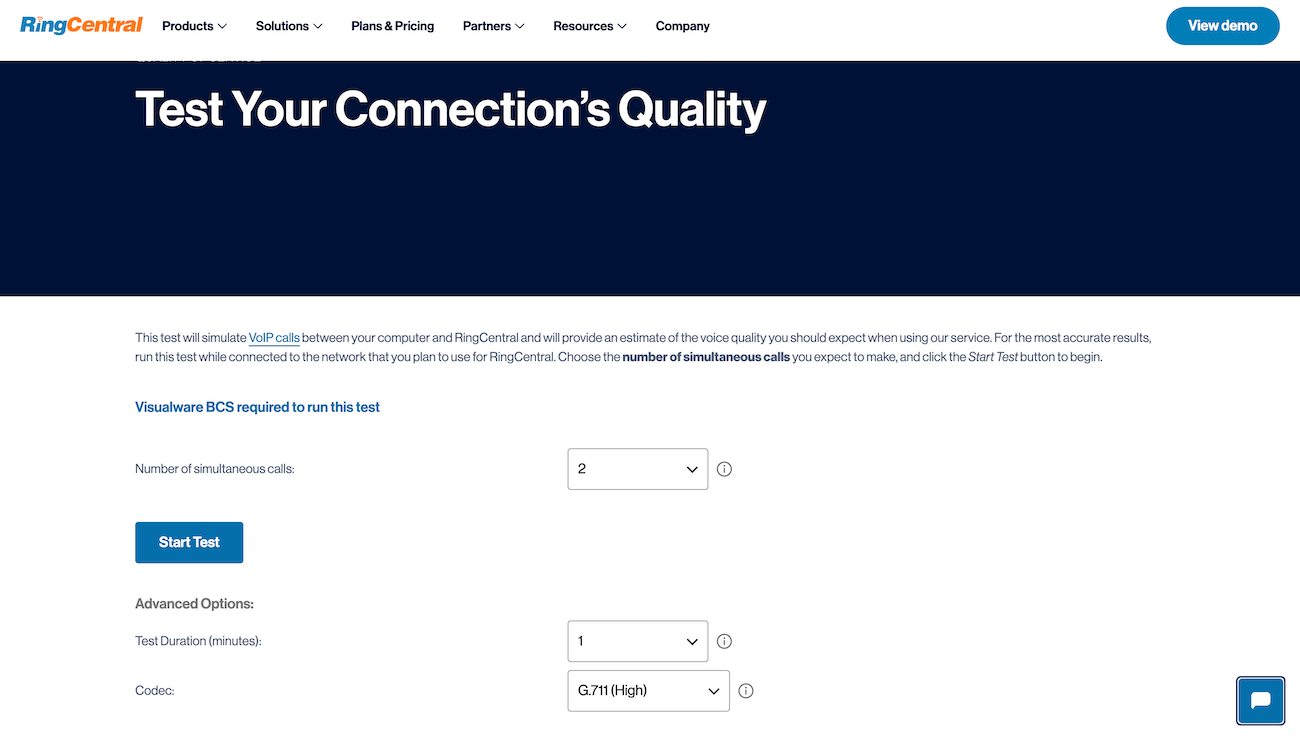
RingCentral’s quality of service test is one of the best free options I’ve seen.

Screenshot of RingCentral’s quality of service test page, with a button to start the test.
Test the quality of your VoIP network with RingCentral’s free online test. Image: Ringcentral.com

The best part about this test is that it gives you MOS. It also measures packet loss, latency, and jitter in your audit summary.

Another standout of RingCentral’s test is the ability to adjust your codec. You can also test up to 50 simultaneous calls and run the test for up to five minutes — the longer you test, the better chance you have of finding an issue.

Once the test is finished, it does a good job of explaining what all the numbers mean and whether or not your connection passes.

It’s also about as easy as it gets to run. All you have to do is select your preferred number of concurrent calls, adjust the duration, and tweak the codec if you want.

While RingCentral’s is one of the most detailed free options, there are others you can use to validate your results if you’d like.

There are other VoIP quality tests on the market that you can use, and it might be a good idea to try multiple to see if you get consistent results across the board. Here are some others worth checking out:

Overall, RingCentral’s is the most detailed, but these other free VoIP quality tests can give you more data points to ensure accuracy.

SEE: Learn more about our favorite VoIP providers: RingCentral review | Nextiva review | Ooma review | 8×8 review.

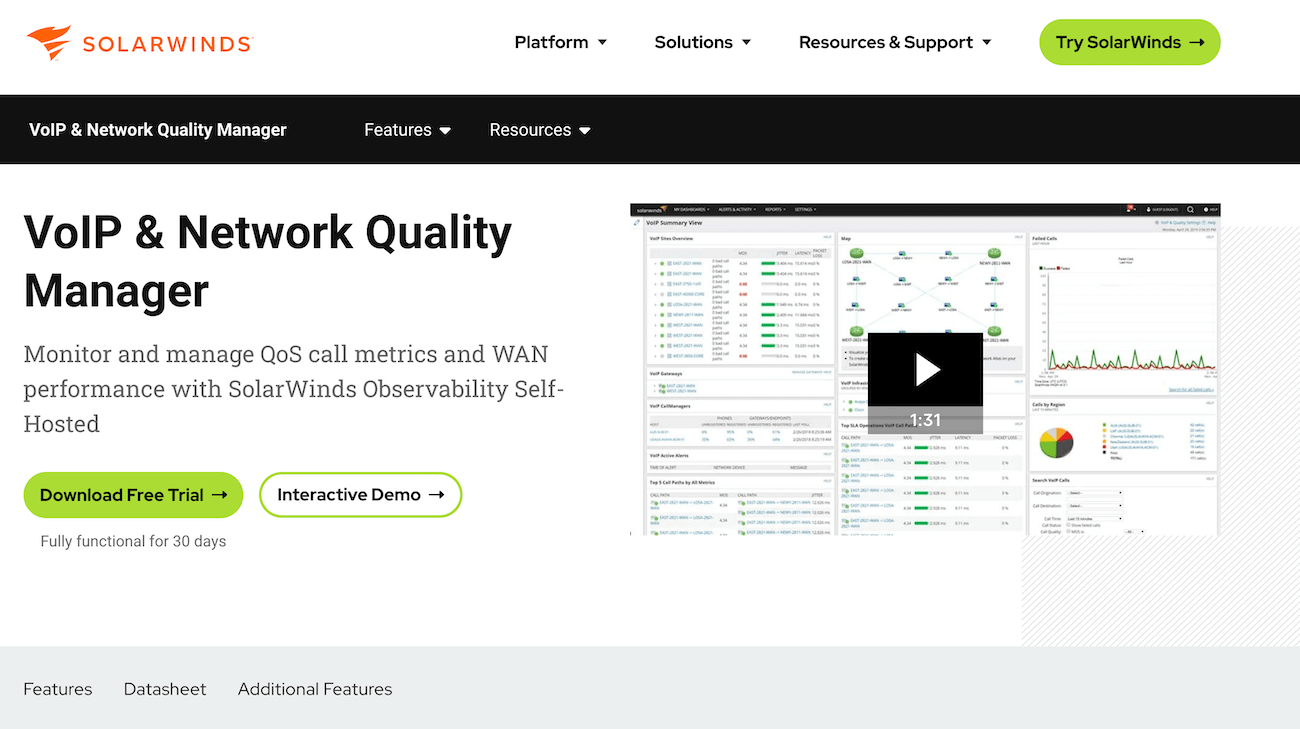
Network monitoring software (paid with a free trial)

Network monitoring software is typically used by IT network administrators to ensure their network is running smoothly. It’s also useful for identifying issues with various components (routers, servers, firewalls, switches, etc.).

You can also use them for testing VoIP network quality, and they provide far more detailed information than any of the free tools out there.

SolarWinds VoIP network quality manager is one of the best. Instead of one-off tests every now and then, it runs continuously in the background.

SolarWinds’ VoIP and network quality manager landing page with a video demo of how it works.
Start your free trial for deeper insight into your VoIP network. Image: Solarwinds.com

Although SolarWinds isn’t free, there is a 30-day free trial. You can test your network for a full month to see how its performance changes over time. From there, you can decide if you want to keep using it.

Beyond basic VoIP quality stats, it also provides WAN performance metrics. It also provides contextual information related to performance issues.

For example, you can see the specific IP addresses of devices that are causing jitter, latency, or packet loss. This will help you determine if call quality issues are related to hardware on your network or something else.

The software does a whole lot more than that, but it’s a great alternative if you need real-time data or more data points to understand and improve your MOS.

Posted on

Exact Steps to Find Your Network Security Key On All Devices

Confused about network security keys? You’re not alone. This guide includes step-by-step instructions on how to find your network key for the four most popular digital devices.

Here’s a quick summary:

  • iOS: Open the Settings app, tap on Wi-Fi, select your connected network, and find the Password field.
  • Android: Open the Settings app, tap on Network & Internet, go to Internet, tap on your connected network, choose Share, and view the passwords that show up.
  • Mac: Use the Keychain Access app, find your current network, double-click on it, check the Show password box, and authenticate.
  • Windows PC: Go to Settings, then to Network & Internet, then to Wi-Fi. Access the properties of your wireless network connection by clicking on the second row starting from the top, and find the network security key by scrolling down on the network’s window.

Keep reading if you’d like more detailed instructions on where to go, along with tips for keeping your network secure.

Find a router or modem network security key

A network security key is most commonly known as a Wi-Fi password. If you’re trying to find the network security key on your router or modem, you’ll probably need to dive into your device’s settings. The steps will vary slightly depending on your router model and firmware, but here’s a basic guide.

Just a heads-up: your security key might go by the name of WEP key, Wireless Security Key Password, or something similar. Keep an eye out for those variations.

Step 1: Identify your router’s IP address

  1. Open a web browser on a device connected to your network.
  2. In the address bar, enter one of the following standard router IP addresses: 192.168.0.1, 192.168.1.1, or 192.168.1.254.
  3. Press Enter to access the router’s login page.

Step 2: Log in to your router

  1. Enter the username and password for your router. If you need to change it, you can find the default login credentials on the router or the user manual. If you use a good Internet Service Provider, it’s easy to find guides and videos online for more tips.
  2. Note that some routers may not require a username, and the password could be left blank or set as admin. If you can’t find your password, do the same but connect to your modem via an Ethernet cable instead of Wi-Fi.

Step 3: Navigate to the wireless settings

  1. Once logged in, look for a section related to wireless settings or Wi-Fi configuration.
  2. The exact location can vary depending on the router’s interface, but it is typically found under Wireless, Wireless Settings, or Wi-Fi and Wi-Fi Setup.

Step 4: Find the network security key

  1. Look for a subsection within the wireless settings that mentions security or encryption.
  2. Standard options include Security, Wireless Security, or Encryption.
  3. Within this section, you should find the network security key associated with your Wi-Fi network.
  4. It might be labeled as Key, Network Key, Passphrase, Password, or similar terms.

Step 5: Note any variations

  1. As mentioned earlier, the terminology used for the network security key can vary. Look for alternative labels or terms that indicate the same information.
  2. Make note of any variations you come across during the search, as they may help you locate the network security key more easily.

Now, let’s review each device type in detail.

iOS network security key

For iOS, follow these steps to find your network security key:

  • Access settings: Open the Settings app on your iOS device, located on your home screen.
  • Navigate to Wi-Fi: Within the Settings menu, tap on Wi-Fi.
  • Select the Wi-Fi network: Select the desired network by tapping its name.
  • Access network details: Look for the small circled i icon next to the chosen network, and tap on it.
  • Reveal the network key: You’ll notice the passphrase is hidden in gray bullet characters, like • • • • •. Tap on it, authenticate, and the network security will show up.

Android network security key

  • Settings: Open the Settings app on your Android device. You can typically find this app on your home screen or in the app drawer.
  • Network & Internet: Access the first item on the list, called Network & Internet, and then tap on Internet.
  • Network selection: Long-press the Wi-Fi network name you’re interested in This action will usually reveal additional options related to that network. You can also simply tap it and access an additional screen.
  • Sharing options: Choose Share. The specific wording may vary depending on your device, but search for an option to share or display network details. You might need to authenticate.
  • Key sharing methods: Your key will show up as a QR code and a small written line. You can share either. Some Android devices also allow sharing it with nearby technology.

Note: Sharing via a QR code allows other devices to connect instantly without typing.

Keep in mind these variations:

Some Android users report that their menu option is called Internet and Network — the reverse of Network & Internet. Also, older Androids might reveal the key directly after long-pressing the network name. Finally, seek options like Show Password or Network Key.

Mac network security key

Obtaining your Network Security Key on macOS is not as straightforward as iOS, Android, or Windows. macOS Ventura, the 2022 release, incorporated a feature to make Wi-Fi passwords easier to check, but other versions like Monterey don’t have it. Fortunately, we’ve found a workaround for either situation.

To find your network security key on macOS Ventura, do this:

  1. System settings: Click the Apple icon in the top-left corner and click on System Settings, which is called System Preferences in older versions.
  2. Network: Use the search bar to find Network, access it, and then click Wi-Fi on the right.
  3. Advanced settings: Scroll down and click Advanced to open the list of known networks.
  4. Copy password: Click the More button, which you’ll recognize as three dots inside a circle right next to the network name, then choose Copy Password.
  5. See the network security key: Paste the password in a Notes document or your browser.

If you have an older MacOS version, you’ll need the Keychain Access app. To find your network security key on macOS Monterey or older versions, do this:

  1. Open Keychain Access: Use the search bar at the top of the screen to find Keychain Access. Don’t mix it up with Keychain, which is a separate item.
  2. Find your current Wi-Fi network: Use the search bar inside the new window to find your existing Wi-Fi network.
  3. Access your Wi-Fi network specs: Once you find it, click on it or use the i icon.
  4. Show password: Check the Show Password box, authenticate, and obtain the network security key.

Here are some variations you might encounter:

Older Mac versions may have slightly different Network Preferences navigation. Your device might switch between System Preferences and System Settings. Also, look for keywords like Security and Wireless Password. Your OS could be a one-off case and you could find the network security key more easily than how we described it.

Windows network security key

  • Taskbar options: Right-click the Wi-Fi icon in your Windows taskbar. The taskbar is typically located at the bottom of your screen.
  • Network settings: Choose Network Settings from the pop-up menu by clicking on the > sign next to the Wi-Fi logo. This action opens the list of current Wi-Fi networks.
  • Network selection: Click Properties next to your desired Wi-Fi network.
  • Scroll down on the network page: Within that window, scroll down until you see the View Wi-Fi Security Key.
  • Password display: Click on View. A pop-up will give you the password.

Furthermore, if you need help finding the key on Windows 10 and later, go to Control Panel > Network and Sharing Center > Change adapter settings, right-click your Wi-Fi adapter, choose Status, then Wireless Properties, and finally Security to uncover the key.

Here are a couple more variations to note:

The wording in Network Settings and Security tab layout may vary based on your Windows version. Also, keywords like Security and Network Password will guide you.

I’m getting the network security key mismatch error

If you are seeing the “Network Security Key Mismatch” error, don’t worry, it is usually a pretty easy fix. Let’s look at the most common reasons for a network security key mismatch, and how to solve each one:

  • Typing errors: You might be simply punching in the wrong password. Check for inadvertent spaces, missing characters, or incorrectly placed symbols. Keep in mind that the capitalization of characters matters for many network keys. Is the Caps Lock key toggled on or off?
  • Concealed characters: Some devices mask the key with asterisks or dots. Look for options like Show Password or uncheck Hide characters to reveal the actual key and ensure accurate input.
  • Outdated security: Older networks using WEP security may have shorter, hex-coded keys with the letters A-F and 0-9. Confirm that you’re entering the key in the correct format.
  • Network changes: If your router has been modified or updated, network names and keys may have changed. Double-check the latest information with your internet service provider or network administrator.
  • Signal interference: Wireless signals can be inconsistent. Try moving closer to the router, restarting your device, or temporarily disabling antivirus software.
  • Device variations: Different devices handle network keys differently. Check your device’s Wi-Fi settings for hidden options or variations.

Alternative steps to address the mismatch error

If none of the easy fixes worked, follow these simple steps to walk the error back to its source:

  • Verify the key: Confirm for typos, hidden characters, and format requirements. Make sure you’re using the correct key for the specific network.
  • Restart everything: Perform a quick reboot of your router and device. A fresh start can sometimes resolve minor glitches.
  • Forget and reconnect: Disconnect from the network on your device and then reconnect, entering the key carefully again.
  • Update drivers: Outdated device drivers can lead to connectivity issues. Check for and install any available updates.
  • Check the user manual: Your router and device manuals may contain troubleshooting insights. Take a look for additional guidance.
  • Seek assistance: If all else fails, reach out to your internet service provider or network administrator.

Where do I find my hotspot security key?

Let’s see how to connect to a hotspot. Hotspots are the wireless networks you can start up with your mobile phone. Sometimes, data plans don’t allow you to set up hotspots, but in most other cases turning a hotspot on is fairly easy.

Step 1: Open the settings menu on your device

For iOS and Android devices, go to Settings.

Step 2: Look for the Hotspot or Tethering option

  • On iOS devices, it may be called Personal Hotspot.
  • On Android devices, it can be found under Network & Internet.

Step 3: Access the hotspot settings

Tap on the Hotspot or Tethering option to open the settings.

Step 4: Find the security key

  • Look for the Password or Security Key field in the hotspot settings.
  • The security key may be labeled as Wi-Fi password, Hotspot password, or similar terms.
  • On some Android devices, the password might not show up on this step. Now that you’ve turned your Hotspot on, expand the Quick Access Menu — the screen you access by sliding down from the top — and tap the Hotspot icon. You’ll be sent to a screen where you can tap and check on the password.

Step 5: Learn your own security key

  • The security key is typically a combination of letters, numbers, or both.
  • Learn it and use your data plan to connect to other devices via your hotspot.

Remember to keep your hotspot security key confidential and only share it with trusted individuals. It’s usually only used by those who set it up to avoid hefty data plan bills.

How to avoid network security key problems

Use a strong key

Craft a unique password with a mix of upper and lowercase letters, numbers, and special characters. Aim for at least 12 characters for optimal strength. And try to remember it — don’t write it down.

Don’t use a network security key that’s identical to another password or security key you use for something else. Reusing passwords is a major security risk. Learn more about how to create a secure password or security key.

Share your key with as few people as possible

Treat your code like the precious resource it is. Only share it with trusted individuals who absolutely need it. Remember that anyone with it can access your network or could change it behind the scenes.

Rotate keys regularly

Consider changing it every six months to a year, especially if you suspect a breach in your company or have shared it with a neighbor affected by a power-out. I know, changing passwords is a huge headache, but it’s a critical part of keeping your home or business network secure.

Enhance network security

Upgrade your wireless network security protocol to WPA3 whenever possible. It offers significant encryption advancements compared to the older WPA2, making your network tougher to crack.

Create a separate guest network with a different key for temporary users. This keeps your primary network safe from potential vulnerabilities introduced by unknown devices.

If it is not already, enable your router’s firewall to act as a digital bouncer, filtering incoming and outgoing traffic and keeping away unwanted intruders.

SEE: Learn more about what a firewall does to protect your home network.

When changing isn’t necessary

If you have a rock-solid security key and haven’t shared it with anyone untrusted, there’s no need to change it just for the sake of it. Consistency can sometimes be your best friend.

Changing your key can sometimes cause compatibility issues with older devices that haven’t been updated with the new password. Assess the potential downsides before making a hasty switch.

Posted on

6 Types of Network Address Translation: Which One to Use?

Network Address Translation (NAT) is one of the key technological concepts behind the performance of communication networks and the internet at large. NAT is a mechanism for converting private (local) IP addresses into public (global) IP addresses and vice versa.

There are six main NAT types: static, dynamic, port address translation, overlapping, and masquerade.

Understanding the functionality of each NAT type — as well as its purpose — is vital in helping you choose the right one to reap the most benefits.

Network Address Translation, IPv4, and IPv6

It’s helpful to understand a little bit about how IP addressing works in order to understand the different types of NAT and the problems they solve.

NAT enables efficient use of limited IPv4 addresses — there are only 4,294,967,296 possible 32-bit IPv4 addresses, which is not enough for every device worldwide — NAT allows organizations to maintain numerous private devices while requiring only a small number of public addresses for internet access.

IPv6 is the next generation of internet protocol, designed to solve the IPv4 address shortage. Instead of 32-bit addresses, IPv6 uses 128-bit addresses. This creates an almost unlimited number of addresses — enough for every device on Earth to have its own unique identifier.

IPv6 reduces the need for NAT, but it is still important in networks where IPv4 and IPv6 coexist. These mixed environments often rely on NAT to ensure smooth communication between devices using different protocols.

As organizations transition to IPv6, understanding when and how to use NAT remains essential for maintaining efficient and reliable connections.

The six types of Network Address Translation and what they do

Once again, NAT is a technology that allows the use of private and public TCP/IP addresses by facilitating the translation between internal and external IP addresses. It involves routing and remapping IP addresses via routing devices such as firewalls and routers.

Since you can’t use a private IP address to gain access to an external network like the internet, NAT ensures that a local host has internet access by translating local IP addresses into one or multiple global IP addresses.

Conveniently, NAT allows a unique IP address to represent a whole group of devices and computers. In other words, NAT is what enables you to connect multiple electronic devices to your home router while using the same public IP address to access the internet.

NAT is typically implemented by a router. In addition to facilitating address translation, NAT can serve a number of important additional purposes:

  • Network security: Obscures internal IP addresses, adding a layer of protection against external threats.
  • Firewall functionality: Filters traffic and blocks unauthorized access based on security rules.
  • Port forwarding: Enables external access to internal services by forwarding specific ports to the appropriate devices.
  • Load balancing: Distributes traffic across multiple servers for better resource utilization and traffic management.
  • Session tracking: Ensures proper routing of incoming data by tracking active connections.
  • Simplified network management: Reuses private IP addresses, reducing the need for public IP allocation.
  • VPN support: Allows secure communication between devices on different networks by translating IP addresses.

The following six types of Network Address Translation offer different means of improving network security, addressing connectivity issues, and solving performance problems.

1. Static NAT

Description: This is a straightforward translation that maps a single private IP address to a corresponding public IP address. A static NAT must match the number of IP addresses on the local area network (LAN) with an equal number on the outside network. For this reason, Static NAT is also called balanced NAT.

Purpose: Static networks are fixed because they provide one-to-one (or many-to-many) mapping, allowing the creation of a fixed translation to an actual address. As a result, their mappings provide a consecutive connection to the same address. Ultimately, Web and FTP servers favor using Network Address Translation because of its consistency and reliability.

Benefits: Static networks reduce the problem of overlapping addresses while also providing a degree of protection for your registered public addresses.

Static NAT can be more challenging to set up, but it is usually easier to manage and troubleshoot — leaving you with a low-maintenance network. Also, when you switch networks, you won’t face the hassle of having your IP addresses renumbered.

Limitations: Since static networks have fixed IP addresses that don’t change, they are more susceptible to spoofing and hacking, as malicious actors can easily target them. These security risks make it critical to protect your network with firewalls and encryption.

Additionally, a static NAT is bi-directional, meaning hosts can initiate connections both inside and outside the network. Of course, you need a policy to allow this, but it could still expose you to a significant security loophole.

Finally, static Network Address Translation is also more expensive than its dynamic counterpart because it requires more public IP addresses for its implementation. These increased costs extend to your internet service provider (ISP), which will typically charge you more for the privilege of a dedicated IP address. Meanwhile, the inflexible nature of static IPs also forces you to change them manually if you ever move to another location.

Best for: Static IP addresses are best for applications, processes, and protocols that require a consistent IP, such as web hosts, application servers, printers, routers, and gaming consoles.

Example: In addition to one-to-one mapping, static NAT is bi-directional, allowing connections between an inside and outside address. For instance, assume you have a web server in your LAN with a private inside address of 172.17.1.0.

Perhaps you want to make it accessible when a remote host makes a request to 209.165.200.10 (an example of a registered public IP address). To do so, you or your network administrator must configure at least one interface on the router (which typically has NAT inside and NAT outside), along with a set of rules it’ll use to translate IP addresses in traffic payloads and packet headers.

In this case, a configuration for the router to allow static NAT outside-to-inside translation will look something like this: ip nat inside source static 172.17.1.0 209.165.200.10.

2. Dynamic NAT

Description: Instead of single mapping, dynamic NAT maps a group of public IP addresses to internal addresses.

For this to work, network administrators must configure an organization’s router to handle a pool of IP addresses to facilitate dynamic NAT. This way, an internal IPv4 host that wants internet connectivity can make a request to the router, which dynamically assigns an available public IPv4 address from the pool.

Similarly, when a machine in a private network needs to access an external network such as the internet, a public IP address from the available pool is assigned to it.

The nature of Network Address Translation, which requires translating private IP addresses into public ones, creates a dichotomy of inside and outside IPs. As such, dynamic NAT requires associating an unregistered IP address on the LAN’s inside list — with the pool of registered IP addresses on the outside global list.

Keep in mind that “NAT inside” represents the inside addresses, which are unregistered IPs on the private LAN behind the NAT device (typically a router). Meanwhile, “NAT outside” represents everything else, such as external networks with registered, public IP addresses (like the internet).

Purpose: Internet Service Providers (ISPs) and remote access environments use dynamic NAT to supply and conserve IP addresses.

Benefits: The dynamic nature of this type of NAT provides many advantages. In terms of security, for example, there is no static IP address to trace and target, so the periodic changes frustrate hackers with nefarious intentions. Dynamic NAT therefore hides and protects your private network and its associated devices from the malicious dangers of the outside world.

Dynamic NAT is also cheaper and more adaptable than static networks, which is reflected in its ability to connect to different locations and networks without changing IP addresses. This means you aren’t burdened with having to update your settings and reconfigure your devices because the server automatically assigns the IP addresses.

The increased connection capability provides enterprise networks with greater flexibility. Large, distributed organizations, which typically require multiple public IP addresses, often choose dynamic NAT to efficiently manage their network traffic.

Limitations: Most of dynamic NAT’s limitations are due to the technicalities of mapping several local IPs to a pool of public IP addresses. Since dynamic IP addresses are likely to change and may expire without notice, dynamic networks end up introducing more overhead due to switching and associated path delays during translation.

As a result, the overall network performance is reduced because of unreliability, unpredictability, and a lack of end-to-end traceability. For example, a router or firewall will drop traffic if a local host attempts to make a connection when all the public IP addresses from the pool have already been assigned.

Best for: Dynamic networks are ideal for when an organization can anticipate the number of fixed users that will access the internet at a given time. They have low maintenance requirements, adaptability, and cost-effectiveness that make them suitable for managing environments with significant host devices.

In terms of privacy and protection, dynamic IP addresses are best-suited for devices and scenarios that demand increased security systems and flexibility. As such, they are ideal for smartphones, laptops, tablets, and smart TVs.

Example: Assume you have a computer on an internal network with a local address of 172.178.0.1/24. Dynamic NAT will assign a registered address to your internal host from a pool of public IP addresses, such as those from 192.168.1.1 to 192.168.1.150.

To a remote server, any traffic coming from this setup will appear to originate from a public IP address. However, the NAT system is actually masking the original machine’s address of 172.178.0.1/150 and hiding your entire internal network.

Once the request has been satisfied and the source machine is idle, the network returns the public IP address (192.168.1.1) to the free pool of NAT resources.

As a result, a configuration of the router to allow dynamic NAT translation would look like this: ip nat pool NAT-POOL 192.168.1.1 192.168.1.150 netmask 255.255.255.0.

This dynamic NAT configuration ensures that when an inside host makes a request to an outside host, any private addresses in the 172.178.0.1/24 are translated to public addresses in the 192.168.1.1 to 192.168.1.150 range.

3. Port Address Translation (PAT)

Description: Like NAT, PAT is a technique to translate private IP addresses into public ones, but it does so in combination with a port. As an extension of NAT, it allows multiple devices within a private network to use a single public address.

PAT is also known as NAT overload. It creates a fully extended translation with a translation table that contains entries for IP addresses and source/destination port information.

PAT uses port numbers to determine which traffic belongs to a particular IP address. It works by using many-to-one mapping, assigning each device a unique port number to identify it when routing incoming traffic.

Keep in mind that although Cisco uses the term PAT, other vendors use different names. For instance, Microsoft prefers Internet Connection Sharing.

Purpose: PAT was designed to conserve IPv4 addresses by using a single public IP address for a group of private hosts—despite how a more permanent solution emerged in the form of IPv6. PAT leverages unique source port numbers to distinguish communication interactions on each translation.

Benefits: PAT is more cost-effective than NAT. Thanks to its one-to-many mapping, one registered IP address with PAT can theoretically connect to thousands of internal devices, enabling simultaneous internet access for many devices.

This is because port numbers are based on 16-bit character encoding. Consequently, a router can potentially support up to 65,536 port numbers (since 16 bits can represent 65,536 addresses, which you get from calculating 2 to the 16th power).

Since the host on your private network doesn’t expose their IPs, NAT fortifies them against security threats launched from public networks.

Limitations: While PAT was developed to conserve IP addresses, it can easily result in port exhaustion. It also limits your network infrastructure from running multiple instances of the same service on the same address.

For instance, you can’t use two public web servers if they both have to listen to the default port 80 on the same address. Thus, since organizations using PAT must rely on a single IP address, it prevents them from easily running more than one of the same type of public service.

Best for: PAT is ideal for most home networks and small-time businesses or shops. Homeowners can leverage a single IP address from their ISPs and configure their router to assign internal IP addresses to devices on their network.

Example: Assume your LAN has private IP addresses in the range of 172.17.0.1, 172.17.0.2, and 172.17.0.3, and you want to access a remote server through your registered 155.4.12.1 public IP address.

Your router must maintain a Network Address Translation table because NAT’s execution — especially with PAT—requires mapping unique ports and IP addresses. This table not only keeps entry records for every distinct combination of private IP addresses and their corresponding ports, but it also keeps their global address translation and unique port numbers.

Therefore, if a host system on your local network with an IP address of 172.17.0.1 and port 1056 (172.17.0.1:1056) wanted to access Facebook, for instance, the router would translate this private address into 155.4.12.1:1056.

When Facebook receives this request and responds, the traffic will be sent to 155.4.12.1:1056. When the router gets this response, it’ll look up its NAT translation table (for the private IP address the message belongs to) and forward it to 172.17.0.1:1056.

4. Overlapping

Description: IP allocation is one of the central issues you’ll face when designing a network, whether that’s for the cloud or a traditional on-premises environment. However, network concepts like overlapping are suddenly heightened when migrating your infrastructure to the cloud.

The concept of overlapping denotes a conflict of IP addresses. This can occur because an IP address is assigned to multiple applications, devices, or logical units—especially when this is being done on the same network. Moreover, popular services like AWS and third-party products like Docker automatically reserve specific IP address ranges, which can result in conflicts when you try to use them.

In practical terms, overlapping occurs because several devices share common IP addresses. When this happens, if there are two or more networks with overlapping IP addresses, the configuration will only work if you use Network Address Translation.

Implementing this setup requires two routers/firewalls within the intermediate network to hide the identical networks and IP addresses. Inside the local private network, the router or firewall assigns a public address to one or more computers. Consequently, this creates an intermediary between the private and public networks.

Purpose: NAT overlapping eliminates the need to make manual changes to networking configurations (like the subnet environment) to avoid conflicts. It allows enterprises to connect and communicate across multiple environments, shared resources, and virtual machines. By overlapping NAT, it removes duplication, confusion, and loss of data packets.

Benefits: NAT overlapping enables you to handle IP address conflicts, letting computers communicate without the need to readdress all of those devices.

Limitations: Like most NAT scenarios, overlapping is limited to IPv4 networks. You will most likely be able to avoid this obstacle with IPv6-based networks due to the size of their address space.

Best for: Overlapping NAT is best used for preventing IP address conflicts, usually by mapping a unique IP address to a virtual private network (VPN) or virtual machine connected to the network.

Example: Although it can occur unintentionally, NAT overlapping is often triggered in two instances. The first of which happens when companies merge or are acquired and both continue to use the same private IP address ranges (like the RFC 1918 block of addresses, which isn’t routable over the internet). Secondly, when managed service providers with unique IP addresses add new clients, they must provide access to customers with the same IP address range—and this can trigger overlaps.

5. Masquerade NAT

Description: Masquerade follows the basic concepts of NAT, but as it translates private source IP addresses to public ones, outgoing connections use a single IP address. This allows a private network to hide behind the address bound to the public interface.

IP masquerading hinges on a Linux-based router performing smart, real-time IP address and port translation so that a private (reserved) IP address connected to the Linux box can reach the internet.

This NAT type uses a one-to-many form of Linux IP masquerading, with one computer acting as a gateway for the internal network to reach the internet. When computers on the network send requests through this gateway, it replaces the source IP address with its own before forwarding the packets to the internet.

In general, the masquerading computer keeps track of connections, along with their sources, and reroutes packets with Linux’s connection tracking feature. Essentially, the masquerading machine sort of tricks the remote server into thinking it made the request instead of an internal machine — hence the name.

Keep in mind that masquerading is only initiated by the internal network with a range of local IP addresses hidden and bound behind a public IP address.

Purpose: By hiding intranet clients, IP masquerading conceals individual devices and computers so their IP addresses are effectively invisible from the internet. Network administrators generally implement IP masquerading to deal with instances of two conflicting private network imperatives.

Remember, to be reachable on the LAN, every computer and computing device on the local intranet must have an IP address. At the same time, they also require a public IP address to access the internet — be it a fixed or dynamically assigned address. To bridge this duality, a masquerading machine acts as a router, serving as a gateway to separate the intranet from the internet.

Benefits: IP masquerading enables network administrators to implement a heavily secured network environment. With a fortified firewall, hackers find it considerably more challenging to break the security protection of a well-configured masquerade system.

Although it’s used to hide multiple addresses, it is also relatively cheap because you only have to purchase a single IP address to use with many internal systems.

Lastly, Masquerade Network Address Translation prevents external hosts from initiating traffic into your network, so it has some additional protection from outside attacks built in.

Limitations: Implementing IP masquerading comes with a performance impact, however it is not very noticeable in most instances. That said, if you have many computers creating active masquerading sessions, the processing power required is likely to affect the network’s throughput.

At the end of the day, hiding provides an extra layer of protection, but your entire network is only as secure as the masquerading machine — so it’s a weak link in the chain. Moreover, the hosts that hide behind masquerading cannot offer services like file transfer or mail delivery because their networks can’t establish inward connections.

Finally, IP masquerading requires specialized software/equipment like a Linux box or ISDN router, and it simply cannot work without a Linux machine. Likewise, some networks just won’t work through a masquerade without significant hacks or modifications.

Best for: NAT masquerading is best for concealing your internal network, allowing you to reap added security benefits. It is ideal for helping machines with non-routable IP addresses to access the internet. It is also economical, so it’s good for price-sensitive environments—because you only need to purchase one public IP address and it doesn’t necessarily require a firewall.

Additionally, masquerading networks only allow machines inside the network to initiate communication, so they are useful in work environments where employers don’t want external users initiating conversations with their employees (while still providing their staff access to the internet). However, you must enable the port forwarding feature on your router or TCP/IP connection to overcome this restriction and allow 2-way communication.

Example: Your internal network may have multiple computers, but each requires individual IP addresses within a range of private IP addresses. When a local computer requests an external service, the router will send packets to the remote host outside the LAN if you set up the system conventionally.

Meanwhile, the source address in the packet will indicate that it is from a private IP address. Since private, unregistered IP addresses aren’t officially part of the internet, they aren’t valid return addresses, meaning the receiving host can’t send a reply.

With IP masquerading, you can circumvent this problem by configuring one of the computers as a conventional router so it acts as a single gateway.

As a result, when one of the workstations on your intranet or small ethernet network wants to access a remote host (such as TechRepublic’s server), the masquerading system takes over. The computer then routes its packets to the host acting as the masquerade, which accepts the request and forwards it to the remote host.

The only host visible on the internet in this case will be the masquerade machine, which replaces the source IP address with its own before sending the packet to the destination outside the LAN.

6. Reverse NAT

Description: Reverse Network Address Translation (RNAT) is a sub-type of static NAT that translates a public IP address into a private one. While static NAT is bi-directional, RNAT’s translation only goes in one direction — and since it goes in the reverse direction of general NAT, it earned the name Reverse NAT.

Purpose: The primary purpose of RNAT is to allow servers with private, non-routable IP addresses to connect to the internet, meaning users can connect to themselves via the internet or other public networks. It also allows you to administer hosts in the LAN remotely behind a NAT firewall.

Benefits: The so-called reverse direction of RNAT makes it possible to publish a service or server from a private LAN to the internet. Since it allows you to administer network hosts remotely behind a firewall, it improves practicality and security. It is also helpful for capturing and redirecting domain name server (DNS) and network time protocol (NTP) requests.

Limitations: Since hosts hide behind NAT-enabled routers, RNAT lacks end-to-end connectivity.

Best for: Besides publishing a server or service from a LAN, reverse NAT is also ideal for scanning remote IP addresses.

Example: Depending on your router, there are several ways of implementing a reverse NAT configuration. If you have a feature-rich Cisco router, for example, you can simply follow the static NAT instructions for allowing external traffic to reach a specific host, perhaps by permitting traffic on TCP/IP port 80.

On the other hand, if you have a Netgear, D-Link, or Linksys router, you can explore how they allow port forwarding given their respective parameters. In any case, the general methods for implementing reverse NAT require providing the local IP address you want to be accessed from outside and identifying (or activating) the local server’s internal port that will be used to respond to external traffic and internet connections.

Is NAT really that important?

Yes, because NAT is immensely beneficial — and it serves as a fairly effective line of defense against malicious attacks.

Of course, NAT is not a panacea to network issues, so it’s a good idea to incorporate network monitoring tools in your cloud computing infrastructure to ensure applications and services run smoothly.

In any case, there are a number of higher-level benefits that come with NAT.

IP conservation

As previously mentioned, NAT is a powerful solution for mitigating the depletion of IPv4 addresses. It conserves the number of IPv4 addresses in use by allowing private, local networks using unregistered IP addresses to communicate with wide area networks (WAN) and the internet.

In many instances, this conservation delays the need for an organization to migrate to IPv6.

Enhanced security

NAT enhances security by directly preventing internet access to private IP addresses on internal networks. It essentially acts as a firewall, building a fortified moat around your private network to bolster security against malicious attacks.

Additionally, NAT improves privacy by hiding your network’s topology so hackers cannot get “a lay of the land” to equip them for launching successful attacks.

Network boundaries

NAT creates network boundaries by separating private and public networks. This boundary boosts the privacy of your local addresses and the systems attached to them. At the end of the day, the local address behind your NAT firewall/router is private — and therefore can’t be routed across the internet.

Cost-effectiveness

Without NAT, every device worldwide would need its own public IP address. This would mean registered IP addresses would be very scarce, making communication networks expensive to maintain.

NAT also boosts cost efficiency in other ways, such as by reducing the frequency of address overlapping. Likewise, NAT has reduced the price of maintaining a LAN by making IP routing commonplace, even in residential homes.

Speed and improved network performance

Although path delays can happen while switching, NAT still helps network performance by allowing many devices to share a common IP address.

Increased flexibility

NAT allows networks to connect to the internet through a bunch of configurations, which means it can be used for a wide range of purposes.

Four downsides to using Network Address Translation

While NAT’s benefits tend to outweigh its liabilities by a fair amount, you should still be aware of the downsides so you can prevent or circumvent them.

Increased performance problems

Due to the additional layer of processing and translation required for NAT, network performance problems like latency and packet loss are often induced.

Limited connectivity

While NAT provides an overall enhancement to network communications, it can also limit end-to-end connectivity in other ways. For instance, NAT limits the direct connection and communication of devices hosted on different private networks. This means that some strict NAT configurations will cause connectivity to lag and slow down internet surfing.

Bottlenecked traffic

Since all traffic must pass through the Network Address Translation router, it can lead to a more limited bandwidth that slows or impedes the free flow of packets.

Issues with tunneling protocols

To execute its processes, NAT frequently modifies the header values in a packet. This action can interfere with the integrity checks conducted by IPsec and other tunneling protocols, such as those used in VPNs (Virtual Private Networks). As a result, Network Address Translation can disrupt the proper functioning of tunneling protocols, complicating secure communication across networks.